


A TUI + CLI for the Runloop.ai platform. Use it as an interactive TUI (Terminal User Interface) with rich UI components, or as a traditional CLI for scripting and automation.
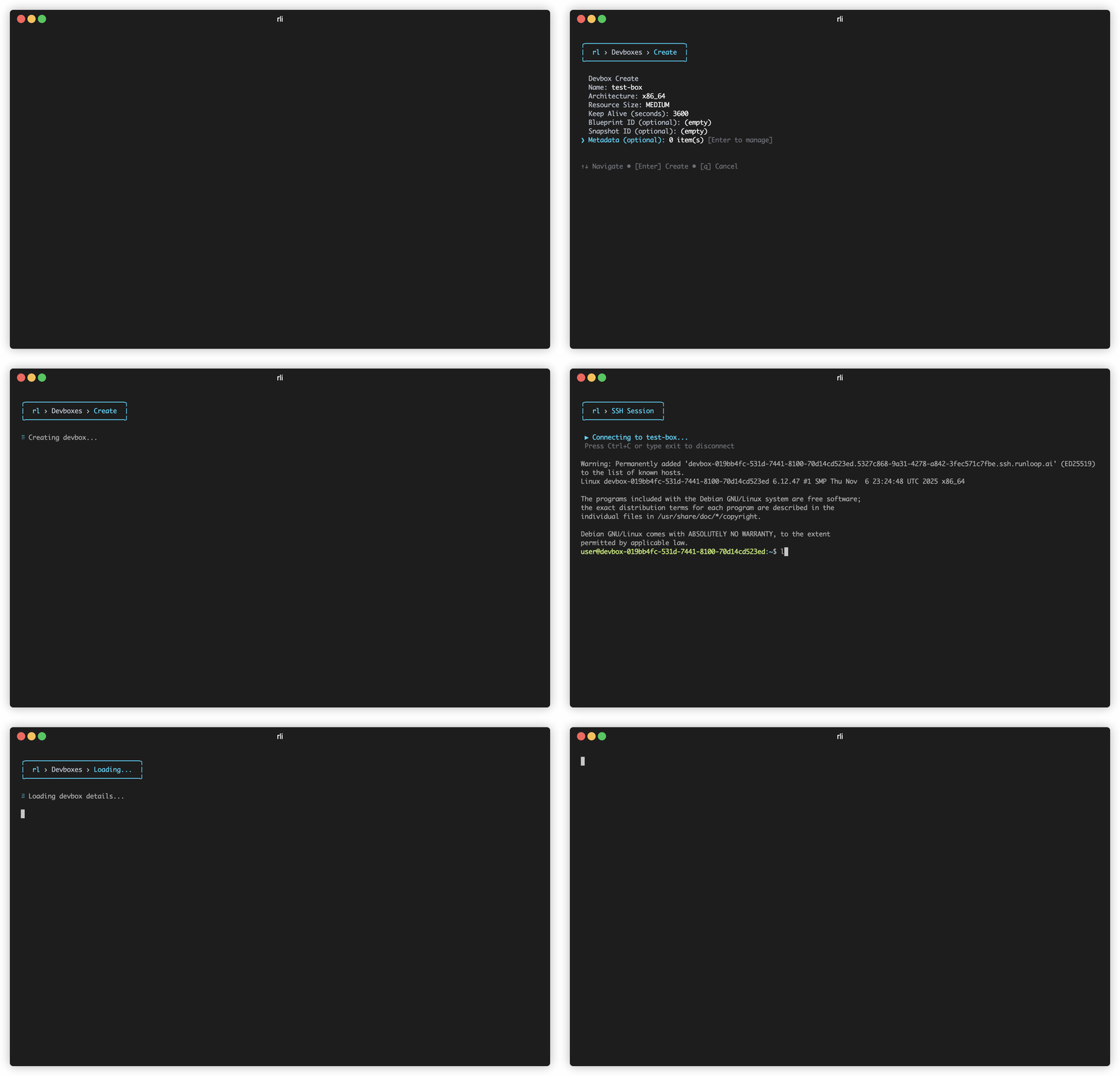
# TUI mode - launches an interactive terminal UI
rli

# CLI mode - perfect for scripts and automation
rli devbox list                    # Outputs JSON/text
rli devbox create --name my-devbox
rli devbox exec <devbox-id> echo "Hello World"
rli devbox delete <devbox-id>- 🖥️ TUI mode — Interactive terminal UI with menus, tables, and real-time updates
- 🎯 CLI mode — Traditional commands with text, JSON, and YAML output for scripting
- ⚡ Fast and responsive with pagination
- 📦 Manage devboxes, snapshots, and blueprints
- 🚀 Execute commands, SSH, PTY shell, view logs in devboxes
- 🤖 Model Context Protocol (MCP) server for AI integration
Install globally via npm or pnpm:
npm install -g @runloop/rl-cli
# or
pnpm add -g @runloop/rl-cliexport RUNLOOP_API_KEY=your_api_key_hereGet your API key from https://runloop.ai/settings
By default the CLI and MCP server connect to https://api.runloop.ai. To use a different deployment, set RUNLOOP_BASE_URL to the full API URL:
export RUNLOOP_BASE_URL=https://api.runloop.proThe URL must be of the form https://api.<domain>, optionally with a :port (e.g. https://api.runloop.pro:8443). The CLI derives other service hostnames from the domain portion:
| Service | Host |
|---|---|
| API | https://api.<domain> (the value of RUNLOOP_BASE_URL) |
| Platform | https://platform.<domain> |
| SSH | ssh.<domain>:443 |
| Tunnels | tunnel.<domain> (PTY sessions reach the devbox over a tunnel created via the API) |
rli                    # Launch the interactive TUI
rli --help # See help informationAll commands support --output (-o) for format control:
rli devbox list                      # Default text output
rli devbox list -o json              # JSON output
rli devbox list -o yaml # YAML outputThe CLI is organized into command buckets:
rli devbox create                        # Create a new devbox
rli devbox list                          # List all devboxes
rli devbox delete <id>                   # Shutdown a devbox
rli devbox exec <id> <command...>        # Execute a command in a devbox
rli devbox exec-async <id> <command...>  # Execute a command asynchronously on a...
rli devbox upload <id> <file>            # Upload a file to a devbox
rli devbox get <id>                      # Get devbox details
rli devbox get-async <id> <execution-id> # Get status of an async execution
rli devbox suspend <id>                  # Suspend a devbox
rli devbox resume <id>                   # Resume a suspended devbox
rli devbox shutdown <id>                 # Shutdown a devbox
rli devbox ssh <id>                      # SSH into a devbox
rli devbox pty <id>                      # Connect to a devbox PTY session via W...
rli devbox scp <src> <dst>               # Copy files to/from a devbox using scp...
rli devbox rsync <src> <dst>             # Sync files to/from a devbox using rsy...
rli devbox tunnel <id> <ports>           # Create a port-forwarding tunnel to a ...
rli devbox read <id>                     # Read a file from a devbox using the API
rli devbox write <id>                    # Write a file to a devbox using the API
rli devbox download <id>                 # Download a file from a devbox
rli devbox send-stdin <id> <execution-id> # Send stdin to a running async execution
rli devbox logs <id> # View devbox logsrli snapshot list # List all snapshots
rli snapshot create <devbox-id> # Create a snapshot of a devbox
rli snapshot delete <id> # Delete a snapshot
rli snapshot get <id> # Get snapshot details
rli snapshot prune <devbox-id> # Delete old snapshots for a devbox, ke...
rli snapshot status <snapshot-id> # Get snapshot operation statusrli blueprint list # List all blueprints
rli blueprint create # Create a new blueprint
rli blueprint get <name-or-id> # Get blueprint details by name or ID (...
rli blueprint logs <name-or-id> # Get blueprint build logs by name or I...
rli blueprint delete <id> # Delete a blueprint by ID
rli blueprint prune <name> # Delete old blueprint builds, keeping ...
rli blueprint from-dockerfile # Create a blueprint from a Dockerfile ...rli object list # List objects
rli object get <id> # Get object details
rli object download <id> [path] # Download an object. Omit path to save...
rli object upload [paths...] # Upload an object. Reads from piped st...
rli object delete <id> # Delete an object (irreversible)rli network-policy list # List network policies
rli network-policy get <id> # Get network policy details
rli network-policy create # Create a new network policy
rli network-policy delete <id> # Delete a network policyrli secret create <name> # Create a new secret. Value can be pip...
rli secret list # List all secrets
rli secret get <name> # Get secret metadata by name
rli secret update <name> # Update a secret value (value from std...
rli secret delete <name> # Delete a secretrli gateway-config list # List gateway configurations
rli gateway-config create # Create a new gateway configuration
rli gateway-config get <id> # Get gateway configuration details
rli gateway-config update <id> # Update a gateway configuration
rli gateway-config delete <id> # Delete a gateway configurationrli mcp-config list # List MCP configurations
rli mcp-config create # Create a new MCP configuration
rli mcp-config get <id> # Get MCP configuration details
rli mcp-config update <id> # Update an MCP configuration
rli mcp-config delete <id> # Delete an MCP configurationrli mcp start # Start the MCP server
rli mcp install # Install Runloop MCP server configurat...rli axon list # List active axons
rli axon events <id> # List events for an axonrli scenario info <id> # Display scenario definition details
rli scenario list # List scenario runsrli benchmark-job run # Run a benchmark job with one or more ...
rli benchmark-job summary <id> # Get benchmark job summary and results
rli benchmark-job watch <id> # Watch benchmark job progress in real-...
rli benchmark-job logs <id> # Download devbox logs for all scenario...
rli benchmark-job list # List benchmark jobsrli agent list # List agents
rli agent create # Create a new agent
rli agent delete <id-or-name> # Delete an agent
rli agent show <id-or-name> # Show agent detailsRunloop includes a Model Context Protocol (MCP) server that allows AI assistants like Claude to interact with your devboxes.
# Install MCP configuration
rli mcp install

# Restart Claude Desktop, then ask Claude:
# "List my devboxes" or "Create a new devbox"# Stdio mode (for Claude Desktop)
rli mcp start
# HTTP mode (for web/remote access)
rli mcp start --http
rli mcp start --http --port 8080Documentation:
- CLAUDE_SETUP.md - Complete setup guide for Claude Desktop
- MCP_README.md - Full MCP documentation
- MCP_COMMANDS.md - Quick command reference
The TUI supports both light and dark terminal themes and will automatically select the appropriate theme.
# Install dependencies
pnpm install

# Build
pnpm run build

# Watch mode
pnpm run devIf the TUI crashes (e.g. when pressing Enter on a form field), you can capture logs to inspect the error:
Option 1 – stderr to file (no debug env)
Useful to see uncaught errors and stack traces that the app writes to stderr:
pnpm run build
pnpm run start:debug
# Reproduce the crash, then:
cat debug.log
Option 2 – run under Node with inspector
To get a stack trace from an uncaught exception, run with Node’s inspector and reproduce the crash; the process will pause and you can inspect the stack:
node --inspect-brk dist/cli.js
# Attach Chrome/Edge to the URL shown (e.g. chrome://inspect) and resume; reproduce the crash.We welcome contributions! Please see CONTRIBUTING.md for guidelines on how to contribute to this project.
MIT