Releases: AdguardTeam/AdGuardVPNExtension
Release list
2.10.4

The extension now runs more smoothly thanks to this minor update, which fixes a number of bugs.
Changelog
Fixes
- Switching profile from selective mode fails to reconfigure proxy and trigger disconnect for current connections #247
Download release version from store:
Store beta version:
Firefox beta version:
2.10.4 beta
2.10.3
This time, we focused on making AdGuard VPN Browser Extension more flexible for different everyday scenarios. In v2.10, we’ve added custom profiles — a faster way to switch between different VPN setups.
Custom profiles
You may use VPN differently throughout the day: one setup for work, another for social media, and a third for streaming or watching cartoons with your kid. Each scenario may require a different VPN location, DNS server, or exclusion list.
With custom profiles, you can save different VPN settings and switch between them in one click. You can create up to 10 profiles in total.
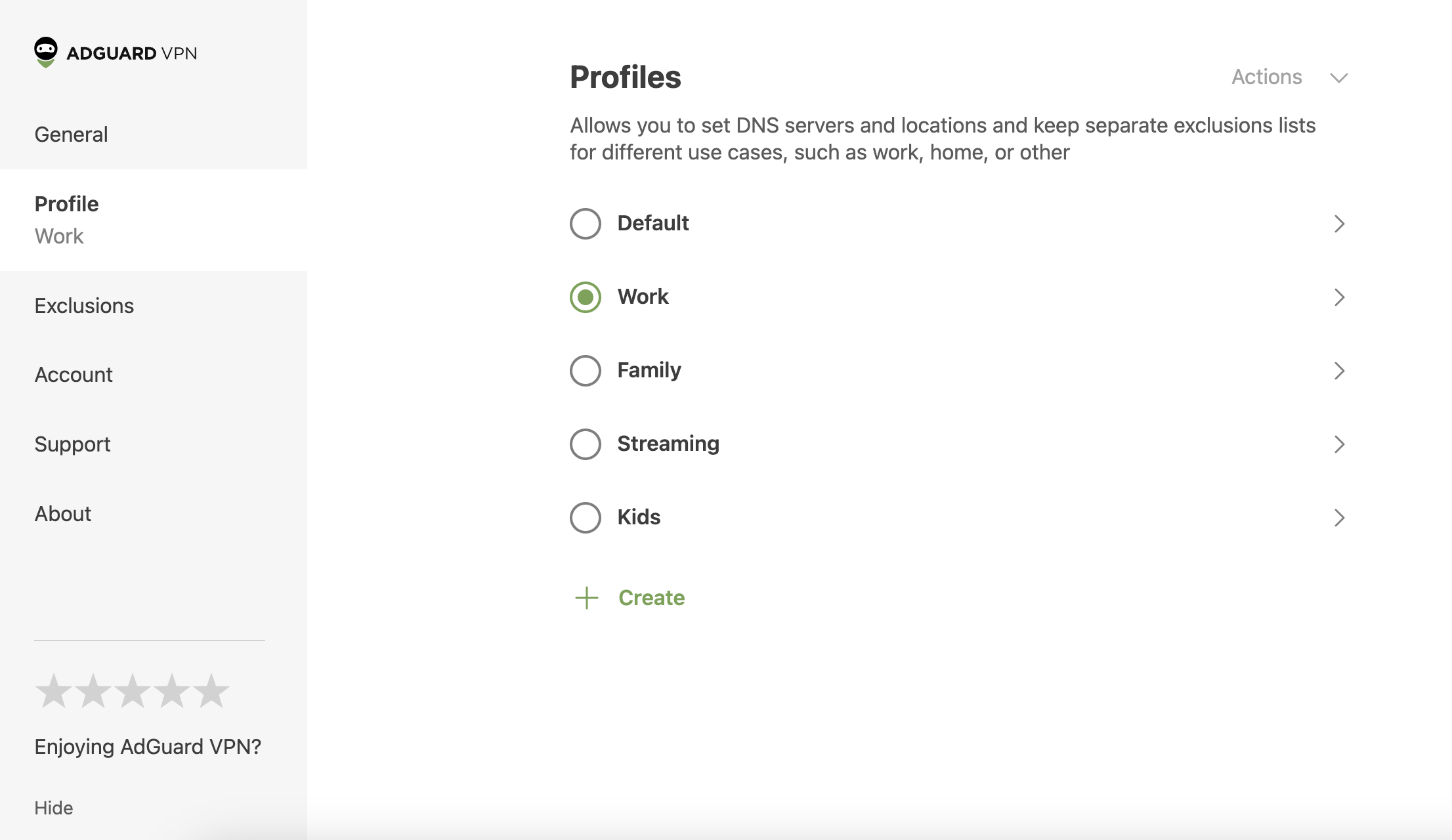
To try the new feature, click the AdGuard VPN icon in your browser → three-line menu in the upper-right corner (☰) → Profiles.
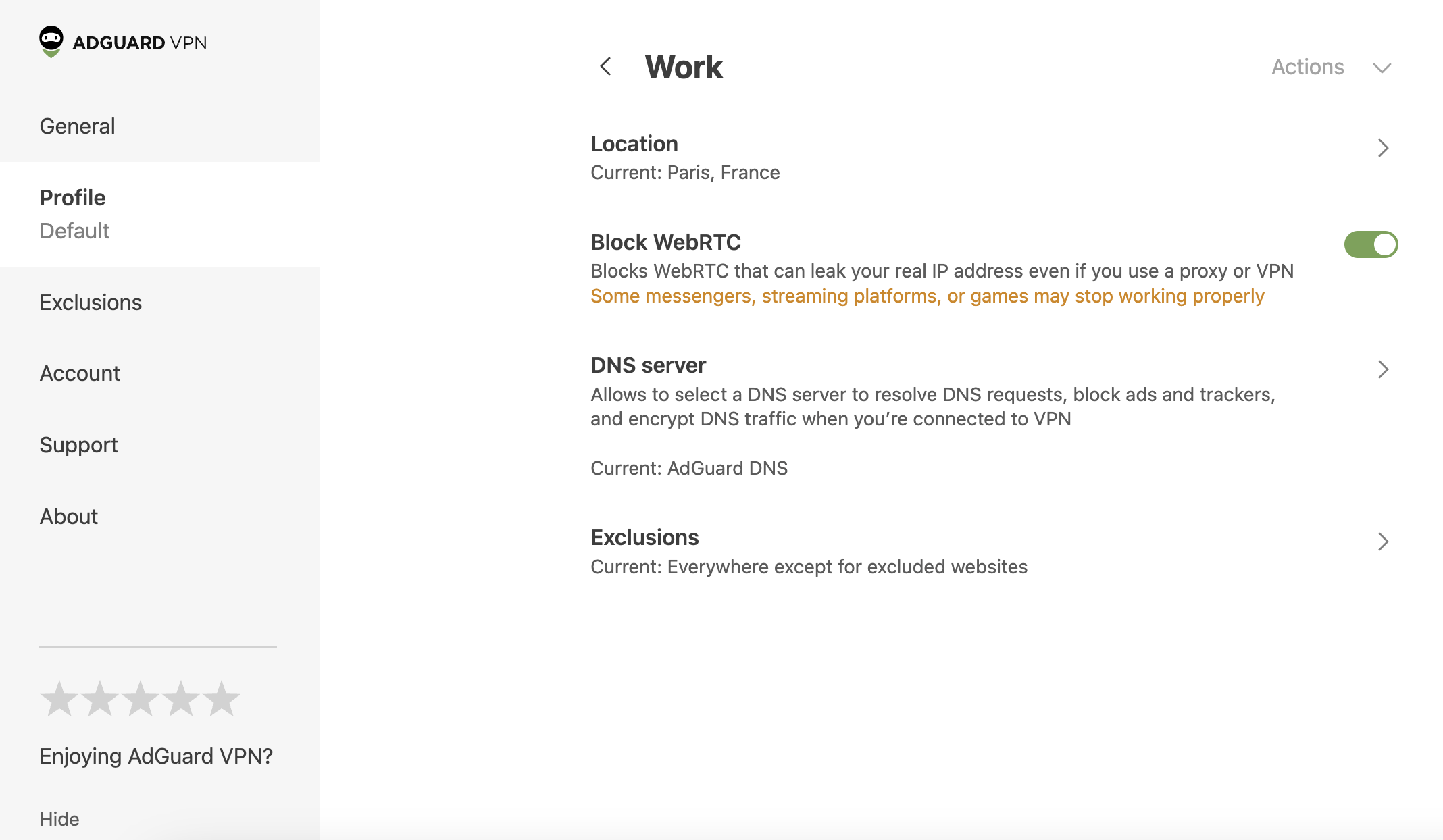
Profile settings
You can choose a name for each profile and configure the following settings:
- Server location
- WebRTC
- DNS server
- Exclusions
Other improvements
We’ve also fixed a few minor bugs to make the extension more stable.
Changelog
Improvements
- Added custom profiles #138
- Added version history and GitHub repository links to the About section #125
Download release version from store:
Store beta version:
Firefox beta version:
2.10.3 beta
This time, we focused on making AdGuard VPN Browser Extension more flexible for different everyday scenarios. In v2.10, we’ve added custom profiles — a faster way to switch between different VPN setups.
Custom profiles
You may use VPN differently throughout the day: one setup for work, another for social media, and a third for streaming or watching cartoons with your kid. Each scenario may require a different VPN location, DNS server, or exclusion list.
With custom profiles, you can save different VPN settings and switch between them in one click. You can create up to 10 profiles in total.
To try the new feature, click the AdGuard VPN icon in your browser → three-line menu in the upper-right corner (☰) → Profiles.
Profile settings
You can choose a name for each profile and configure the following settings:
- Server location
- WebRTC
- DNS server
- Exclusions
Other improvements
We’ve also fixed a few minor bugs to make the extension more stable.
Changelog
Improvements
- Added custom profiles #138
- Added version history and GitHub repository links to the About section #125
Store beta version:
Firefox beta version:
2.9.8
This release feels like a supportive hand on your shoulder, offering better control, clearer information, and additional value for your interactions with AdGuard VPN Browser Extension. Let’s take a closer look at what’s behind these improvements.
Interface language selection
If you’ve ever changed the extension’s language by adjusting your browser settings — consider this a big hug and an invitation to forget that painful experience. No more complex steps: you can now change the extension’s language directly in its settings. Fewer steps, more control, and a personalized experience.
More accurate server information
We’ve revamped how we get ping data, so you’ll now have a clearer understanding of available servers and locations. This update makes your experience more predictable and aligns expectations with actual performance.
Extra free traffic
We’re adding more value for users engaging with our product. You can now earn 1 GB of free traffic by sharing a post about AdGuard VPN on Facebook or X. Once you’ve shared, go to Settings → Free GBs → Promote AdGuard VPN on socials, and fill out the form. Then we’ll check everything and add the extra traffic to your account.
This new way of earning free traffic is an additional benefit on top of our existing offers — it’s our way of thanking you for being part of the AdGuard community.
We hope this update makes your AdGuard VPN experience smoother, more transparent, and more rewarding.
Changelog
Improvements
- Added a language selector to the extension settings #237
- Added a Promote AdGuard VPN on socials tab to the Free GBs section
Download release version from store:
Store beta version:
Firefox beta version:
2.9.8 beta
This beta feels like a supportive hand on your shoulder, offering better control, clearer information, and additional value for your interactions with AdGuard VPN Browser Extension. Let’s take a closer look at what’s behind these improvements.
Interface language selection
If you’ve ever changed the extension’s language by adjusting your browser settings — consider this a big hug and an invitation to forget that painful experience. No more complex steps: you can now change the extension’s language directly in its settings. Fewer steps, more control, and a personalized experience.
More accurate server information
We’ve revamped how we get ping data, so you’ll now have a clearer understanding of available servers and locations. This update makes your experience more predictable and aligns expectations with actual performance.
Extra free traffic
We’re adding more value for users engaging with our product. You can now earn 1 GB of free traffic by sharing a post about AdGuard VPN on Facebook or X. Once you’ve shared, go to Settings → Free GBs → Promote AdGuard VPN on socials, and fill out the form. Then we’ll check everything and add the extra traffic to your account.
This new way of earning free traffic is an additional benefit on top of our existing offers — it’s our way of thanking you for being part of the AdGuard community.
We hope this update makes your AdGuard VPN experience smoother, more transparent, and more rewarding.
Changelog
Improvements
- Added a language selector to the extension settings #237
- Added a Promote AdGuard VPN on socials tab to the Free GBs section
Store beta version:
Firefox beta version:
2.8.9
With this latest beta version of AdGuard VPN Browser Extension v2.8, we are expanding the range of browsers it can be used with and making some UI improvements.
Big news: we added support for Firefox on Android devices! We would really appreciate it if you could try the new version of our VPN extension on the Firefox browser and leave feedback.
As for UI, now the locations best suited for streaming have their own separate icons and can be easily identified. We also fixed a glitch that affected the display of notification messages.
Changelog
Improvements
- Added support for Firefox on Android
- Added icons indicating locations optimized for streaming services
Fixes
- Overflowing messages in the notification UI
Download release version from store:
Store beta version:
Firefox beta version:
2.8.9 beta
2.8.8 beta
With this latest beta version of AdGuard VPN Browser Extension v2.8, we are expanding the range of browsers it can be used with and making some UI improvements.
Big news: we added support for Firefox on Android devices! We would really appreciate it if you could try the new version of our VPN extension on the Firefox browser and leave feedback.
As for UI, now the locations best suited for streaming have their own separate icons and can be easily identified. We also fixed a glitch that affected the display of notification messages.
Changelog
Improvements
- Added support for Firefox on Android
- Added icons indicating locations optimized for streaming services
Fixes
- Overflowing messages in the notification UI