
A simple frontend demo project built with Vite and React that allows users to explore a list of reviews for various individuals. Users can navigate through the reviews, view them randomly, and get information about each person, including their image, name, job, and review text.
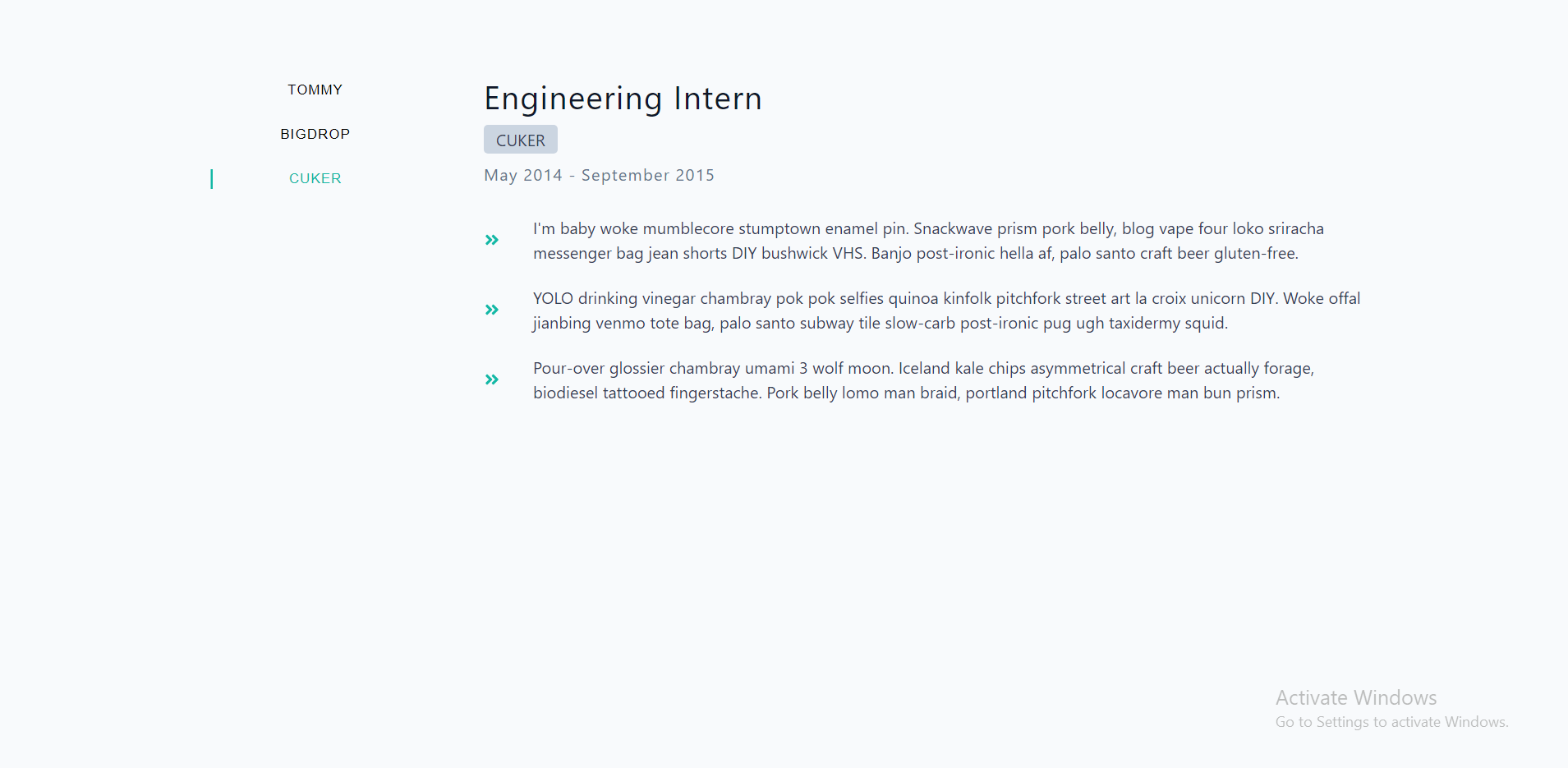
This repository contains a Tabs project that showcases job information fetched from an external API. Users can navigate through the list of jobs and view details such as company, dates, job title, and duties. The application is built using Vite and React and utilizes various hooks and components to display job information dynamically.
Follow the steps below to set up the project and fetch job information from the external API.
In the App.jsx file, utilize the fetch API to retrieve job information from the external API. Use the useEffect hook to make the API call when the component mounts. While the data is being fetched, set up a loading state to display a message to the user.
Once the data has been fetched, store it in a state variable using the useState hook. This will allow you to modify the data and have those changes automatically reflected in the rendered output.
Create a JobInfo component to display the details of the first job in the list. Use object destructuring to extract the relevant data from the job object. Display the company, dates, title, and duties, utilizing the Duties component to render the list of duties.
In the Duties component, iterate over the array of duties and render each item. If you want to use icons, you will need to install the react-icons library.
To generate unique ids for each job (as the job data does not have an id), install the uuid library:
npm install uuidThen, import the library in your code:
import { v4 as uuidv4 } from 'uuid';Use the generated ids instead of the index to set the key prop for the JobInfo and Duties components.
Set up a BtnContainer component and pass the jobs array, currentItem state variable, and setCurrentItem function down as props. In the BtnContainer component, create a button for each job in the jobs array.
Create a currentItem state variable in App.jsx and set it to 0 initially. Pass this state variable down to the JobInfo component as a prop, and use it to display the current job.
Attach the setCurrentItem function to each button. When the user clicks a button, the setCurrentItem function should be called with the index of the selected job. This function should update the currentItem state variable, causing the JobInfo component to render the selected job.
To use the Tabs project, follow the steps below:
- Clone the repository: Start by cloning this repository to your local machine using the following command:
git clone https://github.com/Mohamed-Esmat/tabs-project.git- Navigate to the project directory: Change your working directory to the project folder:
cd tabs-project- Install dependencies: Install the necessary dependencies by running:
npm install- Start the development server: Run the development server to see the Tabs project in action:
npm run div- Explore the Tabs project: Once the development server is running, open your web browser and navigate to
http://localhost:3000. You will be able to view the job information and navigate through the list of jobs using the provided buttons.
Experience the Tabs Project in action! Click the link below to access the live demo:
Feel free to interact with the project, browse through different jobs, and explore the user-friendly interface. The live demo provides a hands-on experience to see the Tabs Project in action.
We appreciate and welcome contributions to enhance the project! To contribute, follow these steps:
-
Fork the repository: Start by forking this repository to your GitHub account using the "Fork" button at the top right corner of the repository page.
-
Clone your fork: Clone the forked repository to your local machine using the following command:
git clone https://github.com/Mohamed-Esmat/tabs-project.git- Navigate to the project directory: Change your working directory to the project folder:
cd tabs-project- Install dependencies: Install the necessary dependencies by running:
npm install- Start the development server: Run the development server to see the Tabs project in action:
npm run div-
Make your changes: Implement your changes or add new features to the project.
-
Commit your changes: Commit your
changes with clear and descriptive commit messages:
git commit -m "Add your descriptive commit message here"- Push your changes: Push your changes to your forked repository:
git push origin main- Create a pull request: Open a pull request (PR) against the main repository. Ensure that you provide a clear description of your changes in the PR.
We value your contributions and will review your pull request as soon as possible. Together, we can make this project even better!
This project is licensed under the MIT License. Feel free to use, modify, and distribute the code.
We would like to thank the following resources and communities for their support and inspiration:
- Figma Design for providing the visual reference for the project.
- React Icons for the fantastic collection of icons used in the project.
- uuid library for generating unique ids for each job.
If you have any questions or suggestions regarding the project or want to report an issue, feel free to contact us at:
- Email: msmt0452@gmail.com
- GitHub: Mohamed-Esmat
Enjoy exploring the Tabs Project! If you have any other requests or need further adjustments, let me know, and I'll be happy to assist you. Thank you for checking out the project! 🚀