

A lightweight, self-hosted home dashboard for your services.





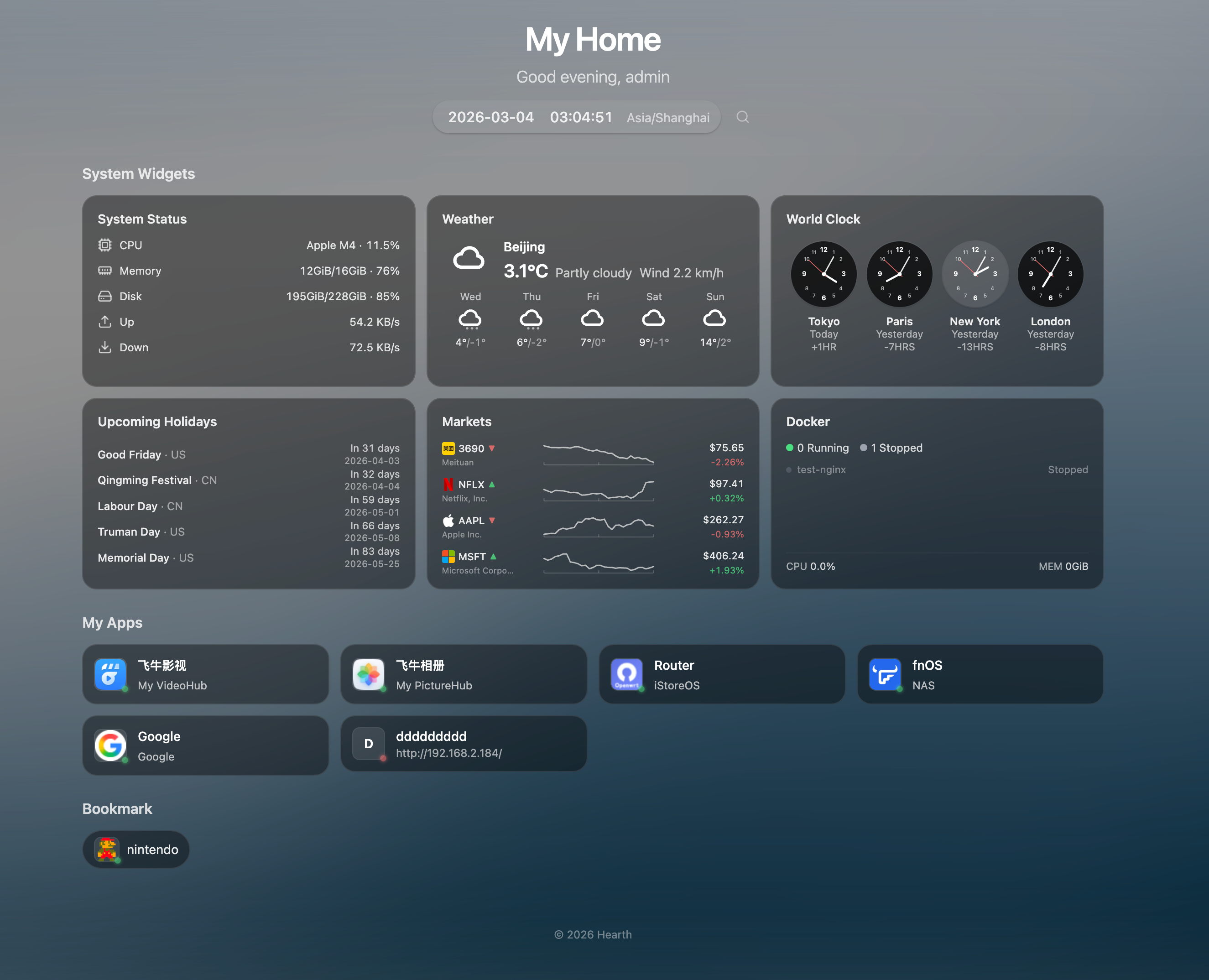
- 🏠 Grouped App Links - Organize your services into custom groups
- 🔖 Bookmarks - Compact pill-style link groups for quick access
- 🔍 Quick Launch -
Cmd/Ctrl+Kto search apps instantly, with pinyin support - 🟢 Service Status - Live health-check indicators (supports HTTPS with self-signed certs)
- 🖱️ Drag & Drop - Reorder groups and items freely
- 🎨 Frosted Glass UI - Borderless glassmorphism card design with backdrop blur
- 🌤️ Weather - Current weather with 7-day forecast (Open-Meteo, no API key needed)
- 📈 Market Ticker - US stocks, HK stocks, and crypto prices with intraday sparkline charts (Yahoo Finance)
- 💱 Currency Exchange - Up to 4 currency pairs with 30-day history sparklines and flag emojis (Frankfurter API)
- 📰 RSS Feed - Aggregate up to 10 RSS/Atom feeds with manual refresh, resizable height
- 🎮 Game Deals - PC (CheapShark/Steam) and iOS (App Store) deals with prices, ratings, and direct store links
- 🕐 World Clock - Up to 4 configurable timezone clocks
- 📊 System Metrics - CPU, memory, disk, and network monitoring with historical charts (7-day retention)
- 🐳 Docker Monitoring - Container status, resource usage, start/stop/restart actions
- 🗓️ Holidays - Upcoming holidays for selected countries
- 📝 Notes - Quick notes and memos
- 👋 Greeting & Daily Quote - Time-based greeting with a daily inspirational quote (ZenQuotes)
- 🗓️ Solar Terms - Optional Chinese 24 solar terms display next to date (toggleable)
- 🎨 Dynamic Backgrounds - Bing daily, random, Unsplash, Picsum, or video backgrounds
- 🌓 Bilingual UI - Chinese and English with full i18n
- 📱 Mobile Friendly - Responsive design for all devices
- ✨ Easter Eggs - 5 hidden particle effects (snow, rain, sakura, firefly, shooting stars)
docker run -d \
  --name hearth \
  -p 8787:8787 \
  -v hearth-data:/data \
  -v /var/run/docker.sock:/var/run/docker.sock \
  --restart unless-stopped \
  cailurus/hearth:latest
Open http://localhost:8787 and login with admin / admin.
The Docker socket mount (
-v /var/run/docker.sock:...) is optional — it enables the Docker monitoring widget. Without it, all other features work normally.
services:
  hearth:
    image: cailurus/hearth:latest
    ports:
      - "8787:8787"
    volumes:
      - hearth-data:/data
      - /var/run/docker.sock:/var/run/docker.sock  # Optional: enables Docker monitoring
    restart: unless-stopped

volumes:
hearth-data:| Item | Details |
|---|---|
| First-run username | admin |
| First-run password | If HEARTH_INITIAL_PASSWORD is set, that value is used. Otherwise Hearth generates a 16-char random password, prints it once to stdout as a banner, and forces a password change on first login. The password is never written to disk and never re-emitted via the structured logger. |
| Rate Limiting | 5 attempts per 15 min, then 5 min lockout |
| Password Reset | docker exec -it hearth /hearth/reset-password -db /data/hearth.db -password NEW |
To retrieve the generated password from a running container:
docker logs hearth | head -20| Variable | Default | Description |
|---|---|---|
HEARTH_ADDR |
:8787 |
Listen address |
HEARTH_DATA_DIR |
/data |
Data directory |
HEARTH_SESSION_TTL |
168h |
Session expiration |
HEARTH_COOKIE_SECURE |
auto |
Secure cookie flag (auto / true / false) |
HEARTH_DOCKER_SOCKET |
auto-detect | Docker socket path (auto-detects common paths) |
HEARTH_INITIAL_PASSWORD |
(unset) | Initial admin password. If unset, a 16-char random password is generated and printed to stdout (visible via docker logs). |
HEARTH_CORS_ORIGINS |
http://localhost:5173,http://127.0.0.1:5173 |
Comma-separated allowed cross-origin URLs. The default permits the bundled Vite dev server only; production deployments serve the frontend from the same origin and need no override unless using a separate domain. |
HEARTH_DOCKER_ALLOW_PATTERNS |
(unset) | Comma-separated regex allowlist for container names that may receive start/stop/restart actions. Empty = allow any container the daemon exposes. Example: `^(jellyfin |
HEARTH_DOCKER_LABEL_INTERVAL |
30s |
Poll interval for hearth.*/homepage.* label discovery. 0s (or 0) disables the loop entirely. |
HEARTH_TRUSTED_PROXY_HEADER |
(unset) | Name of the header carrying the authenticated username when Hearth sits behind a forward-auth proxy (Authelia / Authentik / oauth2-proxy / Caddy forward_auth / Traefik forwardAuth). Common values: X-Remote-User, Remote-User. Requires HEARTH_TRUSTED_PROXY_NETWORKS to also be set; Hearth refuses to start otherwise. |
HEARTH_TRUSTED_PROXY_NETWORKS |
(unset) | Comma-separated CIDR list naming the proxy's source IPs. The proxy header is honored only when the request arrives from one of these networks — bypassing the proxy and hitting Hearth directly cannot forge the header. Example: 10.0.0.0/8,172.20.0.0/16. |
NAS Docker Monitoring Setup (fnOS, Synology, etc.)
NAS Docker UIs typically only allow directory mounts, not individual files. To enable Docker monitoring:
-
Add a directory mount in your NAS Docker settings:
Host Path Container Path /var/run/host-run -
Add an environment variable:
Variable Value HEARTH_DOCKER_SOCKET/host-run/docker.sock
If your NAS restricts access to /var/run, SSH into the NAS and run:
mkdir -p /vol2/1000/ServiceStore/docker-sock
mount --bind /var/run /vol2/1000/ServiceStore/docker-sock
Then mount /vol2/1000/ServiceStore/docker-sock → /host-run instead.
The self-hosted dashboard space has several mature options. Hearth is built for Chinese-speaking home users on NAS platforms (fnOS / Synology / ZSpace) who want a personal launcher with a sense of warmth — pinyin Cmd+K search, glassmorphism UI, 24 solar terms, particle Easter eggs. The table below is a reference, not a ranking.
| Dimension | Hearth | homepage | glance | homarr |
|---|---|---|---|---|
| Best for | CN home NAS users | Power users, labels | News + aesthetics | Teams, multi-user |
| Tech | Go + React 19 | Next.js | Pure Go | Next.js + tRPC |
| Config | UI + JSON | YAML files | YAML files | UI drag-and-drop |
| Widgets | Curated set | 100+ integrations | RSS / HN / Reddit | Plugin marketplace |
| Service discovery | Manual | Docker labels | Manual | Docker + Kubernetes |
| Multi-user | Single user | None | None | OIDC + RBAC |
| Bundle size | Single Go binary | Node runtime | ~25MB binary | Node runtime |
Choosing the right tool. If you run dozens of services and want auto-discovery via Docker labels, pick homepage. If you want the prettiest news-reader-style aggregator with the smallest footprint, pick glance. If you need shared dashboards with SSO and RBAC for a team, pick homarr. If you are a Chinese-speaking home user who wants pinyin search, seasonal touches, and a single-binary backend, Hearth is built for that taste.
Hearth can pick apps up from the labels on your running Docker
containers and add them to the dashboard automatically — no UI clicks
per service. Add a few labels to any container's docker-compose.yml
and the app appears within ~30 seconds:
services:
  jellyfin:
    image: jellyfin/jellyfin
    labels:
      - "hearth.name=Jellyfin"
      - "hearth.group=Media"
      - "hearth.href=http://nas.lan:8096/"
      - "hearth.icon=lucide:film"
- "hearth.description=Movie & TV server"| Label | Required | Purpose |
|---|---|---|
hearth.name |
yes | Display name |
hearth.href |
yes | Where the card links to |
hearth.group |
no | Falls into a same-named user group (case-insensitive) or a virtual "Docker" group |
hearth.icon |
no | URL or lucide:icon-name |
hearth.description |
no | Subtitle text |
Already on gethomepage / homepage? Hearth also reads homepage.*
labels with the same field names, so you can keep your existing
docker-compose unchanged. When both prefixes are set on the same
container, hearth.* wins per-field.
Lifecycle: Containers must be in state="running" to appear.
Stopping or removing a container makes the app vanish from the
dashboard within 30 seconds. Docker-discovered apps are read-only in
the UI (the backend refuses PUT / DELETE on them) — labels are the
source of truth.
Toggling discovery off: Set HEARTH_DOCKER_LABEL_INTERVAL=0 to
disable the polling loop entirely.
# Prerequisites: Go 1.25+, Node.js 20+

git clone https://github.com/cailurus/Hearth
cd Hearth

# Dev mode (backend + frontend with hot reload)
make dev

# Build production
make build
./dist/hearthAll data (including user credentials, app links, settings) is stored in /data:
data/
├── hearth.db    # SQLite database (users, apps, settings)
├── icons/       # Cached app icons
└── cache/       # Background images
To ensure your data survives container updates, mount a volume or host directory:
Using Docker named volume (recommended):
docker run -d -v hearth-data:/data cailurus/hearth:latestUsing host directory:
docker run -d -v /path/to/my/data:/data cailurus/hearth:latestWhen updating the container, your data remains intact:
docker pull cailurus/hearth:latest
docker stop hearth && docker rm hearth
docker run -d --name hearth -p 8787:8787 \
  -v hearth-data:/data \
  -v /var/run/docker.sock:/var/run/docker.sock \
  cailurus/hearth:latest