

Realtime-ish data on plain Convex. A sender batches fast-changing values (cursors, pen strokes, game movement) into one mutation every ~250 ms; watchers replay each batch with its original timing. It looks smooth and live, runs a little behind, and costs a handful of writes a second instead of 60. Batches are kept, so a whole session can be replayed later.
Live demo: https://helpful-wren-102.ap-southeast-2.convex.site (cursors, a shared drawing board, a ghost racer and a phone-tilt marble).
Found a bug? Feature request? File it here.
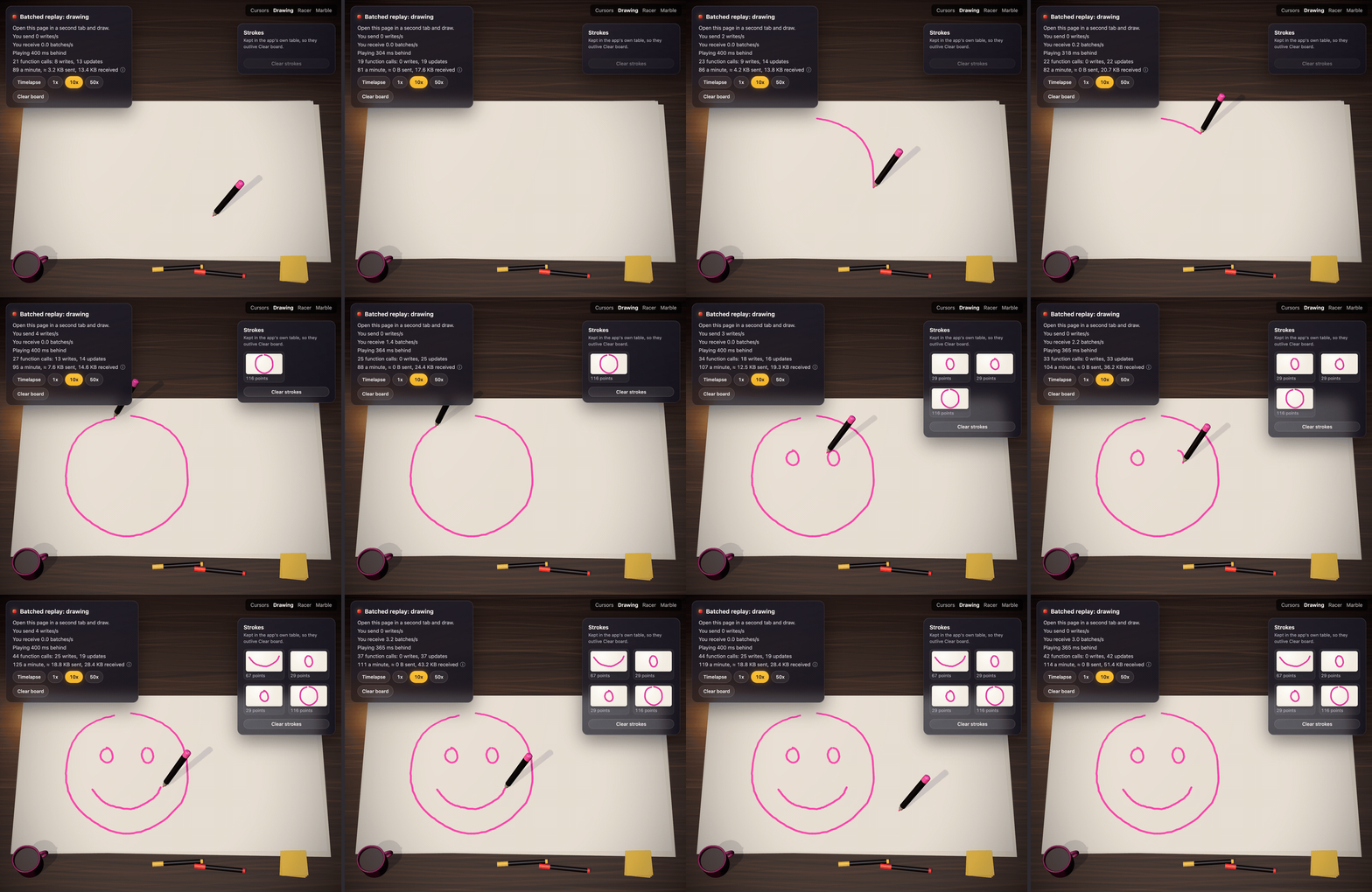
The example's drawing board in two tabs, from about 4 writes a second.
Live demo:
https://helpful-wren-102.ap-southeast-2.convex.site.
Open it in two tabs, or open #marble on a laptop and steer it with your phone.
npm install @convex-dev/batched-replay// convex/convex.config.ts
import { defineApp } from "convex/server";
import batchedReplay from "@convex-dev/batched-replay/convex.config.js";
const app = defineApp();
app.use(batchedReplay);
export default app;A room is a string you pick (a page, a board, a game). A stream is one sender's key inside it.
// convex/cursors.ts
import { v } from "convex/values";
import { components } from "./_generated/api";
import { exposeApi } from "@convex-dev/batched-replay";

export const { append, latest, history, streams } = exposeApi(
  components.batchedReplay,
  {
    // What one sample is. Checked on every append, and it types the hooks.
    // Leave it out and samples are v.any().
    value: v.object({ x: v.number(), y: v.number() }),
    // How long batches are kept after they end. Leave it out to keep them
    // forever (for replays).
    retentionMs: 10 * 60_000,
    // Throw to stop someone watching a room.
    authorizeRead: async (ctx) => {
      const identity = await ctx.auth.getUserIdentity();
      if (!identity) throw new Error("Unauthorized");
    },
    // Return the stream key this caller writes to. `stream` is what the
    // client asked for; here it's only trusted as a per-tab session id.
    authorizeWrite: async (ctx, { stream }) => {
      const identity = await ctx.auth.getUserIdentity();
      if (!identity) throw new Error("Unauthorized");
      return `${identity.tokenIdentifier}:${stream ?? "default"}`;
    },
  },
);
Both callbacks get the full query or mutation ctx, so they can check your own
tables (is this user in this room?). Annotate ctx with your app's QueryCtx
or MutationCtx from ./_generated/server for typed ctx.db access.
One stream key per tab. The server lays each stream's batches end to end on
one timeline. If two devices (or two tabs) write the same key, their batches
interleave and keep clamping against each other, so the stream jitters. Make the
key the user plus a session id each tab picks for itself (for example
crypto.randomUUID() kept in sessionStorage), as above.
usePlayback's self has to be that same key, so the client needs to know it.
Build it on the client and pass it as stream (with authorizeWrite checking
it starts with the signed-in user), or return it from a query of your own.
The example app has no sign-in, so its authorizeRead allows everyone and its
authorizeWrite trusts the client's anonymous key. Don't ship that.
From your own functions you can also use the class:
new BatchedReplay(components.batchedReplay) has append, latest, history,
streams and clear. clear isn't in exposeApi, since it's destructive:
wrap it in your own mutation with your own checks.
Batches are the component's data, made for playback. When your app wants its own
durable copy of something, onAppend is the place: finished drawing strokes,
game laps or checkpoints, sensor rollups and alerts, last-seen presence,
moderation flags, or scheduling an agent when something finishes.
import { v } from "convex/values";
import { exposeApi } from "@convex-dev/batched-replay";
import { components } from "./_generated/api";
import type { MutationCtx } from "./_generated/server";

export const { append, latest, history, streams } = exposeApi(
  components.batchedReplay,
  {
    value: v.object({
      k: v.union(v.literal("down"), v.literal("move"), v.literal("up")),
      x: v.number(),
      y: v.number(),
    }),
    authorizeRead,
    authorizeWrite,
    // Called by append after the batch is stored, in the same transaction.
    onAppend: async (ctx: MutationCtx, batch) => {
      // It runs on every append: return early unless a stroke finished.
      const ups = batch.samples.filter((s) => s.v.k === "up");
      if (ups.length === 0) return;
      for (const up of ups) {
        await ctx.db.insert("penUps", {
          stream: batch.stream,
          seq: batch.seq,
          at: batch.start + up.t, // the sample's server time
          x: up.v.x,
          y: up.v.y,
        });
      }
    },
  },
);
batch has room, stream, seq, start, end, samples (typed by
value) and dropped. samples are only the ones that were stored: dropped
leading samples were left out because they were captured before the room was
last cleared. It isn't called when nothing was stored. The drawing demo's
example/convex/drawing.ts builds whole strokes this way.
The rules, most important first:
- Write documents per stream or per user, never one shared room document.
Everyone's appends (about 4 a second each) would then write the same document,
conflict and retry, which brings back the write conflicts this component is
built to avoid. For room totals, use
@convex-dev/sharded-counteror@convex-dev/aggregate. - Filter first and return early, as above. It runs on every append.
- A throw rolls back the append, and stalls that person's stream for
everyone while their sender retries it. Wrap best-effort work in
try/catch, or hand it toctx.scheduler.runAfter(0, ...). - No duplicates to guard against. The hook runs once per stored batch, inside the same transaction, and Convex runs a mutation at most once.
- Ordering is per stream, by
seq. Batches from different streams can arrive in any order. - A batch is not an event. A stroke spans many batches, so collect it per
stream, and expect partial ones: a stroke with no
down(after a clear, or when a sender drops samples over a minute old), or adownthat never gets itsup.
From the BatchedReplay class there's no hook: append returns the same
{ seq, start, end, dropped } (or null), so do your mirroring on the next line
of your mutation.
import { useSender } from "@convex-dev/batched-replay/react";

const send = useSender(api.cursors.append, {
  room,
  stream: tabId,
  flushMs: 250, // one write per 250 ms while there's anything to send
  onError: (error) => console.warn(error), // it retries, with backoff
  onSend: (batch) => countWrite(), // as each batch goes out, e.g. for a HUD
});
onPointerMove((e) => send({ x: e.clientX, y: e.clientY }));
// Discrete events are never thinned out by sampleMs:
send(value, { keep: true });
It flushes on unmount and pagehide. A failed send keeps its samples and
retries after flushMs, doubling up to 5 s. Samples over a minute old are
dropped, since the server won't take a batch longer than that.
import { usePlayback } from "@convex-dev/batched-replay/react";

const { values, stats } = usePlayback(api.cursors, {
  room,
  self: tabId, // your own stream: draw your own input locally, with no delay
  interpolate: true,
});
// values: Map<stream, { x, y }> of everyone active in the last minute.
// stats: { delayMs, bufferedMs, batchesPerSecond, samplesPerSecond }
It watches the room's 100 most recently active streams; pass maxStreams (up to
1,000) for a bigger crowd.
It plays a little behind the server, by default just far enough to cover how
late batches have been arriving (about 330 ms with a 250 ms flush), and never
more than maxDelayMs (2 s). onSample(stream, value, time) fires for every
sample, in order, even if the tab was hidden for a while. Missed batches are
fetched from history and played in order.
For a drawing, where every stroke matters:
usePlayback(api.drawing, {
  room,
  self: tabId,
  // Replay the whole stored history through onSample first, instantly and
  // in order, then carry on live with no gap and nothing twice.
  fromStart: true,
  onSample: (stream, sample) => draw(stream, sample),
  // Someone cleared the room. With fromStart, the (now empty) history is
  // replayed again afterwards.
  onReset: () => clearCanvas(),
});
Replaying every batch gets slow once a room has a long history. If onAppend
keeps your own copy of what it adds up to (the drawing demo keeps finished
strokes, and each stream's stroke in progress), start from that instead. Have
onAppend also store each stream's last seq, and return the copy from a query
of your own, read in one transaction so the strokes and seqs agree:
const convex = useConvex();
usePlayback(api.drawing, {
  room,
  self: tabId,
  snapshot: {
    // On start, and again after every clear.
    load: () => convex.query(api.drawing.snapshot, {}),
    // Draw it, and say which batch it covers up to, for each stream.
    apply: (snapshot) => {
      drawSnapshot(snapshot);
      return snapshot.pens; // [{ stream, seq }, ...]
    },
  },
  onSample: (stream, sample) => draw(stream, sample),
  onReset: () => clearCanvas(),
});
Each listed stream then plays from the batch after its seq, however old,
fetching any it missed from history, so nothing is drawn twice and nothing
written while the snapshot loaded is lost. A stream the snapshot doesn't list
plays from its first batch. apply isn't called if the room was cleared while
the snapshot loaded; it's loaded again instead. See example/convex/drawing.ts
and example/src/Drawing.tsx.
import { useHistory } from "@convex-dev/batched-replay/react";

const replay = useHistory(api.drawing, { room, speed: 10, onSample: draw });
replay.restart(); // load from the start, picking up new batches, and play
replay.pause(); // also play(), seek(ms), setSpeed(n)
// replay.position, replay.playing, replay.finished, replay.error
Idle stretches longer than maxGapMs (2 s) are cut short, so a timelapse
doesn't sit through an hour of nothing. A failed page load retries after 1 s,
doubling up to 10 s, and shows up as error.
The Sender, Player and HistoryPlayer classes behind the hooks are plain
TypeScript, exported from @convex-dev/batched-replay, if you're not using
React.
- Writes: one
appendper sender per flush, so about 4 a second per person while they're moving, with a 250 ms flush. Nothing while they're idle. - Reads: every viewer subscribes to
latestfor each active stream. Each append runs that query once and Convex shares the result with every viewer, but each viewer's update counts as a function call: about senders x viewers x 4 a second. Ten people in a room all moving is about 400 a second; fifty is about 10,000. The stream list changes at most every 5 s per stream. - Abuse: a client can call
appendas fast as it likes. Put@convex-dev/rate-limiterinauthorizeWrite(say, 10 appends a second per user) for anything public. - Retention: batches are stored until
retentionMsafter they end, then a cron deletes them each minute. WithoutretentionMsthey're kept forever, so storage grows by every sample ever sent: one person moving a cursor at 60 samples a second is roughly 5 MB an hour. Keep forever only what you'll replay, like drawings.
Measured with a load test (N people in one room, each moving at 60 Hz with a 250 ms flush and watching everyone else) against a Convex cloud dev deployment, October 2026:
| People in one room | Write time (p50) | Each viewer receives |
|---|---|---|
| 10 | about 330 ms | 45 KB/s |
| 25 | about 360 ms | 120 KB/s |
| 50 | about 460 ms | 240 KB/s |
| 100 | about 1.5 s | 460 KB/s |
The test ran from Perth to a US region, so about 300 ms of each write is the network. There were no errors and no write conflicts at any size: each person only writes their own batches. It's comfortable up to about 50 people moving at once in one room. Past that, writes slow down, senders automatically send fewer, bigger batches, and playback falls further behind, rather than anything failing. Bandwidth is about 5 KB/s per viewer for each other person moving; rounding your values shrinks it.
To test your own functions with
convex-test, register the
component from @convex-dev/batched-replay/test:
/// <reference types="vite/client" />
import { convexTest } from "convex-test";
import batchedReplay from "@convex-dev/batched-replay/test";
import schema from "./schema";

const modules = import.meta.glob("./**/*.ts");

export function initConvexTest() {
  const t = convexTest(schema, modules);
  batchedReplay.register(t);
  return t;
}
That export is TypeScript source that uses import.meta.glob, so your app needs
convex-test, vitest and vite (for the vite/client types) in its dev
dependencies.
example/ has demos switched by the URL hash. Cursors (#cursors): open it in
two tabs and move the mouse; a slider sets flushMs so you can compare
smooth-but-behind with jumpy-and-expensive, and the HUD switches between three
ways of showing the same batches: Jump (to the newest point), Smooth (a straight
glide to the newest point over one flush interval) and Replay batches. Drawing
(#drawing): a shared board where everyone else's strokes replay at the speed
they were drawn, with a timelapse. A new window draws the board from the app's
own strokes and pens tables, then carries on live. Racer (#racer): a tiny
racing game where each lap is its own stream, so your best lap comes back as a
ghost through useHistory. Marble (#marble, with #tilt on a phone): the
phone's tilt is sent like a cursor and rolls a marble on the laptop. See
example/README.md.
npm run dev
npm run dev:frontend
# 100 bot cursors on the cursors demo, for 60 s or until Ctrl-C
npm run crowd -- --bots 100 --flush 250 --seconds 60
npm run crowd connects each bot as its own client with its own stream key,
sending through Sender like a browser tab. --seconds 0 runs until Ctrl-C,
and --url defaults to VITE_CONVEX_URL in .env.local. It needs the build in
dist/, which npm run dev keeps up to date.
See DESIGN.md for how it works.