A declarative, deterministic toolkit for mocking MCP servers, tools, and CLIs
when testing or evaluating agent skills, prompts, and custom agents. Built on the
official ModelContextProtocol
C# SDK and targeting .NET 10.
This repository hosts the public README, docs, samples and demo media for mockmcp. The tool itself ships on NuGet as
MockMcp.Tool; its source is maintained in a separate repository — github.com/dotutils/mock-mcp-impl — which is currently private.
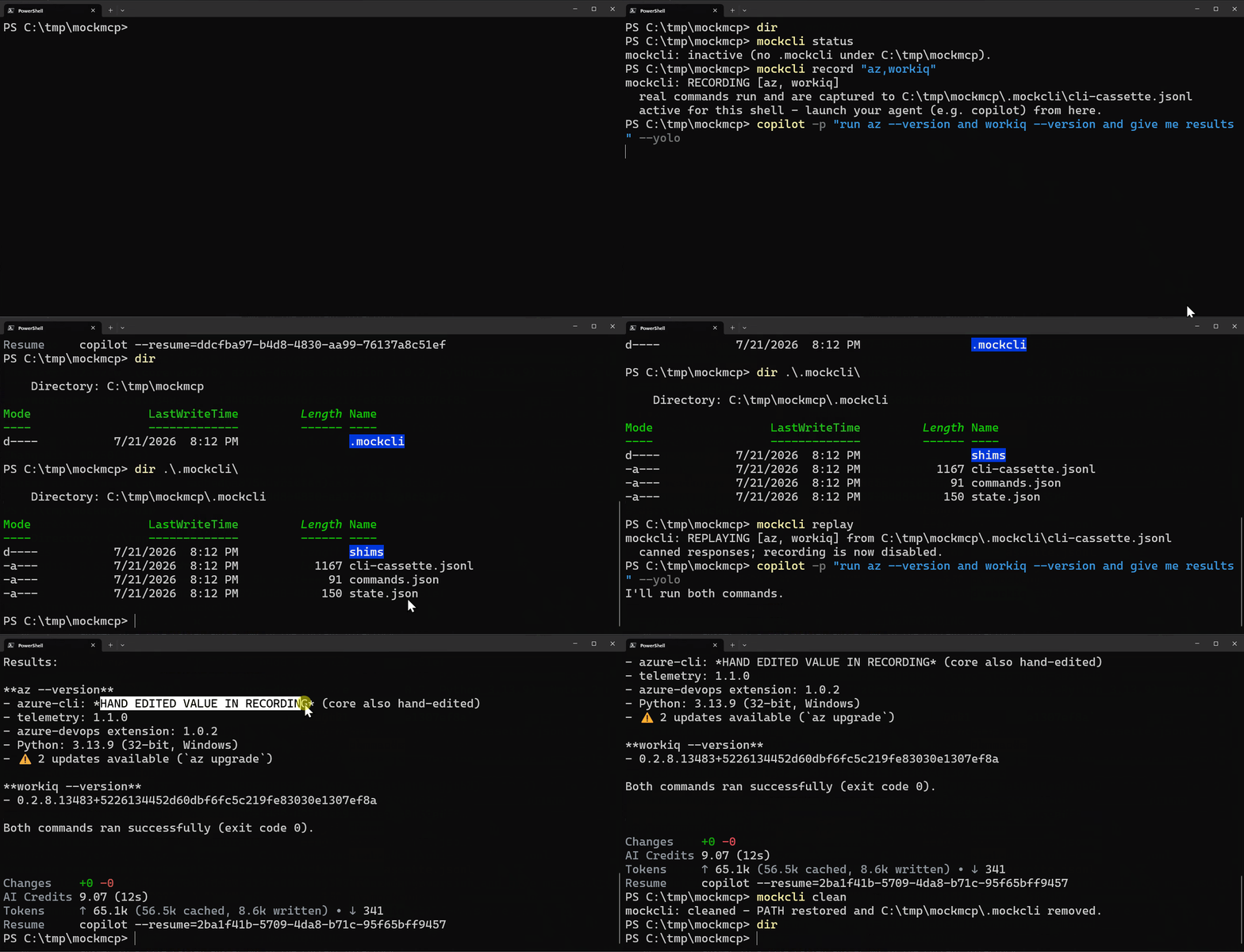
Record a CLI once, then replay it hermetically — real az/gh calls are
captured, then replayed with no real tools or network:
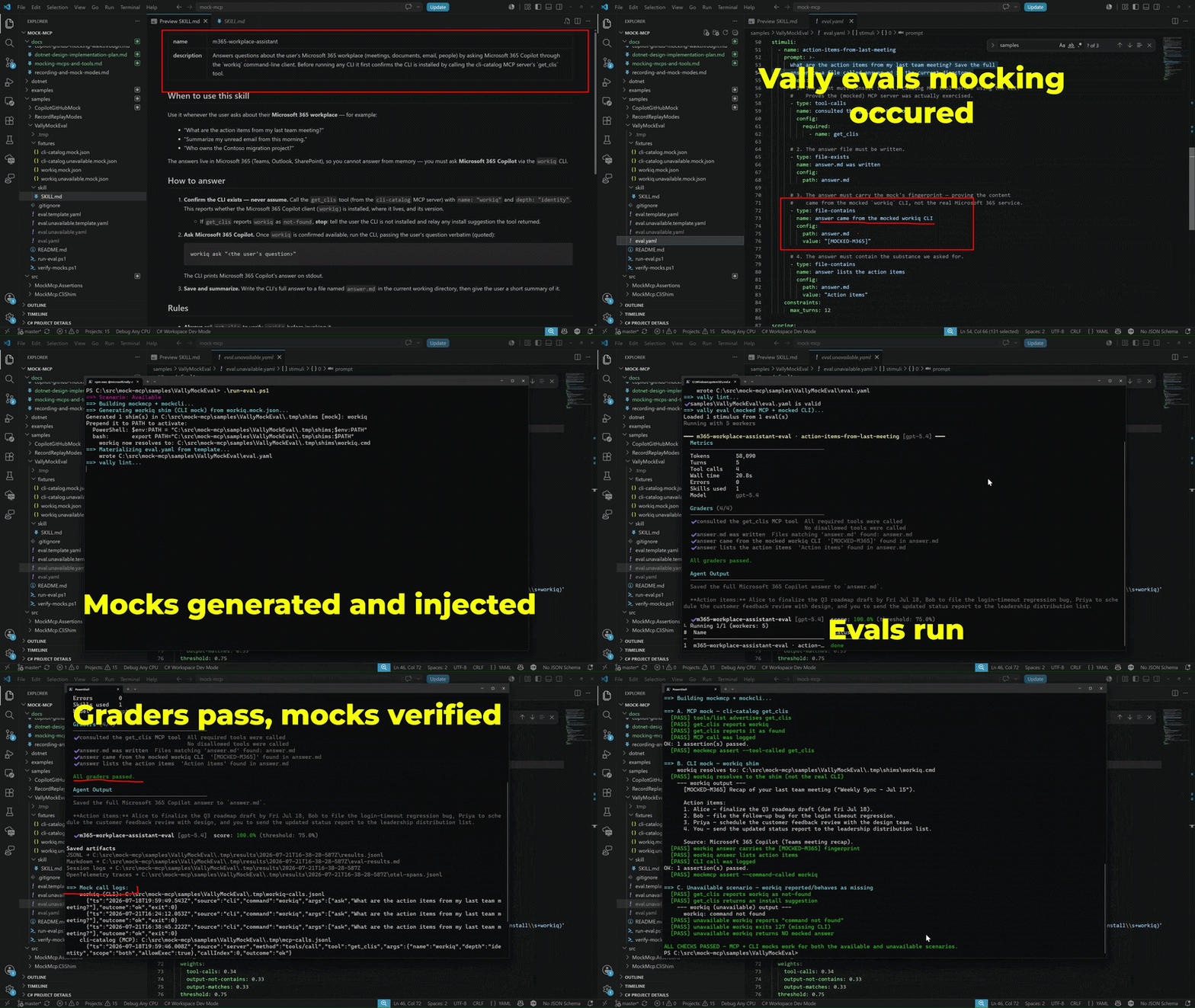
Mock an MCP server inside an agent eval — drive a Vally skill evaluation against a mocked MCP server and CLI tool for deterministic, noninvasive runs:
Record real MCP servers and CLI commands once, then replay them forever — hermetic, deterministic, no token or network. The only prerequisites are a .NET 10 install and (for the examples) the Copilot CLI; you don't need this repo.
0. Install the tool (one‑time) — puts the mockmcp command on your PATH:
dotnet tool install --global MockMcp.ToolPrefer not to install? Skip this step and use
dnx MockMcp.Toolinstead — in a shell replacemockmcpwithdnx MockMcp.Tool; in an MCP config set"command": "dnx"with the tool arguments after the package id (e.g."args": ["MockMcp.Tool", "replay", "github-cassette.jsonl"]).dnxships with the .NET 10 SDK and fetches the package from NuGet on first use. See Install for details.
Record real CLI calls (az, gh, …) once, then replay them with no real tools or
network. Install the mockcli shell function once (add it to your $PROFILE to
keep it across sessions):
mockmcp shell-init pwsh | Out-String | Invoke-Expression # bash: eval "$(mockmcp shell-init bash)"Then record → replay → clean, all in one terminal:
mockcli record "az,gh"     # real az/gh run and are captured
copilot -p "run az --version and gh --version"
mockcli replay             # switch to canned playback (recording now off)
copilot -p "run az --version and gh --version"
mockcli clean # restore PATH, remove the .mockcli working folder1. Record once against the real github server, wrapped by a record proxy.
github.record.proxy.json:
{
  "upstream": {
    "command": "docker",
    "args": ["run", "-i", "--rm", "-e", "GITHUB_PERSONAL_ACCESS_TOKEN", "ghcr.io/github/github-mcp-server"]
  },
  "record": "github-cassette.jsonl"
}
Point Copilot's github server at the recorder — record.mcp.json:
{ "mcpServers": { "github": {
  "type": "local",
  "command": "mockmcp",
  "args": ["record", "github.record.proxy.json"]
} } }
Run Copilot once against the real server. The GitHub MCP server authenticates every request, so even public‑repo reads need a token — a fine‑grained token with read‑only public access (or a classic token with no scopes) is enough. This is the only step that needs a token, Docker, or network:
$env:GITHUB_PERSONAL_ACCESS_TOKEN = "<your token>"
copilot -p "List open issues in octo-org/octo-repo using the github MCP server." `
  --additional-mcp-config "@record.mcp.json" --allow-all-tools --disable-builtin-mcps
Every github tool call + its real result — plus the server's tool manifest
(names, descriptions, schemas) — is written to github-cassette.jsonl.
2. Replay forever — no token, Docker, or network. Repoint the same github
name at the cassette — replay.mcp.json:
{ "mcpServers": { "github": {
  "type": "local",
  "command": "mockmcp",
  "args": ["replay", "github-cassette.jsonl"]
} } }
copilot -p "List open issues in octo-org/octo-repo using the github MCP server." `
--additional-mcp-config "@replay.mcp.json" --allow-all-tools --disable-builtin-mcpsCopilot now runs against the recording — same tool names, descriptions and schemas, same answers, every time.
- Walkthrough: mocking
ghand the GitHub MCP server for Copilot — step‑by‑step for both the Copilot CLI and an app built on a Copilot/agent SDK. - Recording, replay & mock modes:
docs/recording-and-mock-modes.md— record the real target to a cassette and replay it; strict/lenient/passthrough mocks with a verify step. - Vally eval (MCP + CLI mocking):
samples/VallyMockEval— run a Vally skill eval with both an MCP server and a CLI mocked, so the eval is hermetic (no real server, CLI, auth, or network).pwsh samples/VallyMockEval/run-eval.ps1. - Runnable samples:
samples/CopilotGitHubMockandsamples/RecordReplayModes—dotnet run --project samples/....
| Project | Purpose |
|---|---|
MockMcp.Core |
Fixture models, matching engine, scenario state machine, expectation engine (strict/lenient/passthrough), record/replay cassettes, JSONL recorder. |
MockMcp.Server |
SDK-hosted stdio replacement MCP server, driven by a fixture; mock modes + mockmcp_finalize verification. |
MockMcp.Proxy |
Transparent interposing proxy — wraps a real server, overrides chosen tools, and can record real calls to a cassette. |
MockMcp.CliShim |
PATH-shim generator + AOT-ready mockcli runtime for mocking or recording CLIs. |
MockMcp.Assertions |
Framework-agnostic assertions over the JSONL call log. |
MockMcp.Tool |
The mockmcp dotnet tool: init / serve / replay / proxy / record / convert / make-shims / cli / shell-init / assert. |
mockmcp ships as the NuGet dotnet tool MockMcp.Tool,
which targets .NET 10 — a .NET 10 install is the only prerequisite, and you
don't need to clone this repo.
Run without installing — dnx (bundled with the .NET 10 SDK) fetches the
package on first use and runs the mockmcp command:
dnx MockMcp.Tool init server mock.json
dnx MockMcp.Tool serve mock.json
Or install it as a global tool:
dotnet tool install --global MockMcp.Tool
mockmcp init server mock.json
mockmcp serve mock.json
The examples below use the
mockmcpcommand. If you'd rather not install anything, replacemockmcpwithdnx MockMcp.Toolin any command.
The agent points directly at the mock; the entire MCP surface comes from the fixture.
mockmcp serve github.mock.jsonHost config (e.g. Copilot CLI --additional-mcp-config):
{ "mcpServers": { "mock-github": { "type": "local",
  "command": "mockmcp", "args": ["serve", "github.mock.json"] } } }
Not installed globally? Point the host at
dnxinstead:"command": "dnx", "args": ["MockMcp.Tool", "serve", "github.mock.json"].
Keeps the real upstream server in the loop — the model sees the identical tool
manifest — but selected tools/call are answered from the fixture (no side effects).
mockmcp proxy proxy.json{
"upstream": { "command": "npx", "args": ["-y", "@modelcontextprotocol/server-everything"] },
"overrides": {
"echo": { "default": { "content": [{ "type": "text", "text": "MOCKED echo" }] } }
}
}Intercept shell commands (git, gh, …) via PATH shims that forward to the runtime.
mockmcp make-shims cli-shims.json .tmp/shims
$env:PATH = "$PWD/.tmp/shims;$env:PATH"
git log --oneline   # -> canned output; call recorded to the JSONL log
Mark a command "unavailable": true to simulate a missing CLI: the shim
still shadows any real binary on PATH, but reports command not found (exit
127) — handy for testing an agent's behavior when a tool it expects isn't
installed.
Optionally (from a source checkout), publish the shim runtime as a self-contained native executable that starts in milliseconds with no .NET runtime required:
dotnet publish src/MockMcp.CliShim -c Release -r win-x64 /p:PublishAot=trueRun once against the real target, capture what happened into a cassette, then replay it forever after — a VCR‑style workflow that removes hand‑authoring.
# Record: proxy the real MCP server and capture calls + results.
mockmcp record real-github.proxy.json --cassette cassette.jsonl

# Record CLIs: shims run the real binary and capture its output.
mockmcp make-shims gh.cli.json ./.tmp/shims --record cassette.jsonl

# Replay: serve the cassette deterministically, no real target present.
mockmcp replay cassette.jsonl                            # MCP
mockmcp make-shims cassette.jsonl ./.tmp/shims --replay  # CLI (direct from cassette)
mockmcp convert cassette.jsonl replay.mock.json          # or bake a fixture
mockmcp convert cassette.jsonl gh.mock.json --cliVerify interactions, not just answer calls — the way strict mocks do in unit
testing. An ordered expectations list drives responses, and a finalize call
verifies nothing required was missed.
mockmcp serve strict.mock.json --mode strict{
"server": { "name": "mock-github" },
"mode": "strict",
"expectations": [
{ "tool": "search_issues",
"when": { "argsMatch": { "query": "(?i)good first issue" } },
"response": { "content": [{ "type": "text", "text": "Found #101" }] } },
{ "tool": "create_pull_request", "min": 1, "max": 1,
"when": { "args": { "base": "main" } },
"response": { "content": [{ "type": "text", "text": "Created PR #4242" }] } }
]
}| Mode | Unexpected call | Order | Optional (min: 0) |
|---|---|---|---|
strict |
fails | must match the configured order | may be skipped |
lenient |
fails | any order | allowed |
passthrough |
falls back to tool default / real upstream | any order | allowed |
After the run, the harness calls the reserved mockmcp_finalize tool (not
shown in tools/list) to get a pass/fail verdict, or checks the log:
mockmcp assert calls.jsonl --expectations-metSee docs/recording-and-mock-modes.md for the
full design and its mapping to common unit‑testing mock practice.
Match tool calls by partial args, per-field regex ((?i) inline flags), call
index, call count, or scenario state; inject JSON-RPC or tool-level
errors, latency/timeouts, and sequenced (flaky-then-healthy) responses;
expose resources and prompts. See examples for complete samples.
{
  "schemaVersion": 1,
  "server": { "name": "mock-github", "version": "1.0.0" },
  "tools": [
    {
      "name": "search_issues",
      "inputSchema": { "type": "object", "properties": { "query": { "type": "string" } } },
      "responses": [
        { "when": { "argsMatch": { "query": "(?i)good first issue" } },
          "content": [{ "type": "text", "text": "Found #101, #102" }] },
        { "when": { "argsMatch": { "query": "(?i)cve" } },
          "error": { "code": -32003, "message": "Access denied" } }
      ],
      "default": { "content": [{ "type": "text", "text": "No results." }] }
    }
  ]
}responses[] (first match wins) → sequence[callIndex] (clamped to last) → default.
| Fixture | Effect |
|---|---|
content / text |
Success content blocks. |
structuredContent |
Sets CallToolResult.StructuredContent. |
isError: true |
Tool-level error (model-visible, self-correctable). |
error: { code, message } |
JSON-RPC protocol error (throws to the client). |
delayMs |
Delays before responding. |
timeout: true |
Never returns (honors client cancellation). |
| Var | Used by | Meaning |
|---|---|---|
MOCKMCP_FIXTURE |
serve |
Fixture path (or the first argument). |
MOCKMCP_LOG |
serve, proxy |
JSONL request-log path. |
MOCKMCP_STRICT=1 |
serve |
Unknown tool → JSON-RPC error instead of a fallback. |
MOCKMCP_MODE |
serve |
Mock mode: strict / lenient / passthrough. |
MOCKMCP_UNEXPECTED=error |
serve |
Unexpected call throws a JSON-RPC error (default: model-visible tool error). |
MOCKMCP_REPLAY |
serve |
Cassette path to replay instead of a fixture. |
MOCKMCP_RECORD |
proxy |
Cassette path to record forwarded calls + results. |
MOCKMCP_FINALIZE_TOOL |
serve |
Override the finalize tool name (default mockmcp_finalize). |
MOCKCLI_FIXTURE |
shims | CLI fixture path (set by generated shims). |
MOCKCLI_LOG |
shims | JSONL invocation-log path. |
MOCKCLI_RECORD / MOCKCLI_SHIM_DIR |
shims | Cassette path + shim dir for record-mode shims. |
Every mock appends the same JSONL schema, so one assertion API works across MCP and CLI calls:
CallLog.Load("calls.jsonl")
    .AssertToolCalled("search_issues")
    .AssertToolCalledWith("search_issues", """{"query":"good first issue"}""")
    .AssertCallCount("create_pull_request", 1)
    .AssertToolNotCalled("delete_repo")
    .AssertCallOrder("search_issues", "create_pull_request");
Or from the command line (exit code 0/1 for CI):
mockmcp assert calls.jsonl --tool-called search_issues --call-count "search_issues=2"

# Verify a strict/lenient run finalized cleanly (no missed or unexpected calls):
mockmcp assert calls.jsonl --expectations-met
{ "commands": { "workiq": { "unavailable": true } } } // -> "workiq: command not found", exit 127