


I write software with coding agents every day, and the agent only knows what I put in the prompt. When something is missing, it guesses. pi-harness is the set of extensions I built on top of pi so that stepping in costs me little: I approve or refuse a command and say why, I answer a question instead of letting the model guess, and I can see what every agent is doing, from the terminal or from my phone.
pi install npm:@adeildo/pi-harness
It is not a fork. Everything installs on top of pi, and pi remove gives you pi back the way it was. The longer story of why it exists is in Yes, another agent harness (in Portuguese).
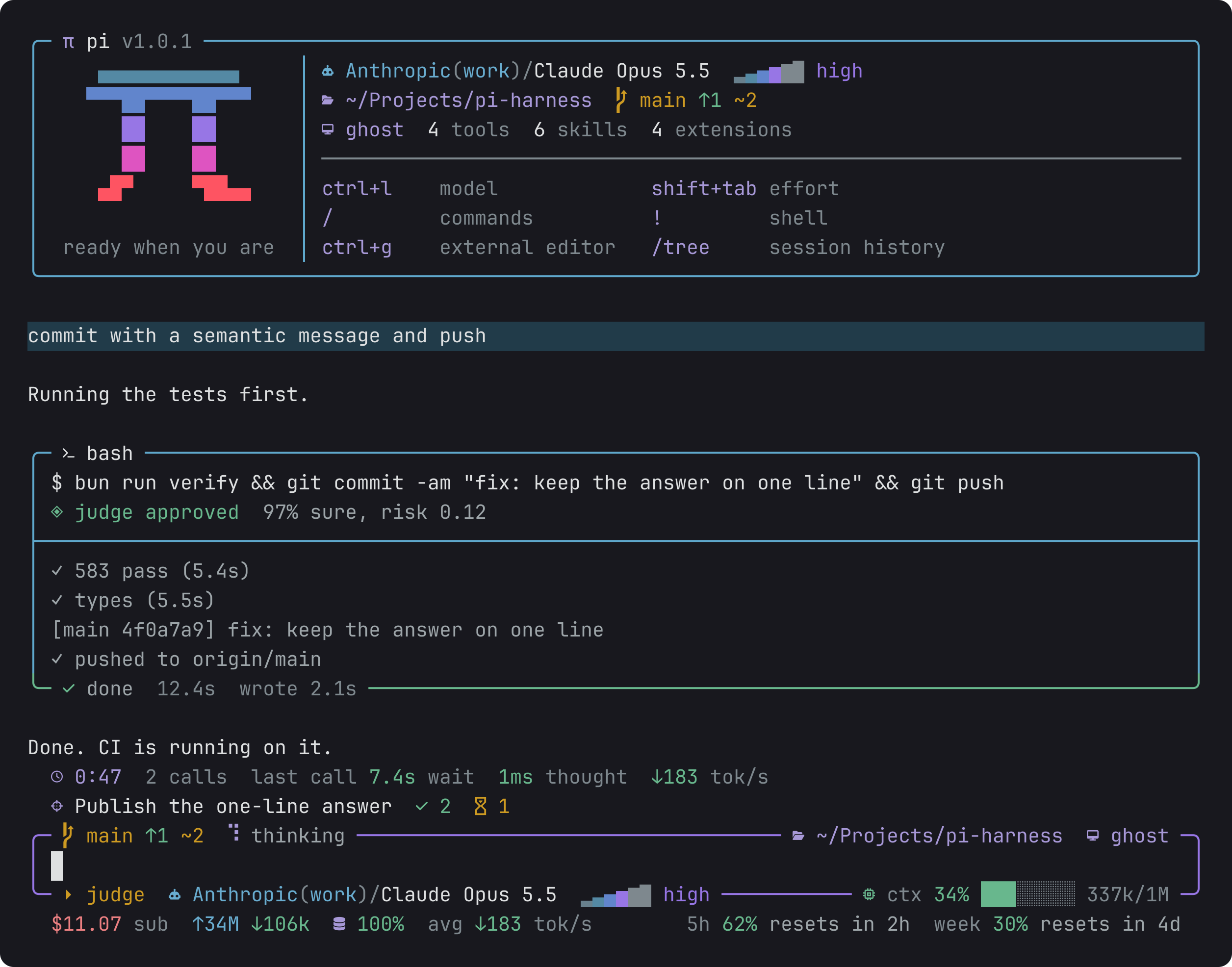
A session: the start card, what you asked, what the model ran, and what it cost.
Out of the box, pi runs every command the model writes. With the harness, pi asks you first. Reads run on their own, and so do the commands you marked "always yes" for the session, the project or everywhere. In judge mode, a small model reads each call and lets through the ones it is sure about, and each call shows who let it run and why.
When you say no, you can leave a note, such as "use pnpm instead", and the model reads it. The model can also ask you a question instead of guessing, with options and a preview of what each option leads to. Both dialogs use the same keys.
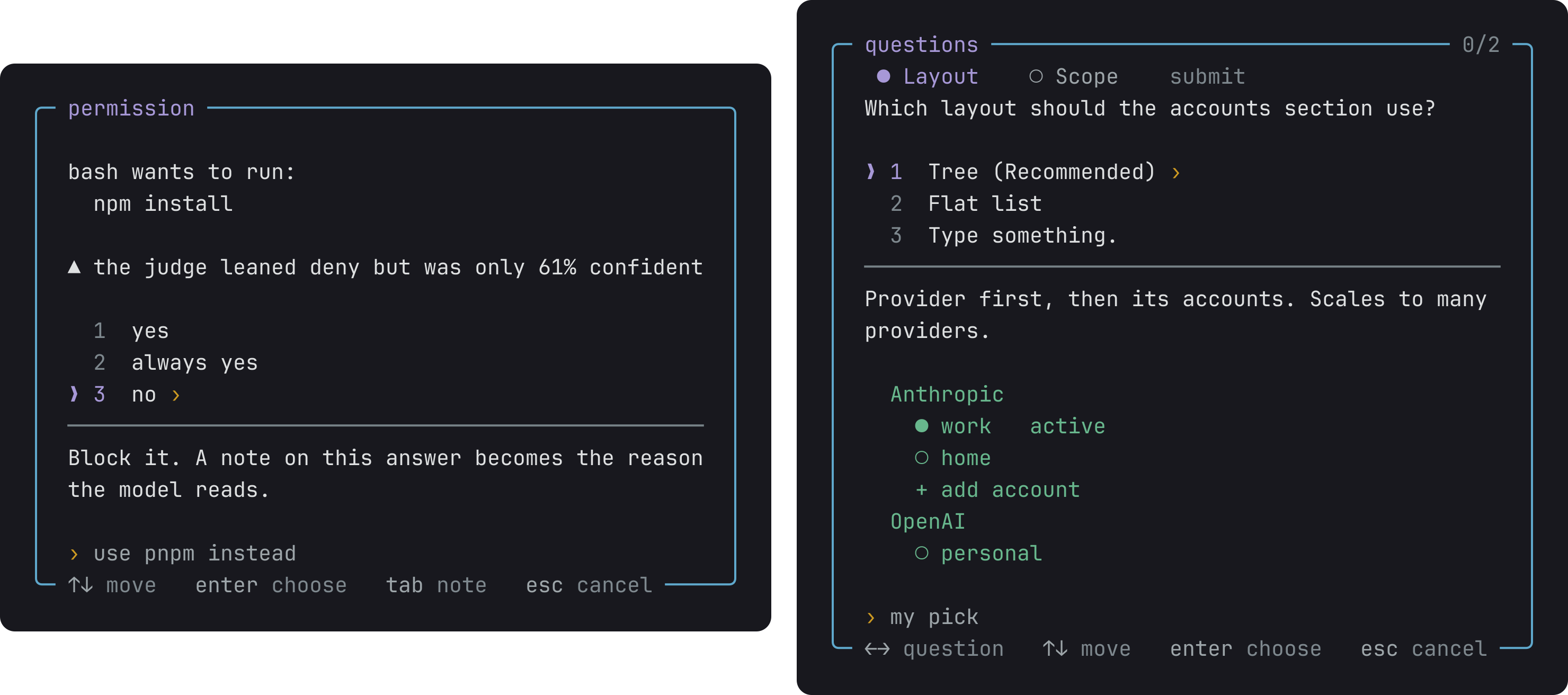
Left, pi asks before it runs a command. Right, the model asks you instead of guessing.
Permission and Questions have the details: the four modes, how the judge decides, and what the model reads back.
The screen is built around what you check while an agent works. The start card tells you what changed since your last session in the folder: a failed CI run, a pull request that waits on you, a branch behind its remote. Every command gets its own box with what ran, who let it run, the output and how long it took. The footer shows what the session cost and how much of your plan is left. Nothing on the screen jumps around while the agent writes.
Look has the whole screen and every setting, all in Alt+S.
The agent keeps a small board of what it is doing, what waits on you and what it delivered. You open it with Alt+T. Other agents read the same board, so they know what yours is doing without asking it.
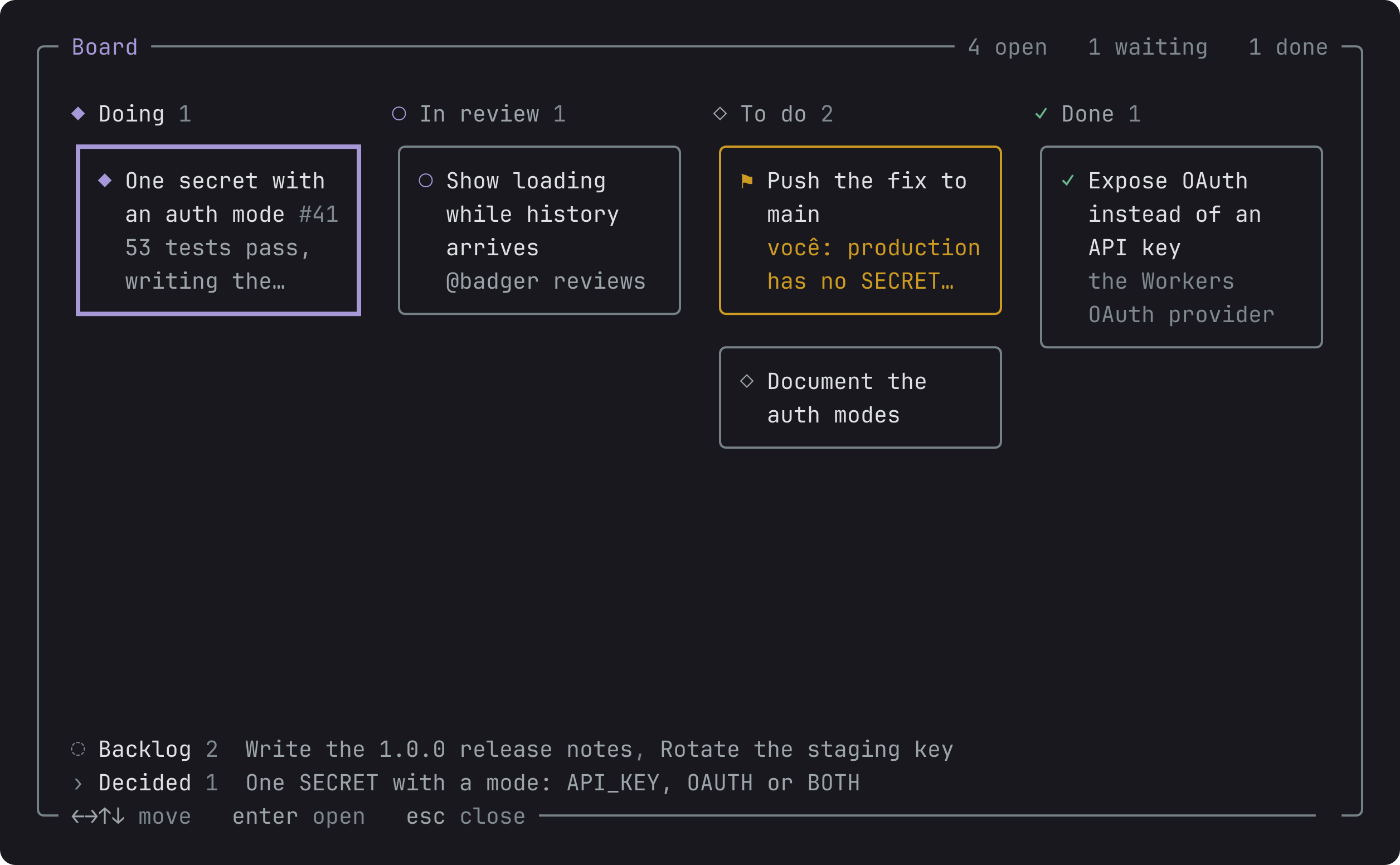
Alt+T: the session's board, a column per stage and a box per card.
How the board works explains what counts as a card and where the board shows up.
Agents that you open in the same folder share a room. Each one sees the others' boards and the files they edited, and they can talk to each other. When you write to everyone, every agent hears it. When you write to anyone, the agent that fits the request best takes it. A room can also join agents from different folders, so a backend agent and a frontend agent can agree on a contract. Alt+G opens the rooms.
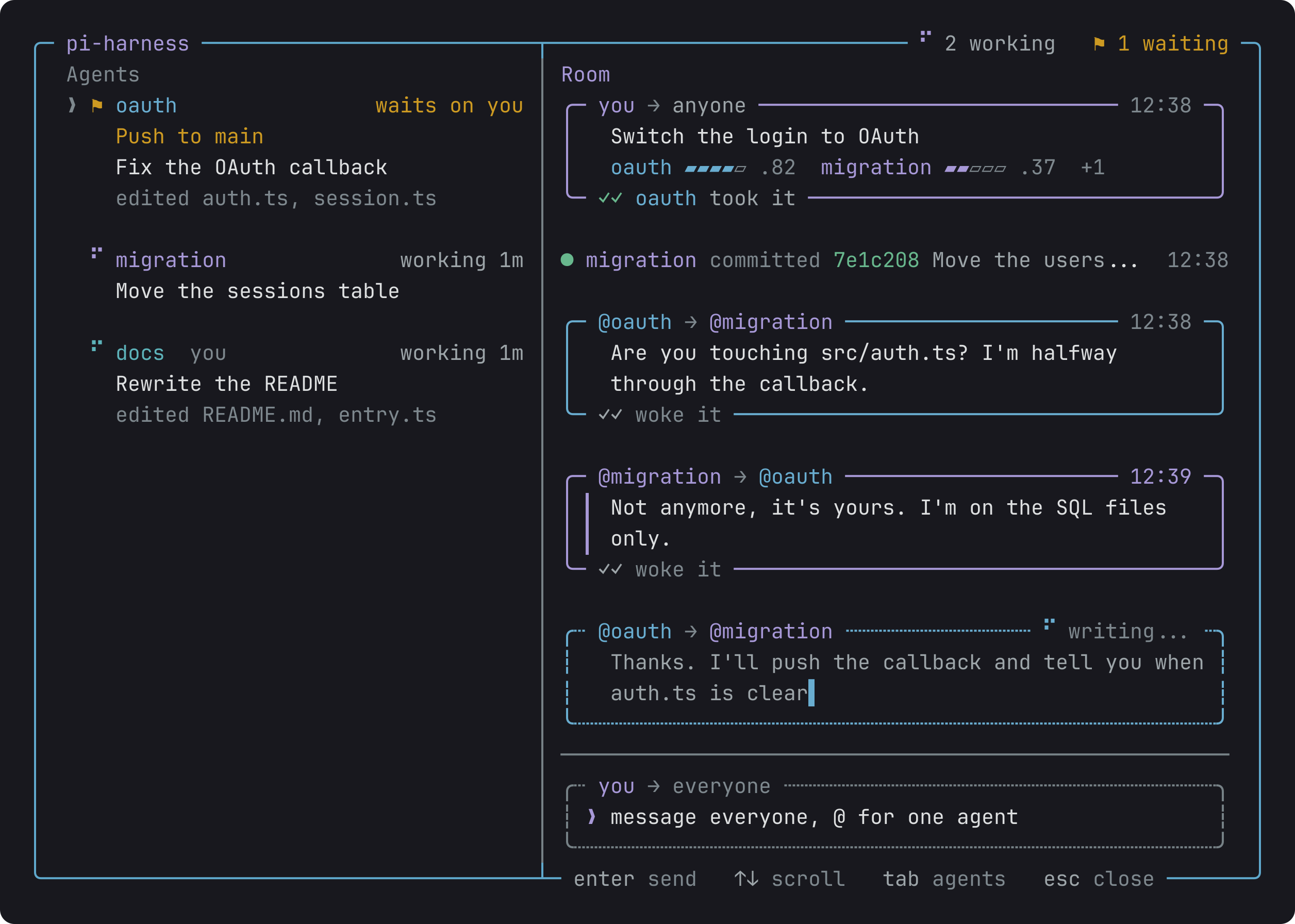
Alt+G: each room, who is in it, how much each agent hears there and what it is doing.
Peers explains rooms, modes and how an agent picks up a request.
When the agent needs you, you are not always at the desk. /remote opens every session of every machine of yours in a browser, and your phone reaches the same page over your Tailscale tailnet. You can read the session as it streams, approve a command, answer a question and send the next message. Whichever screen answers first wins.
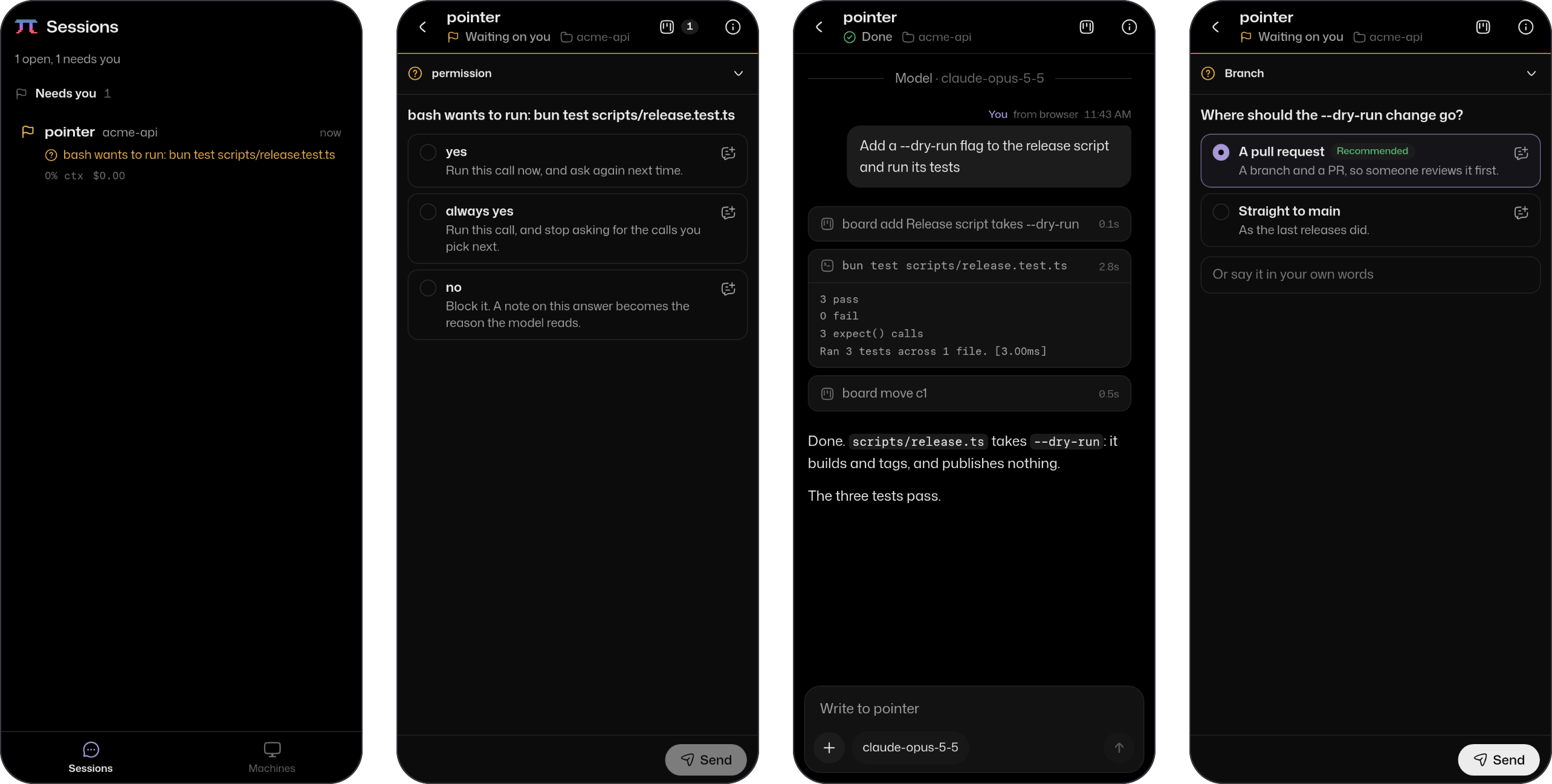
From the left: the session list, a command waiting for your approval, the session after you approved it, and a question from the model.
Remote covers how the machines find each other, how you sign in, and what the daemon keeps.
- Your Claude plan. Providers bills Anthropic requests to the Claude plan you already pay for. It keeps several accounts per provider and switches to the next one when you hit a limit, and it keeps the prompt cache warm while you are likely to come back.
- Cheaper long sessions. Compact hides old tool output once the context passes 150k tokens. On a week of real sessions, that cut the cost by a third.
- Skills from anywhere. With Skill calls, you call the skills you already have from anywhere in a message, several at once.
@adeildo/pi-harness brings every piece, and pi config turns off the ones you do not want. Each piece is also a package of its own: pi install npm:@adeildo/pi-look brings the screen and nothing else.
| Package | What it adds |
|---|---|
pi-ask-permission |
Pi asks before it runs a command, and a small model can answer for you |
pi-ask-questions |
The model asks you instead of guessing |
pi-look |
The start card, the framed editor, a box per command, the footer |
pi-peers |
Rooms where agents see each other's work and talk |
pi-remote |
Every session of every machine, in a browser and on your phone |
pi-providers |
The Claude plan, several accounts, and a warm cache |
pi-compact |
Old tool output hidden in long sessions |
pi-skills |
Skills called from anywhere in a message |
pi-kit |
What the pieces are built with, if you want to write your own |
| You want to | Read |
|---|---|
| Use a piece | Its page, linked in the table above |
| Look up a setting or a key | The piece's docs/reference.md, where it has one |
| Know what is planned | ROADMAP.md |
| Know what changed | CHANGELOG.md |
| Build a piece or send a change | CONTRIBUTING.md |
The pieces borrow ideas from other people's work, and each page says where. In short: pi-open-tui and oh-my-pi for the screen, rpiv-ask-user-question for the questions, pi-claude-max for the Claude plan, and pi-multiprovider for several accounts of one provider.
pi-harness is made by adeildo.dev
