


A fast, lightweight dependency graph CLI for modern JavaScript and TypeScript, built on Oxc.
oxdg = Oxc Dependency Graph
oxdg uses oxc-parser and oxc-resolver for parsing and module resolution, then adds a small graph layer for dependency analysis, queries, and rendering.
No initialization. No required config file. No system Graphviz dependency.
Try it:
npx oxdg src
npx oxdg src --circular
npx oxdg src --image graph.svg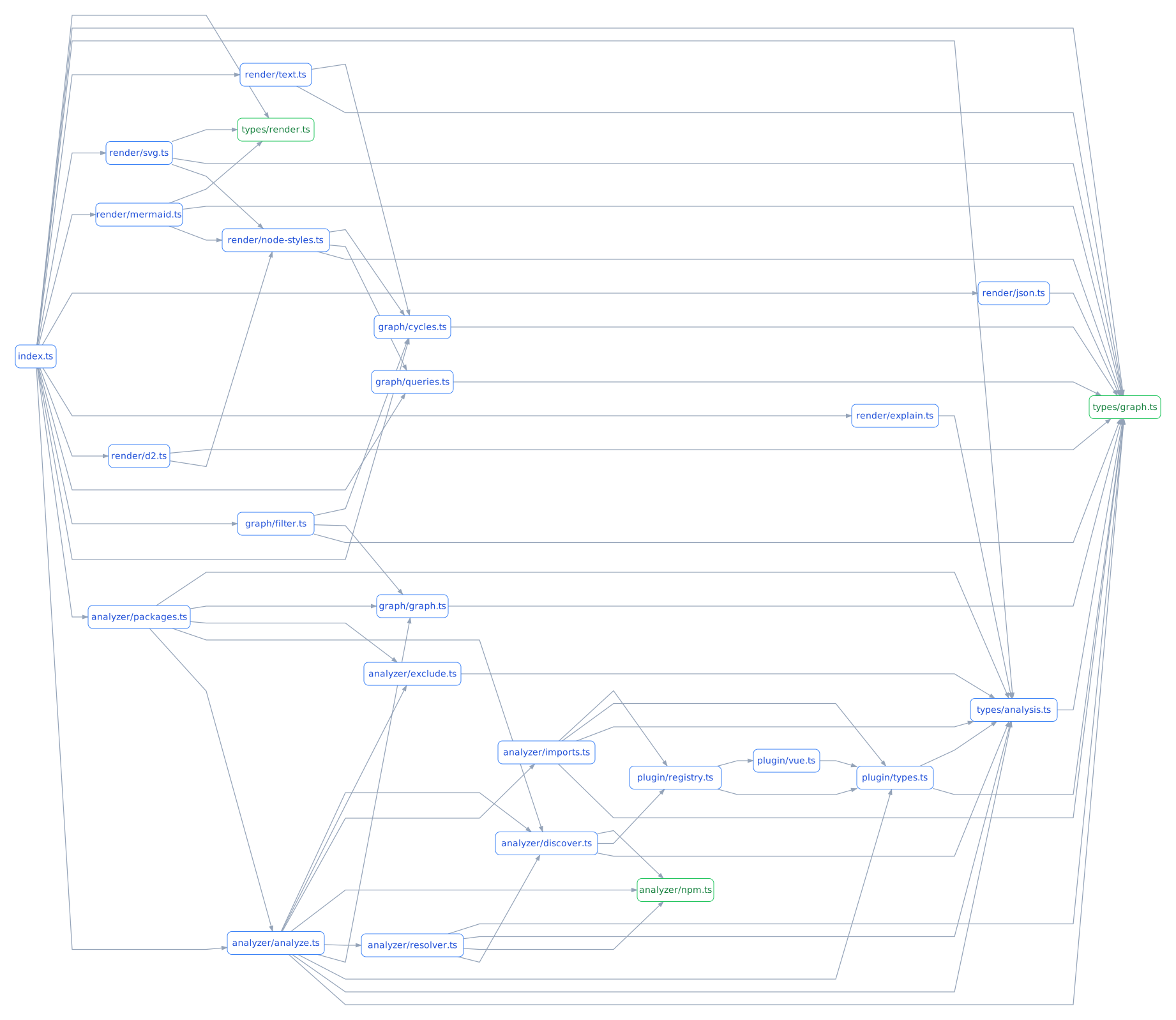
- JavaScript and TypeScript
- Vue single-file components, extracting imports from
<script>and<script setup>blocks written in JS, TS, JSX, or TSX - ESM and CommonJS
- Static imports, dynamic imports,
require(),require.resolve(), and re-exports - Type-only imports and TypeScript path aliases
- Circular dependency detection with CI-friendly failure codes
- Orphan, leaf, and direct-dependent queries
- Source-line explanations for dependencies and cycles, including workspace package graphs
- Text, JSON, Mermaid, D2, and standalone SVG output
- Zero-config one-shot CLI
- No Graphviz or other system package required for SVG generation
The stable benchmark measures the latest published npm release of oxdg against pinned versions of other dependency-graph tools on fixed Hono and Webpack revisions.
The full report records runtime statistics, release-to-main changes, exact commands, package footprint, dependency locks, and runner metadata.
View the released and development benchmark report →
Package footprint is measured separately from runtime performance on every CI pull request and release validation. The shared check reports packed and unpacked package sizes plus node_modules size after a clean install in the GitHub Actions Summary. It also enforces the existing 500 KiB unpacked-package limit.
oxdg is inspired by Madge, but is built around the modern Oxc parser and resolver and includes Mermaid, D2, and standalone SVG output.
The table below focuses on documented capabilities rather than overall ratings. It was checked against the linked public documentation on 2026-09-22.
| Capability | Madge | dependency-cruiser | dpdm | module-graph | oxdg |
|---|---|---|---|---|---|
| JavaScript / TypeScript | Yes | Yes | Yes | Yes | Yes |
| ESM | Yes | Yes | Yes | Yes | Yes |
CommonJS require() |
Yes | Yes | Yes | No | Yes |
| Circular dependency detection | Yes | Yes | Yes | Not a primary focus | Yes |
| JSON output | Yes | Yes | Yes | API-oriented | Yes |
| Mermaid output | No | Yes | No | No | Yes |
| D2 output | No | Yes | No | No | Yes |
| SVG output | Graphviz | Graphviz | No | No | Standalone |
| System Graphviz required for SVG | Yes | Yes | — | — | No |
| Basic CLI works without project config | Yes | --no-config required |
Yes | Yes | Yes |
dependency-cruiser provides a substantially broader architecture-validation and rule system than oxdg. oxdg instead focuses on dependency graph analysis as a small, one-shot CLI.
module-graph refers to @thepassle/module-graph; its documented analyzer is ESM-oriented and does not analyze require().
Analyze a file or directory:
bunx oxdg ./srcGenerate a standalone SVG:
bunx oxdg ./src/index.ts --image graph.svgThe resulting SVG is ready to open in a browser or share directly. No Graphviz installation is required.
Find circular dependencies:
bunx oxdg ./src --circular
bunx oxdg ./src --fail-on-circular
--fail-on-circular exits with code 1 when a cycle exists. Successful analysis exits with 0; invalid command usage exits with 2.
Example:
src/a.ts -> src/b.ts -> src/a.ts
Query the graph:
bunx oxdg ./src --orphans
bunx oxdg ./src --leaves
bunx oxdg ./src --depends src/core.ts
bunx oxdg ./src --json --orphans
bunx oxdg ./src --depends src/core.ts --explain
bunx oxdg ./src --circular --explain --json
Adding --json to a query prints the matching module IDs as a JSON array.
Use structured or graph-oriented output:
bunx oxdg ./src --json
bunx oxdg ./src --mermaid --rankdir TB
bunx oxdg ./src --d2
bunx oxdg ./src --image graph.svg --rankdir TB
The same commands work with npx:
npx oxdg ./src
npx oxdg ./src/index.ts --image graph.svg
Without an output option, oxdg prints a plain-text dependency graph.
Additional analysis options include --cwd, --tsconfig (or --ts-config), --include-npm, --no-type-imports, --extensions ts,tsx, and repeated --exclude patterns. With --include-npm, resolved npm dependencies appear as package-level nodes (npm:<package>); their source files are not analyzed. Mermaid, D2, and SVG distinguish npm nodes by color.
Exclude strings use gitignore semantics via the ignore package, relative to cwd (the current directory by default), for discovered project source files and resolved imports. With --include-npm, patterns match each resolved package file before its import edge is grouped into the package-level npm:<package> node; excluding one subpath does not exclude other imports from that package. For example, *.test.ts matches at any depth, /generated.ts matches only at the root, src/generated.ts matches that path from the root, and generated/ excludes directories of that name and their contents. Patterns are evaluated in order; ! re-includes matching paths, but a file cannot be re-included while its parent directory is excluded. Comments (#) and backslash escapes follow gitignore syntax. .gitignore files are not loaded automatically, and gitignore patterns do not apply to modules outside cwd.
oxdg ./src --exclude '*.test.ts' --exclude '!src/keep.test.ts'
oxdg ./src --exclude 'generated/' --exclude '/src/legacy.ts'
Short aliases include -c, -j, -i, and -d. --rankdir accepts LR, RL, TB, or BT for Mermaid and SVG output and is rejected for other output modes.
Warnings are written to stderr, so structured output on stdout remains usable by scripts and coding agents.
Generate a graph of actual imports between monorepo packages:
oxdg . --packages --image packages.svg
oxdg . --packages --json
oxdg . --packages --circular
oxdg . --packages --depends @my-org/core
Pass the workspace root, not an individual package directory. npm, Bun, and Yarn package.json workspaces (arrays or { "packages": [...] }) and pnpm pnpm-workspace.yaml package patterns are supported, including negative patterns. Each workspace package must have a unique name. Yarn Plug'n'Play resolution for external dependencies is not supported.
Nodes use package names, including packages with no imports. Edges represent source imports, not package.json dependency declarations; imports within the same package are omitted. Package cycles indicate mutual package dependencies, not necessarily a cycle between individual files. Existing renderers, queries, exclusions, and --no-type-imports work in this mode. Add --include-npm to include resolved external npm packages.
Workspace imports can resolve through package exports or entry points without installed workspace links, but their target files must exist; missing generated files remain unresolved. Files outside workspace packages are not represented. Directory symlinks are not discovered as workspace packages.
The API exposes analyzePackages(input, options) with the same result shape as analyze.
Add --explain to --depends or --circular in either analysis mode:
oxdg src --depends src/core.ts --explain
oxdg . --packages --depends @my-org/core --explain
oxdg . --packages --circular --explain --json
Explanations report only the importing source location as path:line (1-based), grouped by dependency. They do not retain or print source code, columns, or surrounding context. Multiple imports on the same line establishing one dependency are listed only once. In package mode, multiple source locations may explain one package-level edge. --explain --json emits from, to, source, and line fields, without code or specifier metadata. Only detected static specifiers are represented; this does not infer why a developer chose an import.
For example:
@repo/app -> @repo/core
  packages/app/src/main.ts:12
  packages/app/src/router.ts:8
Source evidence is collected only when requested (analyze(input, { explain: true }) or analyzePackages(input, { explain: true })). Regular JSON output is unchanged.
oxdg deliberately leaves parsing and module resolution to Oxc.
source files
    ↓
oxc-parser
    ↓
dependency extraction
    ↓
oxc-resolver
    ↓
ModuleGraph
    ├── queries
    ├── cycle detection
    ├── text
    ├── JSON
    ├── Mermaid
    ├── D2
    └── SVG
This keeps oxdg focused on the dependency-graph layer rather than maintaining its own JavaScript parser or module resolver.
For repeated use in a project:
npm install --save-dev oxdgor:
bun add --dev oxdgThe published CLI requires Node.js 22 or newer.
The public API is a small functional layer over the same ModuleGraph used by the CLI:
import { analyze, findCycles, renderSvg } from "oxdg";

const { graph, warnings } = await analyze("./src");

const cycles = findCycles(graph);
const svg = renderSvg(graph);
The API also exposes graph queries and text, JSON, Mermaid, and D2 renderers.
Source module IDs are normalized paths relative to the analysis root. Included npm dependencies use npm:<package> IDs.
bun install
bun run check
bun run lint
bun run format:check
bun test
bun run build
bun run release:check
check runs TypeScript type checking.
build uses Vite+'s vp pack command, powered by tsdown, to produce the ESM distribution, declarations, and source maps.
release:check packs the package, validates the published contents, installs the packed artifact into a temporary project, and exercises the packaged CLI including version, circular dependency, JSON, and SVG checks.
Contributions are welcome. See CONTRIBUTING.md for development setup, testing expectations, performance work, and pull request guidance.
Please report security vulnerabilities privately according to SECURITY.md. Project participation is covered by the Code of Conduct.
Release history is maintained in CHANGELOG.md.