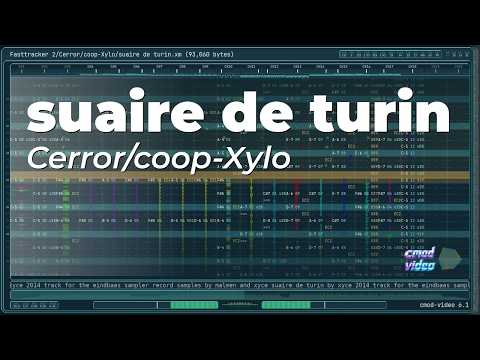
cmod-video is a module music player / renderer focused on tracker-style visuals (MOD/XM/IT/S3M), with real-time preview and offline MKV rendering.
It combines:
- pattern view with smooth scrolling option
- per-channel waveforms / mini scopes
- VU meters + FFT visuals
- tracker-inspired UI/theme system
- built-in song selector/browser (rooted at
./music)
I am known (or was known) as herotyc, a tracker/demoscene musician and co-founder of #modulez circa 2000.
This project started in a very personal way. I simply wanted a nicer way to revisit the tracker songs I grew up with, the ones that stayed with me for years. I wanted to render them, keep them, and have them ready on YouTube so I could return to them easily and enjoy them again, with the care and presentation they deserved.
That was the original goal, nothing more.
You can check the channel here: https://youtube.com/@cmod-video
As I kept working on it, things slowly escalated. What began as a rendering tool turned into a real-time player, and then into something that could also do proper and beautiful offline rendering.
At some point it stopped being just a personal utility and started feeling like something worth sharing.
So this release is that: a tool born from nostalgia, built with a lot of attention, and made to enjoy module music properly, with modern amenities like loudness normalization and high-quality rendering.
Enjoy.
- Supports tracker modules via
libopenmpt(MOD/XM/IT/S3M and more...). - Real-time preview mode (default) with audio + video.
- Offline render mode to
out.mkv(--render) using SVT-AV1 10-bit at CRF 18 plus lossless FLAC audio. - Themeable UI/colors (
theme.ini). - Multiple track(channel) layouts:
trackLayout=0: legacy/classictrackLayout=1: stacked waveform (crazy)trackLayout=2: vertical waveform (modern)
- Smooth pattern scroll (
smoothPattern=1) with centered row highlight. - Pitch-based per-channel
orbitmarkers (tracker dot reinterpretation), with optional trails and theme-controlled motion/appearance - Song selector/browser when started without a file (directories + modules).
- Keyboard navigation between songs in playlist (
PageUp/PageDown) during playback. - Loop mode for preview (
[playback] loop=1). - Fullscreen in preview (double click or
F). - EBU R-128 loudness/tpeak norm.
- Mute/Solo and song scanning in preview mode.
- Microsoft Visual C++ Redistributable 2015-2022 (x64)
- Runtime DLLs included with the release package
Install the local build dependencies:
sudo pacman -S --needed cmake ninja gcc pkgconf sdl2-compat sdl2_ttf sdl2_image libopenmpt libebur128 ffmpegThe ffmpeg package supplies the libavcodec/libavformat development libraries.
cmod-video links to those libraries directly; rendering does not launch or
otherwise depend on the ffmpeg command-line executable.
Configure and build:
cmake -S . -B build-linux -G Ninja \
  -DCMAKE_BUILD_TYPE=Release \
  -DCMOD_BUILD_MEDIA_SMOKE=ON
cmake --build build-linux
Preview and render:
./build-linux/cmod_video "music/song.it"
./build-linux/cmod_video --render "music/song.it"
The encoded output is out.mkv. Offline rendering uses an in-memory SDL
software renderer: it does not initialize SDL video/audio subsystems, create a
window, or require an X11/Wayland session.
cmod-video.sh mirrors the PowerShell workflow without modifying or requiring
the .ps1 scripts. It supports local modules, generic HTTP(S) URLs, Modland
URLs with directory-preserving cache, themes, title overrides and the
raw/osc/render modes:
./cmod-video.sh ./music/song.it
./cmod-video.sh ./music/song.it render
./cmod-video.sh 'https://modland.com/pub/modules/Impulsetracker/Artist/song.it' render
./cmod-video.sh 'http://modland.antarctica.no/pub/modules/Impulsetracker/Artist/song.it' render
./cmod-video.sh ./music/song.it render 'Display title' --theme theme_skin.ini
Core helper dependency:
sudo pacman -S --needed curlFor thumbnail generation, install ImageMagick. The helper also uses ffmpeg
and ffprobe to inspect the completed MKV and extract its middle frame; these
commands are not used by the cmod-video renderer itself.
sudo pacman -S --needed imagemagick ffmpeg ttf-montserratThe thumbnail uses the fonts and icon already bundled under assets/. If the
thumbnail tools are missing, rendering still succeeds and leaves out.mkv and
desc.txt intact.
Copying desc.txt to the clipboard is also optional:
sudo pacman -S --needed wl-clipboard  # Wayland
# or
sudo pacman -S --needed xclip # X11The portable Linux release is built in Docker so its build environment and multimedia stack do not depend on the developer machine:
./packaging/build-appimage.shThe result is dist/cmod-video-x86_64.AppImage. It bundles SDL, libopenmpt,
libebur128, SVT-AV1 and a minimal LGPL-only FFmpeg build. The target machine
still provides the Linux kernel, glibc compatibility, display/audio services
and graphics drivers, but users do not need to install the application
libraries themselves.
The image is based on Ubuntu 22.04 to provide a conservative glibc baseline.
The AppImage also contains the complete package copyright records and standard
license texts indexed by packaging/appimage/THIRD_PARTY_NOTICES.md.
You can use cmod_video.exe as a local player by double-clicking it.
- If started without a file argument, it opens the built-in module selector (rooted at
./music). - You can browse folders, pick a song, and play directly.
Run with a module file:
cmod_video.exe "song.it"This starts the real-time preview window with audio/video.
cmod_video.exe --render "song.it"Note:
- On Windows,
cmod_video.exeis built as a GUI app, so launching--renderdirectly from terminal may return control immediately while rendering continues in background. cmod-render.ps1is recommended for rendering because it waits for completion and writesout.log/err.logfor easier troubleshooting.
Output:
- final file:
out.mkv
For rendering, using the helper script is recommended:
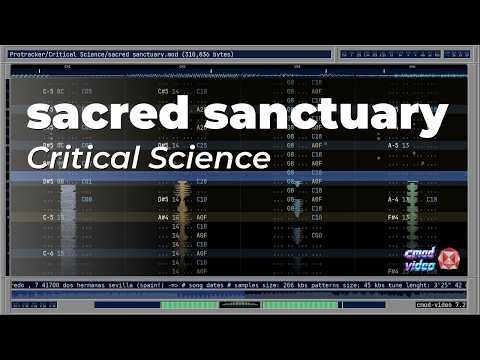
.\cmod-render.ps1 -Module ".\music\your_mod.it"You can render using an alternate theme/skin file:
cmod_video.exe --render --theme "theme_skin.ini" "song.it"Skin preview (courtesy of khrome):
--render- Render offline to video (MKV). Without this flag, preview mode is used.
--title "TEXT"- Override displayed title.
--theme "FILE.ini"- Use a specific theme file instead of
theme.ini(for example:theme_skin.ini).
- Use a specific theme file instead of
--w WIDTH- Override width in pixels (otherwise uses
[playback] widthfrom theme).
- Override width in pixels (otherwise uses
--h HEIGHT- Override height in pixels (otherwise uses
[playback] heightfrom theme).
- Override height in pixels (otherwise uses
--no-video- Disable video output (debug/testing).
--no-audio- Disable audio output (debug/testing).
--no-pipes- Compatibility/debug option: write
video.rgbandaudio.pcminstead of an encoded MKV.
- Compatibility/debug option: write
--no-osc- Disable oscilloscope-related visuals (debug/testing/comparison).
Esc- Quit program
F- Toggle fullscreen
T- Reload
theme.inilive (visual/theme reload)
- Reload
Backspace- Return to song selector (when started without CLI file)
1/2/3- Set
trackLayoutto0 / 1 / 2
- Set
4- Toggle
smoothPattern
- Toggle
5- Toggle
miniFft
- Toggle
6- Toggle
sideFft
- Toggle
7- Toggle
track2MiniScope
- Toggle
8- Toggle
waveColors
- Toggle
9- Toggle mini badge (
miniEnabled)
- Toggle mini badge (
PageDown- Next song
PageUp- Previous song
(Click on CHx headers at the top of the pattern)
M- Clear all channel mute/solo states
- Double click
- Toggle fullscreen
- Left click
- Toggle mute for that channel
- Right click
- Toggle solo for that channel
Shift + Left/Right click- Exclusive solo (solo this channel, clear others)
- Middle click
- Clear mute/solo on that channel
- Left click on progress bar
- Seek to that position in the song (preview mode)
If you start cmod_video.exe without a module file:
- it opens an in-app selector/browser (no OS file picker)
- browser root is
./music(fallback to current directory if./musicdoesn't exist) Enteropens a directory or starts a selected moduleBackspace/Leftgoes to parent directoryEscexits
During playback in that mode:
Backspacereturns to the selectorPageUp/PageDownjumps to previous/next song in current folder playlist- if
loop=0, when a song ends it returns to the selector - if
loop=1, current song loops
The UI is themeable through theme.ini.
Important sections include:
[layout](visual layout switches)[colors](main UI colors)[orbits](orbit visual behavior)[mini](mini 3D badge)[playback](width/height/fps/fullscreen/loop/profile)
In preview mode, you can reload theme.ini at runtime:
T- Reload theme visuals live
Most visual/theme values are reloaded, especially:
[colors]- visual layout options
- UI styling
- waveform/osc visual appearance
- scroller/panel visual styling
The [playback] section is intentionally ignored during live reload.
These are startup-only:
widthheightfpsfullscreenloopprofilesubsong(if set there)fontPathscrollerFontPathscrollerText
If you change playback settings, restart the program.
trackLayout = 0|1|2smoothPattern = 0|1track2MiniScope = 0|1miniFft = 0|1sideFft = 0|1channelVuBars = 0|1channelVuBarHeight = 0..1 or >1(0..1= available upward span,>1= pixels; optional)channelVuBarPos = 0..1(0=left,0.5=center,1=right)channelVuBarWidth = 0..1 or >1(0..1= channel fraction,>1= pixels; optional)
width,heightfpsfullscreen = 0|1loop = 0|1profile = 0|1(prints performance info in preview)fontPath = assets/JetBrainsMono-Regular.ttfscrollerFontPath = assets/DejaVuSansMono.ttfscrollerText = "%INSTRUMENTS%%SAMPLES%%MESSAGE% %CMODSUPPORT% "- Optional scroller template. Available placeholders:
%INSTRUMENTS%,%SAMPLES%,%MESSAGE%,%CMODSUPPORT%. - Quote the value to preserve leading or trailing spaces, for example
scrollerText = " %MESSAGE% ". - Inside quoted values, escape literal quotes and backslashes as
\"and\\.
- Optional scroller template. Available placeholders:
theme.example.iniincludes documented variables and comments.- Copy it to
theme.iniand customize colors/layout. - You can also use
theme_skin.inidirectly with--theme.
If you want to collaborate with new themes or skins, open an issue and you are welcome.
- Check console output for native MKV writer errors.
- Make sure the runtime DLLs shipped with the release are next to
cmod_video.exe.
- Install Microsoft Visual C++ Redistributable 2015-2022 (x64)
- Make sure required DLLs are next to
cmod_video.exe