



Tabs — LNbits extension
A reusable merchant ledger for open balances that can be charged incrementally and settled later. Create named tabs for customers, tables, teams, events, or internal accounts, then add charges, credits, notes, and settlements over time.
Tabs is intentionally generic: other LNbits extensions can post entries into Tabs, while Tabs owns the tab lifecycle, balance rules, audit history, and settlement flow.
- Features
- Overview
- Usage
- Creating Tabs
- Adding Activity
- Settlements
- TPoS Integration
- Powered by LNbits
- Open tab management — create, edit, suspend, close, archive, and delete empty tabs
- Running balances — charge, credit, adjustment, settlement, and note entries
- Deferred settlement — settle partially or fully after the service session
- Lightning settlement — create a standard LNbits invoice and complete the settlement when paid
- Manual settlement — record cash, card, bank transfer, other, or write-off settlement methods
- Public tab view — share a tab page where a payer can inspect and settle the balance
- CSV export — export tab data from the management UI
- TPoS ready — supports the deferred “Book to Tab” point-of-sale workflow
Tabs keeps a merchant-controlled list of open balances. It records what a customer, group, event, or account owes, then lets the merchant clear that balance through a Lightning invoice or a manual settlement record.
Common use cases:
- Bar, cafe, or canteen tabs
- Event and festival organizer tabs
- Office kitchen or staff meal accounts
- Corporate house accounts
- Coworking, hospitality, or service-session billing
-
Enable the Tabs extension.
-
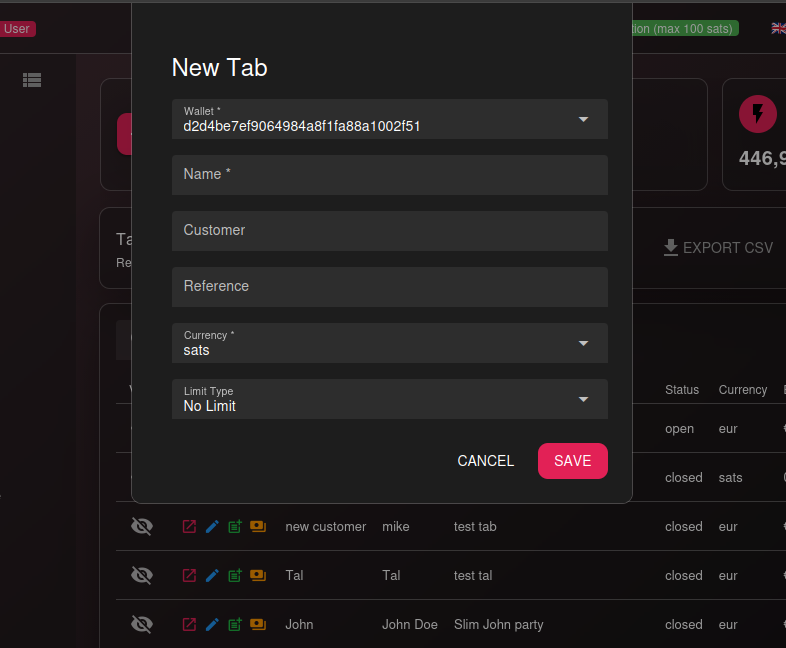
Create a new tab.
Choose the wallet that owns the tab, add a name, optional customer/reference details, currency, and an optional hard limit.
-
Add entries as activity happens.
Charges increase the balance. Credits and settlements reduce it. Notes preserve context without changing the amount due.
-
Settle part or all of the balance.
Use a Lightning invoice for automatic payment tracking, or record a manual method such as cash, card, bank transfer, other, or write-off.
-
Close or archive settled tabs.
Tabs can only be closed when their balance is zero. Tabs with financial history should be archived instead of deleted.
Create a tab for a customer, table, team, event, or internal account.
You can set:
- Wallet — the wallet that owns the tab
- Name — the visible tab name
- Customer — optional customer or group name
- Reference — optional room, table, event, invoice, or account reference
- Currency — sats or supported fiat currency
- Limit type — no limit or hard limit
- Limit amount — maximum balance when a hard limit is active
Use the tabs list to search, filter by status, open public pages, export CSV, and select a tab to view its activity.
Every tab has a running activity history. Add entries as purchases, corrections, or notes happen.
Supported entry types:
- Charge — increases the tab balance
- Credit — reduces the tab balance
- Adjustment — increases or reduces the tab balance
- Settlement — reduces the balance after payment or manual clearing
- Note — records context without changing the balance
Suspended tabs cannot receive new charges. Closed and archived tabs are kept for history.
Tabs supports both Lightning and manual settlement flows.
- The merchant starts a settlement for the full or partial balance.
- Tabs creates a normal LN invoice from the tab wallet.
- A pending settlement is stored with the invoice data.
- When the invoice is paid, Tabs marks the settlement complete.
- A settlement ledger entry is added and the tab balance is updated.
- If the balance reaches zero, the tab may be closed.
Manual methods are completed immediately and still create auditable settlement history.
Supported manual methods:
cashcardbank_transferotherwriteoff
Each tab can expose a public tab page at:
/tabs/{tab_id}
The public page lets someone inspect and pay an outstanding tab without giving them merchant management access.
Tabs is designed so TPoS can stay focused on point-of-sale interaction.
Intended flow:
- The merchant can create a tab in TPoS.
- The merchant chooses Add to Tab.
- TPoS loads eligible tabs from Tabs.
- The merchant selects a tab.
- TPoS posts one summarized charge entry with amount, items, tax, and source details.
- Tabs records the charge and returns the updated tab state.
- TPoS clears the cart and confirms the booking.
Tabs owns the balance and history, so the same tab can also be managed from the Tabs extension after TPoS adds a charge.
LNbits empowers developers and merchants with modular, open-source tools for building Bitcoin-based systems — fast, free, and extendable.




