


A Home Assistant custom integration for tracking medication doses, for pets and people. Add patients and their dose schedule in the UI; the integration auto-creates a switch per dose (on = given today) and resets them daily. Pair it with the included companion automations for actionable, nagging, missed-dose reminders synced across every Companion app.
This is the full-featured, actively developed version, and the recommended way to run Medication Reminder. An older, now-deprecated ha-medication-reminder-yaml package covered the core reminder, nag, and missed-dose flow in pure YAML; it still works for anyone already running it but is no longer maintained, and everything it did now lives here (UI-managed schedules, supply tracking, the as-needed/PRN tools, and the extra sensors and calendar).
⚠️ Important. This is a reminder aid, not a medical device. Validate it on your own Home Assistant and keep a backup reminder method until you trust it, and confirm dosing schedules with your doctor or vet.
Jump to: Highlights · Installation · Dashboard · Roles · Settings · Supply & refill · Safety · Languages · Roadmap
Questions, setup help, or want to show off your setup? Come to Discussions. Bugs and feature requests belong in Issues.
- Pets and people, all in the UI. Add patients and their dose schedule from Settings, no YAML; entities auto-create per patient and survive restarts.
- Flexible scheduling. Each dose daily, on specific days of the week, every N days, an on/off cycle (e.g. 21 on / 7 off), specific days of the month, or as-needed (PRN, no reminders), in 12h or 24h.
- As-needed (PRN) meds. A "Log dose" button (and
log_doseservice) records each dose taken, with a last-taken timestamp, a doses-today count, and a supply decrement, so meds taken several times a day stay tracked. Optional over-dose guard: set a minimum interval and/or a daily cap, and aproblemsensor warns (never blocks) when another dose now would be too soon or over the cap. A rolling 30-day days this month count per med helps with days-per-month limits, like keeping acute pain or migraine meds under about 10 days. - Partial dose marking. For a dose that groups several meds, mark it given while flagging one or more meds as skipped, so the skipped med's supply is not counted and the skip shows in history. No need to split a sometimes-missing med into its own dose. Use the
mark_givenservice, or turn on optional per-med "skip" buttons that put it one tap away on the dashboard. - Skip a dose for the day. Intentionally skipping today's dose? A "Skip today" button on the reminder (and the
skip_todayservice) clears it for the day: reminders and missed-dose nagging stop, but it is not counted as taken and no supply comes off. It resets at the daily reset, shows in history, and the status panel treats it as handled rather than overdue. - Snooze a reminder. Cannot take it this second? A "Remind me later" button on the reminder (and the
snoozeservice) defers it by a configurable delay (default 30 min), then reminds again once if the dose is still not handled. The missed-dose escalation is deferred, not cancelled, so a snoozed-then-forgotten dose still escalates. - Adjustable amount at mark time. For a med whose dose varies (e.g. adjusted from a blood reading), turn on "Ask for amount when marking" on the dose. An amount input appears; set what you are about to take, mark given, and the supply decrements by that instead of the fixed amount. Off by default, so fixed-dose meds are unaffected.
- Glanceable, fail-safe status. A per-patient red/green "needs attention" sensor that trips on elapsed time alone and errs toward "problem"; wire it to a panel, light, or siren.
- Actionable reminders. Nagging, missed-dose escalation, and a "Mark given" button from the notification, routed to each patient's own notify target. Tapping the notification body (not the button) can open your meds dashboard. When several doses are due for the same patient at the same time, the reminders are grouped into one notification (optional) so you are not pinged several times at once.
- Supply & refill tracking. Per-medication counts that decrement as doses are given, with doses-left, a run-out estimate, a low-stock red flag at your reorder threshold, and a refill reminder. Optionally track refills remaining on the prescription too: each refill counts one down, and the supply flags when the prescription is out and needs renewing. Per-dose amounts can be fractional (half a pill) and overridden per dose, and an optional per-unit cost surfaces value on hand, cost per dose, and a monthly estimate.
- Per-medication detail. Optional strength, brand, full name, "prescribed for", and a dosage summary per medication, plus a
medicationssensor that lists everything the patient takes for a ready-to-share "current medications" view to hand a vet or doctor. - Next-dose sensor and calendar. A
next_dosetimestamp and a read-only medication calendar per patient, handy for "remind me before" automations and seeing long cycles laid out. - Weekly pill-box plan. An optional per-day plan for filling a pill organiser: pick a day and see one table of each med and the amount to put in each time-slot compartment, computed for the actual date (every-N-days, cycles, and monthly schedules included). Off by default.
- Zero-edit dashboard. Auto-discovers every patient and dose, no names to maintain.
- Caregiver and admin dashboards. Split day-to-day care from setup using Home Assistant's own user roles: hand a caregiver a non-admin user and a simplified, safe-to-share dashboard (mark doses given, log a PRN dose, refill a low supply, with no config and no editable counts), and keep an admin dashboard with the full per-patient setup audit, editable supply counts, and an audit trail of who marked or refilled. See Roles & sharing.
- Localized UI. The configuration screens follow your Home Assistant language, with German, Dutch, French, Spanish, Italian, and Russian alongside the English base (all but French community-contributed), and any untranslated text falling back to English. See Languages.
- Fail-safe by design. Overdue detection trips on elapsed time alone and errs toward "problem", marking is reversible, dose state survives restarts, and every guard warns rather than blocks. See Safety & fail-safes.
Medication Reminder is in the default HACS store. Open HACS, search for Medication Reminder, install it, and restart Home Assistant. That is the whole install.
Just merged into HACS and not showing yet? It can take a few hours to appear.
Until then, or to install by hand, add
https://github.com/magikh0e/ha-medication-reminder as an Integration under
HACS, top-right menu, Custom repositories, install, and restart. (Or copy
custom_components/medication_reminder/ into your HA config/custom_components/
and restart.)
Already running an older version? You keep all your patients, doses, schedules, and supplies. You only need to update, and for the new early-dose warning, add one automation.
- Update the integration: in HACS, open Medication Reminder, use the three-dot menu, Redownload, choose the latest version, then restart Home Assistant. Your existing config is preserved.
- Core changes apply automatically after the restart, including the
medication_reminder_dose_givenandmedication_reminder_dose_undoneevents and supply-restore-on-undo (un-marking a dose puts its supply count back). - For the early-dose warning (new in 0.10.0), add its automation (see
3. Add the reminder automations below). Import the
early_dose.yamlblueprint, or if you use the pastedcompanion-automations.yaml, re-paste the updated file. If you copy the YAML, replace your existingmedication_reminder_*automations rather than adding a second copy, so reminders are not duplicated. - (Optional) Switch from pasted YAML to blueprints. Blueprints are new in 0.10.0; to manage automations by one-click import and update, delete your old pasted automations and import the blueprints described below.
- Settings, Devices & Services, Add Integration, Medication Reminder.
- Enter the patient name (e.g. a pet or person), pick the patient type (Person / Dog / Cat / ..., which sets the icon), and the notify target (the person or group to remind). One patient per entry; add the integration again for more patients.
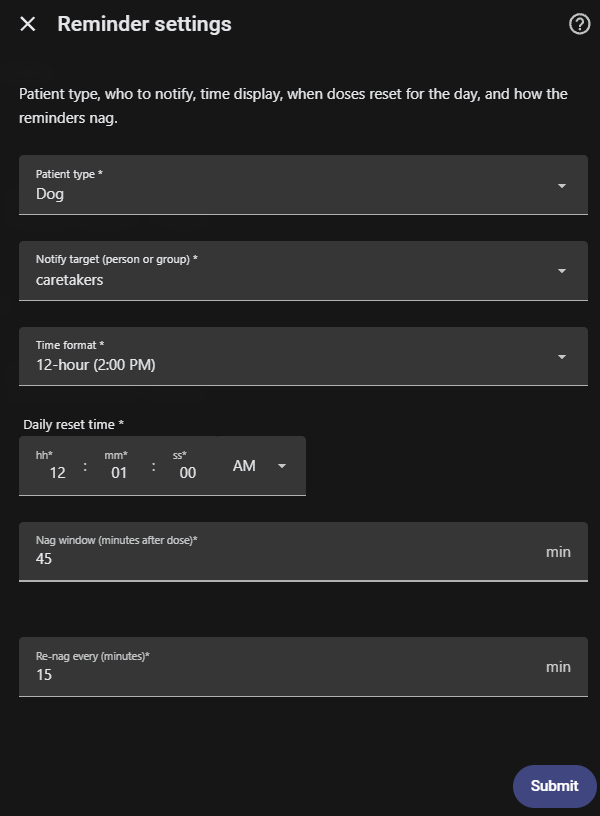
- On the entry, click Configure to Add a dose (pick a time, type the medications, and choose the schedule: days of the week - all days = daily - or every N days, an on/off cycle, specific days of the month, or as-needed/PRN). Repeat for each dose. Edit a dose, Remove a dose, Add medication detail, or open Reminder settings (type, notify target, time format, reset time, nag window/interval) there too.
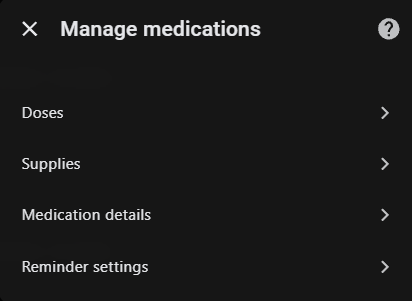
Each group opens its actions:
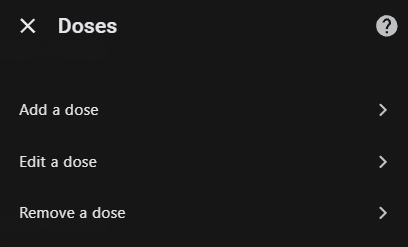
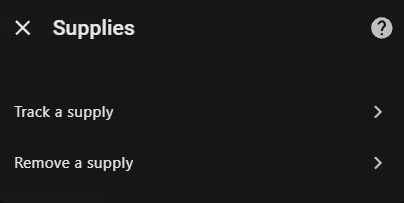
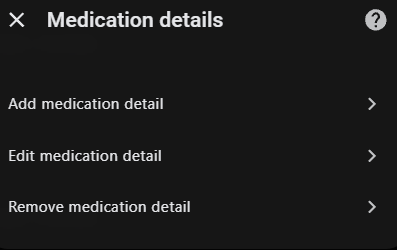
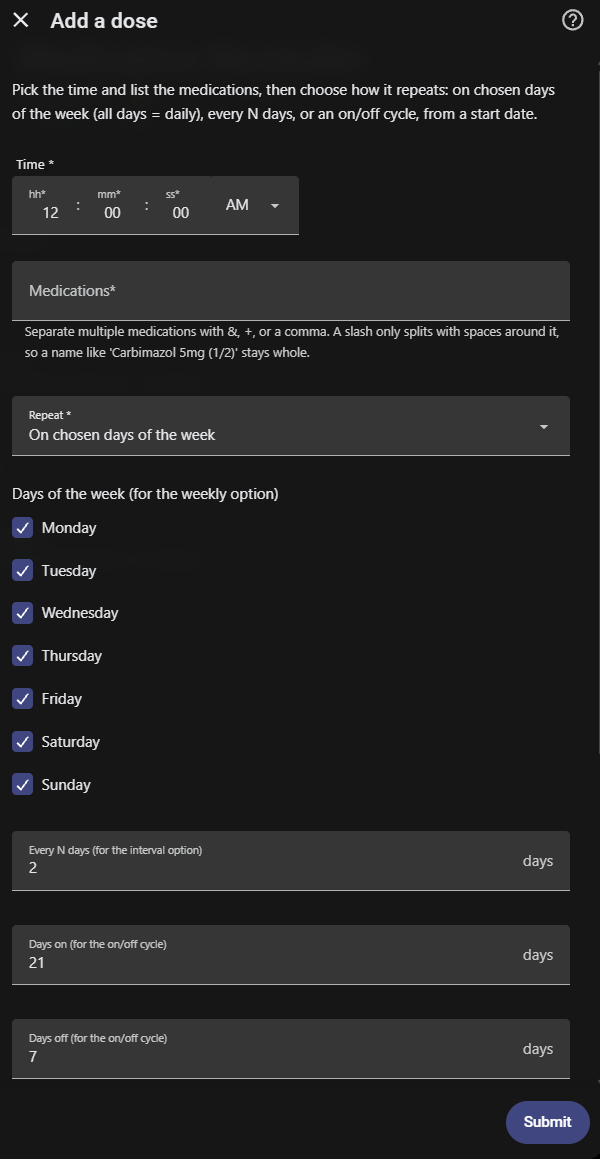
Each dose appears as switch.<patient>_<time>_<meds> (e.g.
switch.bella_8_00_am_apoquel; as-needed doses are switch.<patient>_<meds>_as_needed)
with attributes patient, dose_time, medications, and notify_service.
The integration creates the entities; the reminders, nagging, missed-dose escalation, refill reminders, early-dose warning, and un-mark alert are driven by automations. Pick one of two ways to add them:
Blueprints (recommended), one-click import and easy updates. In Settings, Automations & Scenes, Blueprints, Import Blueprint, paste each URL you want (the link to the file, not the file's contents), then create an automation from it. To update later, re-import the blueprint (its three-dot menu, Re-import) and the automations created from it pick up the change automatically, with their inputs preserved. A HACS integration update does not need a re-import; only re-import when a release note says a blueprint itself changed.
- Reminders and missed-dose escalation (core, with the group-reminders-by-time toggle):
https://github.com/magikh0e/ha-medication-reminder/blob/main/blueprints/automation/medication_reminder/medication_reminders.yaml - Notification actions (core, pairs with the above, handles the "Mark given", "Skip today", and "Remind me later" buttons; has the snooze-delay input):
https://github.com/magikh0e/ha-medication-reminder/blob/main/blueprints/automation/medication_reminder/mark_given.yaml - Early-dose warning (optional):
https://github.com/magikh0e/ha-medication-reminder/blob/main/blueprints/automation/medication_reminder/early_dose.yaml - Low-supply refill reminder (optional):
https://github.com/magikh0e/ha-medication-reminder/blob/main/blueprints/automation/medication_reminder/low_supply.yaml - Un-mark alert (optional):
https://github.com/magikh0e/ha-medication-reminder/blob/main/blueprints/automation/medication_reminder/unmark_alert.yaml
Or copy the YAML. Paste the automations from
companion-automations.yaml into your
automations.yaml and reload; re-paste to update.
Which file goes where (important). The blueprint files listed above (
medication_reminders.yaml,mark_given.yaml,early_dose.yaml,low_supply.yaml,unmark_alert.yaml) use Home Assistant's!inputtag and only work when imported by URL (the blueprint step above). If you paste their contents intoautomations.yaml,configuration.yaml, or a YAML editor, you get a parse error likeunknown scalar tag !/ "could not determine a constructor for the tag !input", because only the blueprint importer resolves!input. The paste-this-YAML route uses onlycompanion-automations.yaml, which has no!inputand drops straight intoautomations.yaml. Pick one route, blueprints or the companion YAML, not both, so reminders are not duplicated.
Each patient's reminders go to the notify target you chose in the UI (read
from the switch's notify_service attribute). The default_notify value in the
automation (caretakers) is only a fallback if a switch has no target set; if
you want a fallback group, define it, for example:
notify:
  - platform: group
    name: caretakers
    services:
      - service: mobile_app_your_phone
They send a reminder when a dose is due and not given, nag every 15 minutes for
45 minutes, then escalate once as a time-sensitive "missed" alert. When several
doses are due for the same patient at the same time, the reminders are grouped
into one notification listing them, which you tap to open the dashboard and act
on each; the Group reminders at the same time input (on by default) toggles
this, and single-dose reminders and the missed alert are unchanged either way.
Tapping Mark given turns the dose's switch on and clears the notification. The
notification also clears if you mark the dose given another way (from the
dashboard, an NFC tag, or the mark_given service), so a lingering reminder does
not sit on your phone after you have already taken the dose. On
Android the Mark given button shows on the notification directly; on iPhone,
long-press (or pull down) the notification to reveal it. It works the same on
both, just tucked behind a long-press on iOS. Tapping the notification body
(not an action button) can jump straight to a dashboard: each notification
blueprint has an Open dashboard when the notification is tapped input (or a
dashboard_path variable in the companion automations); set it to a Lovelace path
such as /lovelace-meds/0, then re-import the blueprints.
The reminders blueprint has an optional Critical missed-dose alert toggle
(the companion automation, a critical_missed variable) that makes the missed
alert override Silent and Do Not Disturb: a critical alert with sound on
iPhones, a high-importance channel on Android, in one payload. It works for a
mix of devices. Off by default; on iPhones it needs Critical Alerts allowed
for the Home Assistant app, and you re-import the blueprint to get the toggle.
The automations send four kinds of notification:
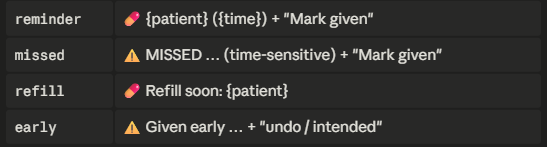
To preview any of these on demand (no waiting for a dose time, handy for a
screenshot), add examples/simulate-reminder.yaml
and run the script.simulate_med_reminder action.
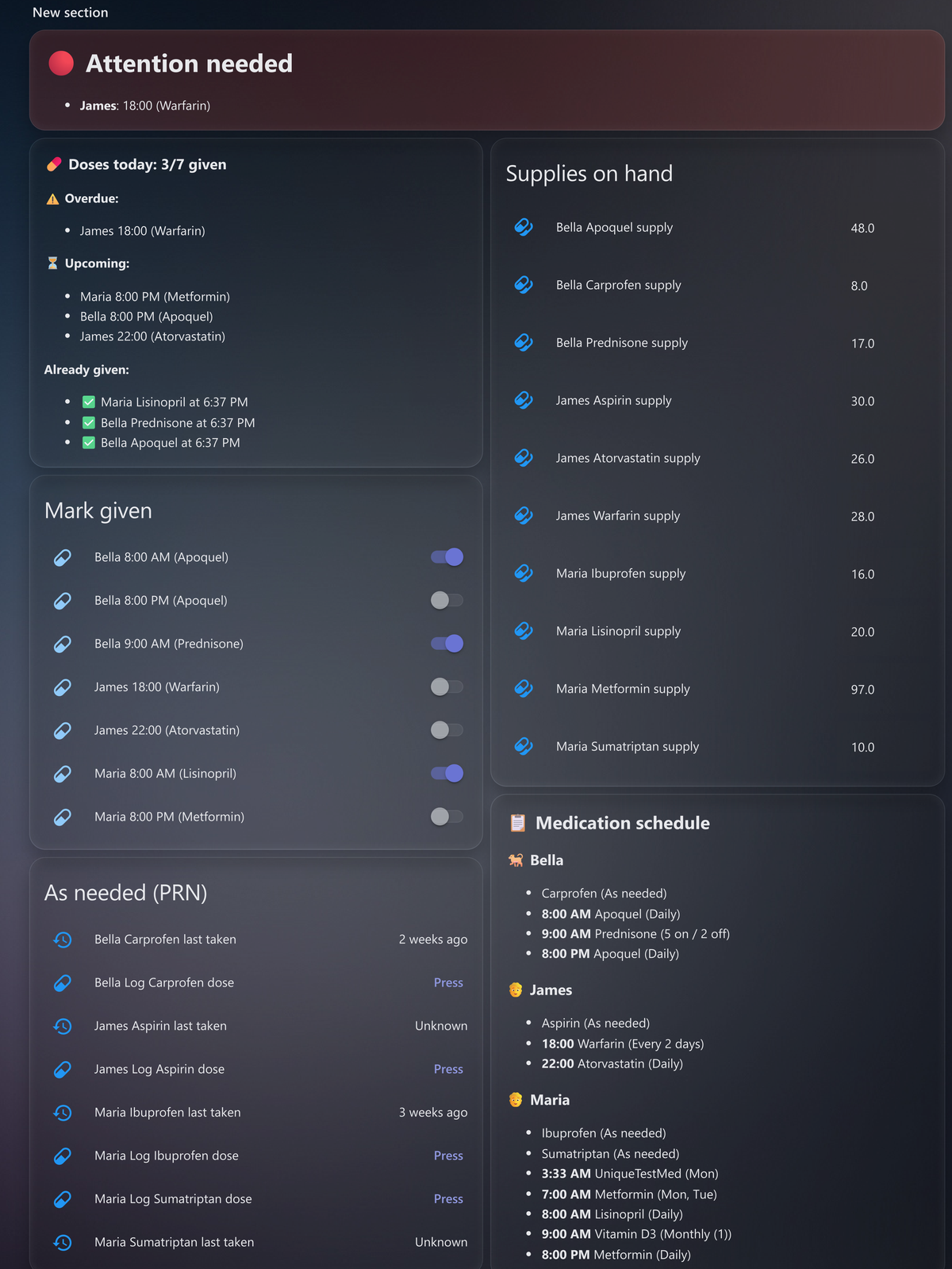
A dashboard is optional, but the bundled ones are auto-discovering: they find every patient and dose automatically and need no editing, so adding, renaming, or removing a patient just updates them. Each has seven parts:
- a red/green status panel (from the
needs_attentionsensors), - a summary of today's scheduled doses (given / still to give, with times),
- one combined "Mark given" card with every dose due today (tap to mark),
- an "As needed (PRN)" card with a Log dose button per as-needed med, plus its "last taken" time, doses today, and rolling 30-day days-this-month count,
- one combined supplies card (units on hand, shown only if you track supplies),
- a per-patient schedule overview (every dose, time, medications, and days),
- a per-patient "current medications" list (full name, strength, brand, what it is for, dosage, and each med's dose times) for handing to a vet or doctor.
With Partial-dose skip buttons turned on (Settings), an extra "Took most of it" card appears alongside Mark given, with a one-tap "skip " per med for grouped doses that are due and not yet given (see Partial dose marking). And for any dose with Ask for amount when marking turned on, a "Dose amounts" card appears for setting the amount before marking given. With Pill-box plan view on, a "Pill-box plan" card appears, a day stepper plus a table of each med and the amount per time slot for the selected day. These stay hidden when their option is off or nothing qualifies.
Where a dose has a Units consumed (this dose) amount set, the today summary and schedule show it next to the medication (e.g. "Marcoumar ½"), so a half-pill day reads differently from a full one at a glance.
Dose ordering. The bundled dashboards list each dose strictly in schedule order (by time of day), so they stay correct however you display times. Home Assistant's auto-generated device page is different: its Controls card sorts entities alphabetically by name, so in 12-hour format times like "10:00 AM", "2:00 PM", and "6:00 AM" sort as plain text and fall out of chronological order. If you prefer that device page, set the patient's Time format to 24-hour in Settings; the times then read 06:00, 14:00, 22:00 and sort correctly there too.
Pick a layout (each file opens with a banner telling you exactly where to paste it):
- Recommended:
lovelace-sections.yamlis a responsive Sections dashboard that adapts to screen width on its own: one clean column on a phone, up to three columns on a tablet or desktop, no manual layout choice. It is a whole dashboard, so create a new dashboard, open its Raw configuration editor, and paste the file. Needs Home Assistant 2024.3+ (Sections view). lovelace-card.yamlis the same content as one card you drop into an existing dashboard (Add Card, then Manual, then paste). A single tall column.lovelace-card-2col.yamlis a wide paste-in card: a full-width status banner above two columns, best on a roomy screen.
All three use the same two HACS cards: auto-entities (the auto-discovering lists) and card-mod (pins the pill icons blue so they stay out of the red/yellow/green status colours; without it the pills fall back to amber). No names or entity_ids to change in any of them. The standalone status panel is below if you want only that piece, and it needs no HACS cards at all.
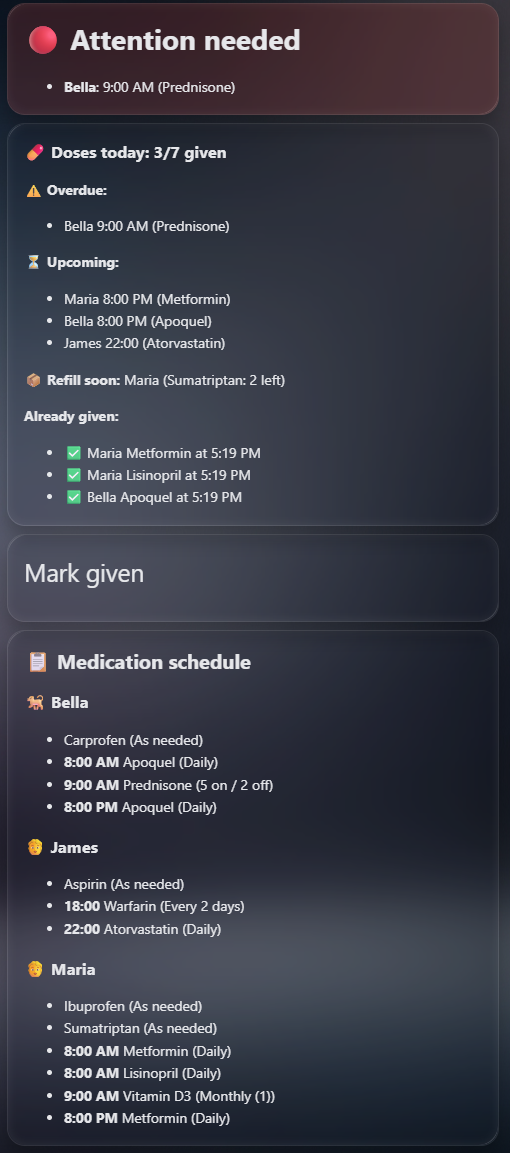
The auto-discovering cards, shown here in the single-column layout; the responsive lovelace-sections.yaml reflows these same cards by screen width.
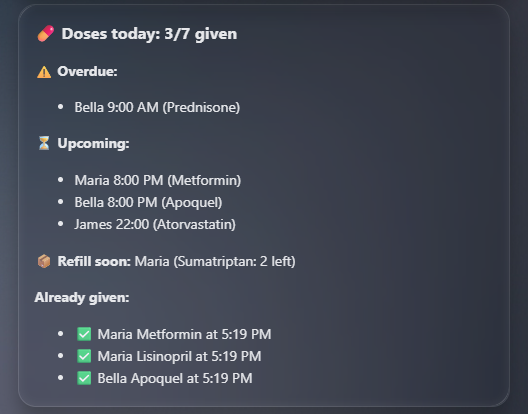
The today summary: doses given vs. still due, what is overdue or upcoming, and the times already-given doses were taken.
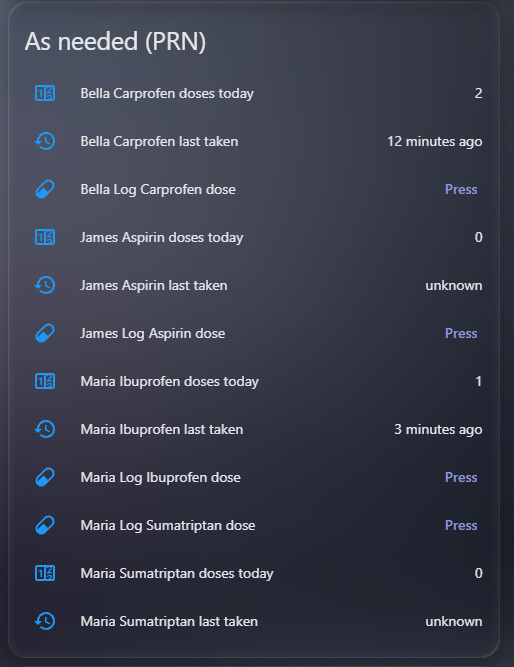
The As needed (PRN) card: a Log dose button per as-needed med, with its last-taken time, doses-today count, and rolling 30-day days-this-month count.
A simple "all OK / attention needed" panel for the top of a dashboard, driven by
the needs_attention sensors. Green when nothing is overdue, red (with who and
what) when something needs investigating. Native card, no HACS needed:

type: markdown
content: |-
  {% set s = states.binary_sensor | selectattr('entity_id','search','_needs_attention') | selectattr('attributes.patient','defined') | list %}
  {% set red = s | selectattr('state','eq','on') | list %}
  {% if red | length == 0 %}
  # 🟢 All OK
  {% else %}
  # 🔴 Attention needed
  {% for p in red %}
  - **{{ p.attributes.patient }}**: {{ p.attributes.overdue | join(', ') }}
  {% endfor %}
  {% endif %}
Because binary_sensor.<patient>_needs_attention is a standard problem entity,
you can also drive a light, siren, pager, or notification straight off it.
Make the panel flash when attention is needed (needs the HACS card-mod card). Add this to the markdown card above:
card_mod:
  style: |
    ha-card {
      {% if (states.binary_sensor | selectattr('entity_id','search','_needs_attention') | selectattr('attributes.patient','defined') | selectattr('state','eq','on') | list | length) > 0 %}
      animation: mr-flash 1.2s ease-in-out infinite;
      {% endif %}
    }
    @keyframes mr-flash {
      0%, 100% { background-color: var(--card-background-color); }
      50% { background-color: rgba(244, 67, 54, 0.55); }
    }
For care settings, a physical flash is even better: trigger a lamp or siren
off the needs_attention sensor so the alert is visible from across the room.
A card that lists each patient's full schedule (every dose, time, medications, and which days it applies), not just today. Auto-discovers all patients, respects each one's 12h/24h setting, and shows "Daily" or the specific days. Native markdown card, no HACS needed:
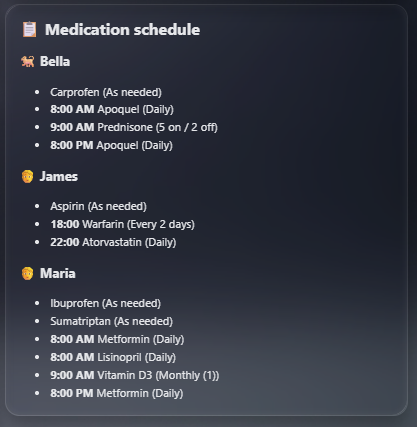
type: markdown
content: |-
  ## 📋 Medication schedule
  {% set meds = states.switch | selectattr('attributes.medications','defined') | list %}
  {% set week = ['mon','tue','wed','thu','fri','sat','sun'] %}
  {% for p in (meds | map(attribute='attributes.patient') | unique | list | sort) %}
  {% set _byp = meds | selectattr('attributes.patient','eq',p) | sort(attribute='attributes.dose_time') | list %}
  {% set pdoses = (_byp | rejectattr('attributes.schedule_type','eq','prn') | list) + (_byp | selectattr('attributes.schedule_type','eq','prn') | list) %}
  {% set ptype = pdoses[0].attributes.patient_type | default('person') %}
  ### {{ {'dog':'🐕','cat':'🐈','person':'🧑','bird':'🐦','rabbit':'🐇','other':'🐾'}.get(ptype,'💊') }} {{ p }}
  {% for d in pdoses %}
  {%- set days = d.attributes.days or week %}
  {%- set fmt = '%H:%M' if d.attributes.time_format == '24h' else '%-I:%M %p' %}
  - **{{ as_timestamp(today_at(d.attributes.dose_time)) | timestamp_custom(fmt) }}** {{ d.attributes.medications }} ({{ 'Daily' if days|length == 7 else (week | select('in', days) | map('capitalize') | join(', ')) }})
  {%- endfor %}
{% endfor %}Every dose, supply, and status entity carries a patient attribute, so any card
can be scoped to a single patient or a group by filtering on it, handy for a
per-person or per-room overview. (Suggested by GitHub user blubbel42.)
In the markdown cards (status panel, today summary, schedule overview), add a patient filter where the entity list is built:
{% set meds = states.switch | selectattr('attributes.medications','defined')
   | selectattr('attributes.patient','eq','Person A') | list %}
For a group, pass a list of names instead:
| selectattr('attributes.patient','in',['Whiskers','Mittens','Felix'])In the auto-entities cards (Mark given, Supplies), add the same check inside the
template's if (Supplies is identical on states.number):
{% for s in states.switch if s.attributes.medications is defined
   and s.attributes.patient == 'Person A' %}
The only entity without a patient attribute is the Log dose (PRN)
button, so on the As-needed (PRN) card filter it by entity_id, which
starts with the patient's name (lowercased, spaces become underscores):
{% for s in states.button if 'Log ' in s.name and s.name.endswith('dose')
   and s.entity_id.startswith('button.person_a_') %}
The "last taken" and "doses today" sensors on that card do carry patient, so
they keep using the selectattr form like the rest.
A read-only list of every medication a patient takes, with the optional detail (strength, brand, what it is for, dosage), for handing to a vet or doctor.
Add the detail per medication in Configure, Add medication detail:
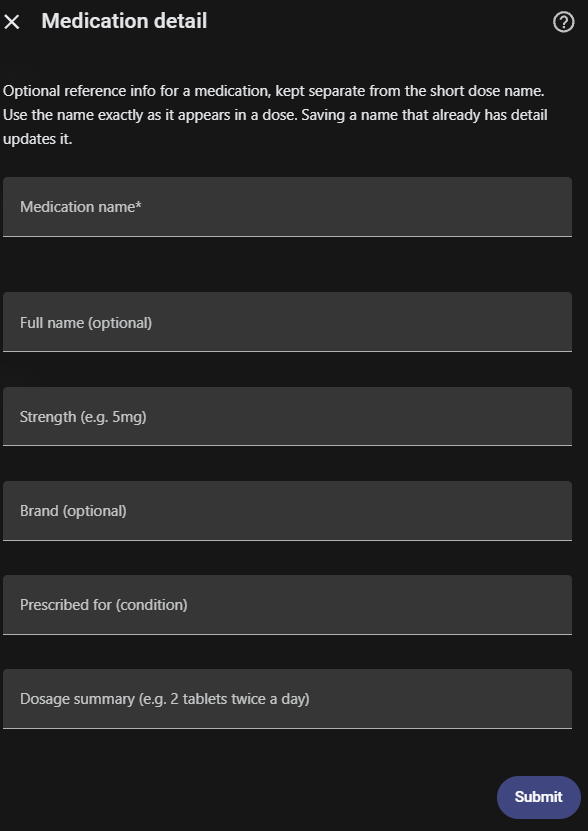
It reads the medications sensor; native markdown card, no HACS needed:
type: markdown
content: |-
  ## 💊 Current medications
  {% for s in states.sensor if s.attributes.medications is defined and s.entity_id.endswith('_medications') %}
  ### {{ s.attributes.patient }}
  {% for m in s.attributes.medications %}
  - **{{ m.full_name or m.name }}**{% if m.brand %} ({{ m.brand }}){% endif %}{% if m.strength %} {{ m.strength }}{% endif %}{% if m.prescribed_for %}, for {{ m.prescribed_for }}{% endif %}{% if m.dosage %}, {{ m.dosage }}{% endif %}
  {% endfor %}
  {% endfor %}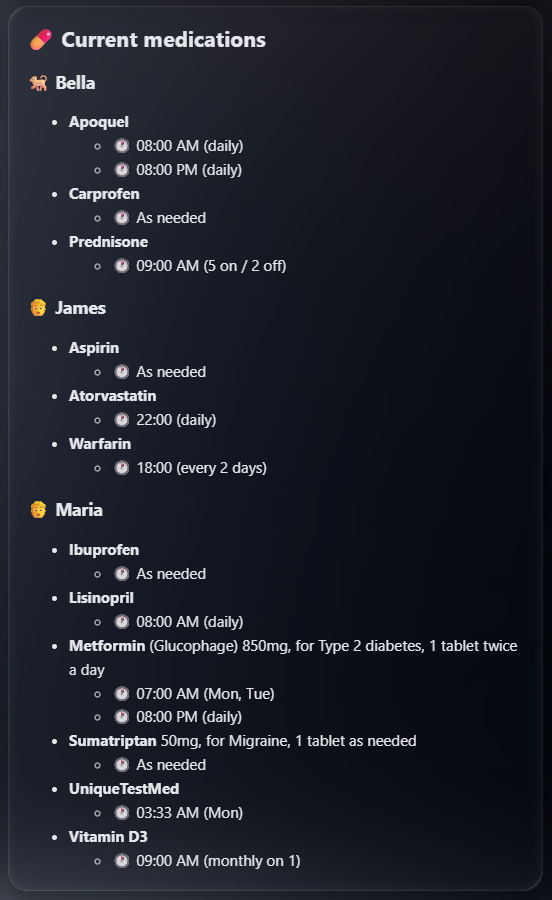
The current-medications card: each patient's medications with strength and dosage, plus each med's dose times, for handing to a vet or doctor.
Split day-to-day care from setup and oversight using Home Assistant's own user roles. There are no accounts to build here; it is all HA.
- Caregivers get
lovelace-caregiver.yaml: a simplified view with the status banner, today's doses (tap to mark given), as-needed logging, low supplies to refill, and a current-medications reference. It has no config and no editable supply counts, so it is safe to hand to anyone helping out. - Admins get
lovelace-admin.yaml: the manage-and-audit view with a full per-patient setup audit, editable supply counts, attention/guard sensors, pointers to History and Logbook (adherence, and who marked or refilled), and a test-reminder button. Configuring doses, supplies, and reminders stays in the integration's Configure flow, which is already admin-only.
To set it up:
- Create each caregiver as a non-admin user: Settings → People → Users → Add user, with Administrator left off.
- Create two dashboards (Settings → Dashboards → Add dashboard) and paste each file into its Raw configuration editor.
- On the admin dashboard turn on Admin only (Settings → Dashboards → the dashboard → Settings) so non-admin users cannot see it. Caregivers can still tap Mark given, log a PRN dose, and refill on the caregiver dashboard.
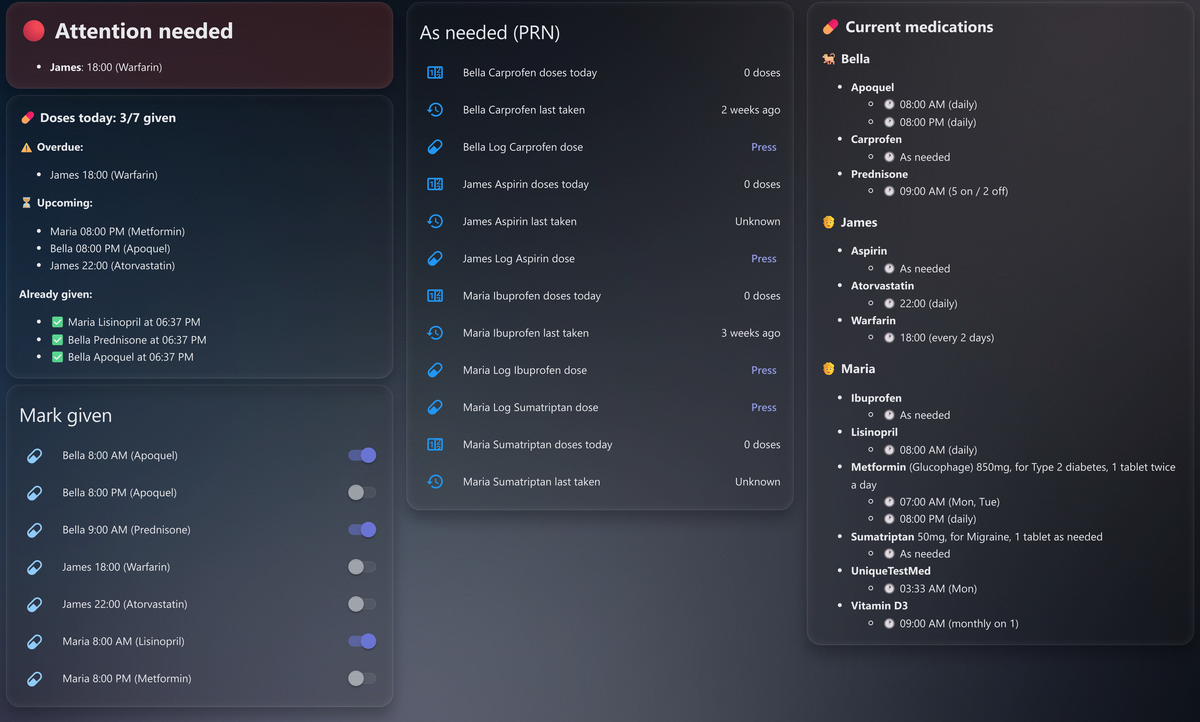
The caregiver dashboard: what to do now, mark a dose given, refill a low supply, and a current-medications reference. No config and no editable counts, so it is safe to share.
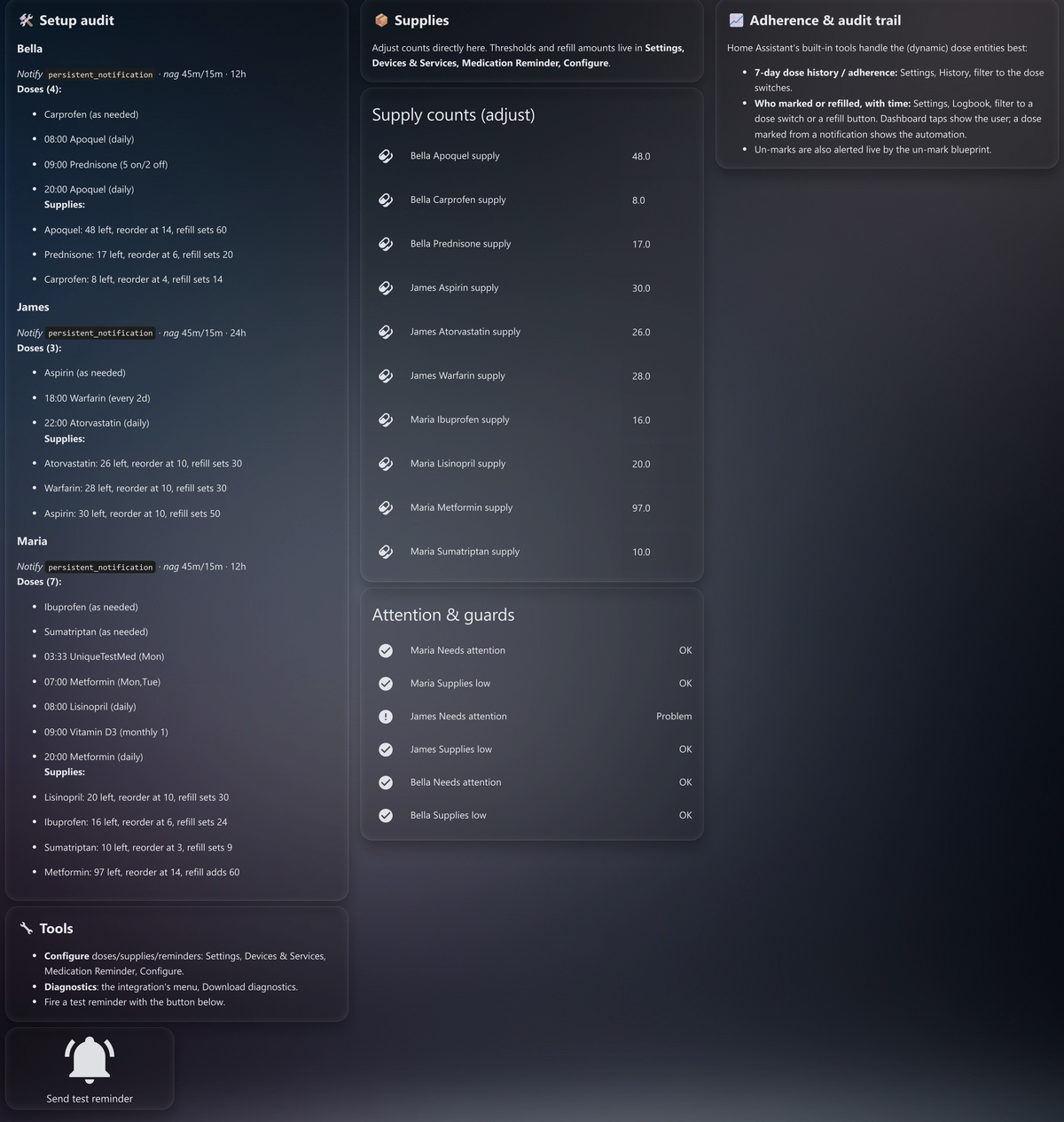
The admin dashboard: a full per-patient setup audit, editable supply counts, attention and guard sensors, pointers to History and Logbook for adherence and who marked or refilled, and a test-reminder button.
Each patient has its own Configure, Reminder settings with:
- Patient type - Person / Dog / Cat / ..., which sets the icon.
- Notify target - who gets that patient's reminders.
- Time format - 12-hour (
2:00 PM) or 24-hour (14:00) in the dose entity names (default 12-hour). - Daily reset time - when the day's doses reset to "not given" (default 00:01).
- Nag window - how long to keep reminding after a dose time (default 45 min).
- Re-nag interval - how often to re-remind within that window (default 15 min).
- Partial-dose skip buttons - off by default. When on, each scheduled dose that groups two or more meds gains a one-tap "Mark given, skip " button per med (see How marking works below). Leave off to avoid the extra button entities if you never partially dose.
- Pill-box plan view - off by default. When on, adds a per-day pill-organiser plan: a
sensor.<patient>_planwith the day's meds and amounts per time slot, and anumber.<patient>_planoffsetto pick the day (0 = today). The bundled dashboards show it as a "Pill-box plan" card (a day stepper plus a table of each med and the amount per time slot), handy for prepping a weekly box.
The reset time is applied by the integration; the nag window/interval are exposed as switch attributes that the companion automations read.
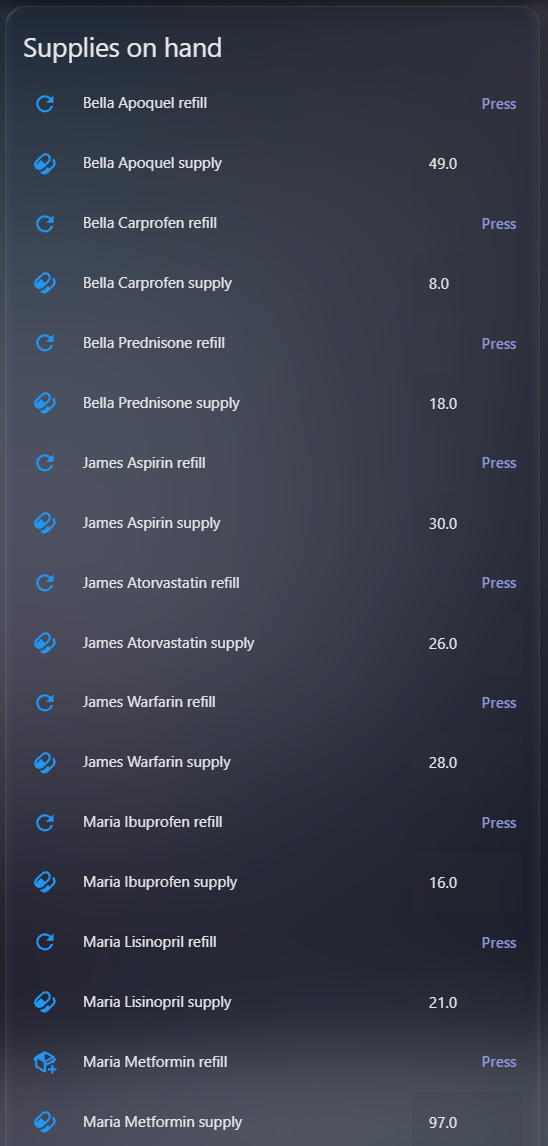
The supplies-on-hand card: each medication's units left plus a one-tap refill button; a medication at or below its threshold turns red.
Optionally track how much of each medication you have on hand. In Configure,
Track a medication supply, pick the medication from your doses, then set units
on hand, units consumed per dose, a low-stock threshold, a refill amount,
(optionally) a cost per unit, and (optionally) the number of refills
remaining on the prescription. Change those later with Edit a supply in the
same menu. Units consumed per dose accepts fractions (e.g. 0.5 for half a pill),
and any single dose can override it with its own Units consumed (this dose)
field, so a medication taken as half a pill on some days and a whole pill on others
tracks stock correctly from one supply and one medication name (add two doses
with the same medication, one per schedule). Each tracked
medication then gets:
number.<patient>_<med>_supply- units on hand, settable. It decrements when a dose containing that medication is marked given (once per dose per day, restart-safe, and never on the daily reset). Attributes includedoses_leftandest_runout_date, computed from the schedule. Setting a cost per unit on the supply addsvalue_on_hand,cost_per_dose, andest_monthly_costattributes. Un-marking a dose (the early-dose "undo" or a manual toggle-off) adds the units back. Adjust it any time to correct a miscount or to refill. Setting Refills remaining on the supply tracks how many refills the prescription still allows: each press of the refill button counts it down by one, addingrefills_remaining,refills_configured, andrefills_outattributes. When it reaches zero the supply flags low (seesupplies_lowbelow) so you know to renew the prescription before the next refill. Leave it at 0 to skip refill tracking.button.<patient>_<med>_refill- a one-tap restock, instead of editing the number by hand. By default it sets the supply to its configured refill amount; turn on Add on refill (package refill) for that supply to instead add the refill amount to what is left (e.g. 17 + 30 = 47), capped at the max. The button shows which mode it is in: arefill_modeattribute (setoradd), arefill_amountattribute, and a distinct icon (a plus-package in add mode). It also carriespatient/medicationattributes, so it can go on a dashboard alongside the supply. It fires amedication_reminder_supply_refillevent that the supply number listens for.button.<patient>_log_<meds>_dose- only created for as-needed (PRN) doses. Pressing it logs one dose and decrements the matching supply with no once-per-day limit, so a med taken several times a day is counted each press. It fires amedication_reminder_dose_loggedevent. PRN doses have no schedule, so the daily on/off switch does not count them; this button is how their supply tracks. Call themedication_reminder.log_doseservice on it with an optionaltaken_atto record a dose taken earlier than now.sensor.<patient>_<med>_last_taken(device classtimestamp) - only created for as-needed (PRN) doses. When that med was last logged (button tap or thelog_doseservice), restart-safe. Drives the dashboard's "last taken" line and is the basis for a PRN over-dose guard (warn if logged again too soon).sensor.<patient>_<med>_doses_today- only created for as-needed (PRN) doses. How many doses were logged so far today, incrementing on each Log dose press (orlog_dosecall) and resetting at the patient's daily reset time, restart-safe. Answers "how many have I taken today?".sensor.<patient>_<med>_days_this_month- only created for as-needed (PRN) doses. How many distinct days in the rolling last 30 you logged this med, for meds with a days-per-month limit (e.g. acute pain or migraine medication that should stay under about 10 days a month to avoid medication overuse). Itsdatesattribute lists which days, an archive you can keep, and the 30-day window rolls forward on its own so old days drop off. Restart-safe.binary_sensor.<patient>_<med>_dose_guard(device classproblem) - only created for an as-needed (PRN) dose that sets a minimum interval and/or a daily cap. Red when another dose now would be too soon (within the minimum hours since the last log) or over the daily cap; otherwise off. It warns, never blocks. Attributes:too_soon,over_cap,next_allowed(when it is safe again),last_taken,doses_today,remaining_today,min_interval_hours,max_per_day.binary_sensor.<patient>_supplies_low(device classproblem) - red when any of that patient's supplies reaches its threshold, or a tracked prescription runs out of refills, with alowlist of which medications are short and arefills_outlist (plusrefills_out_count) of which have no refills left.
A medication shared across several doses (e.g. one given morning and night) draws
from a single pool; dose meds strings are split on &, +, a comma, or a
slash with spaces around it (/) so each medication is tracked individually. A
bare slash is kept as part of the name, so combo drugs and fractional doses like
Carbimazol 5mg (1/2), TMP/SMX, or 5mg/ml are not split apart. The companion
med_supply_low automation sends a once-a-day refill reminder to the patient's
notify target for anything low.
- The integration publishes
switch.*entities carryingpatient/patient_type/dose_time/medications/dose_units/days/schedule_type/interval_days/anchor_date/cycle_on/cycle_off/month_days/scheduled_today/skipped/skipped_today/snooze_until/ask_units/marked_units/notify_service/nag_minutes/nag_interval/time_format/given_atattributes (a dose is only reminded, counted, or flagged overdue whenscheduled_todayis true, which respects day-of-week, every-N-days, on/off-cycle, and monthly schedules). Per patient it also publishes two binary sensors:binary_sensor.<patient>_all_doses_given(patient-type icon) - on when all of that patient's doses are handled today (given or skipped), withtotal/given/skipped/skipped_doses/remaining/pendingattributes.binary_sensor.<patient>_needs_attention(device classproblem) - red when a dose is overdue (past its time by the nag window and still not given or skipped), green when all is well. It re-evaluates on a 60-second timer so it trips on elapsed time alone, and fails safe toward "problem". Attributes:overdue/overdue_count.
- It also publishes
sensor.<patient>_next_dose(timestamp of the next upcoming dose, with the medications as an attribute) andcalendar.<patient>_medication(the schedule as calendar events). The entry offers downloadable diagnostics on its device page, and raises a Repairs warning if a tracked supply's medication matches no dose (so it would never decrement). sensor.<patient>_medicationslists every medication the patient takes (gathered from their doses). Its state is the count of distinct medications; itsmedicationsattribute holds each one's optional detail (full name, strength, brand, prescribed-for, dosage) and itssummaryattribute is a ready-to-share "current medications" list. Add detail in Configure, Medication detail (it does not change the dose's short name).- The companion reminder automation iterates those switches and routes each reminder to its
notify_service/nag_minutes/nag_interval, so adding a dose or changing a patient's settings in the UI needs no automation edits. - "Mark given" flips the switch on; the daily reset flips all off at the configured reset time.
- Skip a dose for the day. The
medication_reminder.skip_todayservice (target the dose's switch) clears a dose for the current day without taking it: reminders and missed-dose alerts stop, but the dose is not recorded as given and no supply is deducted. It is a third state, carried on the switch'sskipped_todayattribute, soneeds_attentiondoes not flag it overdue andall_doses_givencounts it as handled. It resets at the daily reset, and marking the dose given cancels the skip (restoring supply if it had been given first). The reminder and missed-dose notifications carry a Skip today button that calls this (re-import the blueprints to get it). This is separate from the partial-doseskippedlist onmark_given, which skips one med while the dose is still taken. - Snooze a reminder ("remind me later"). The
medication_reminder.snoozeservice (target the dose's switch, optionalminutes, default 30) defers a dose's reminder without marking it given or skipped. It records asnooze_untiltime on the switch, and the reminder automation pushes that dose's whole nag window and its missed-dose escalation out to the later of the dose time and the snooze, so the reminder goes quiet and comes back once, later, if the dose is still not handled. The escalation is deferred, not cancelled. Marking the dose given or skipped, and the daily reset, clear the snooze. The reminder and missed-dose notifications carry a Remind me later button (re-import the blueprints to get it), and the delay is a blueprint input. The glanceable "needs attention" panel is not affected by a snooze: it still shows a snoozed-but-untaken dose once past its window, since the dose does still need taking; snooze only quiets the phone reminder. - To log a dose taken at a different time than now, call the
medication_reminder.mark_givenservice (target the dose's switch) with agiven_attime. The plain switch is "Take Now"; the service is the "Specify Time" equivalent. Correcting the time on an already-given dose just updates the timestamp (it does not re-warn or re-decrement supply). - Adjustable amount at mark time. For a med whose dose varies, turn on Ask for amount when marking on the dose (Add/Edit a dose, off by default). That creates a
number.<patient>_<time>_<meds>_amountinput; set it to the amount about to be taken, then mark the dose given any way (dashboard, notification, or service) and the matching supply decrements by that amount instead of the configured one. The switch carries the amount as amarked_unitsattribute, and themark_givenservice also takes an optionalunitsto pass it directly (handy from automations). The bundled dashboards show a "Dose amounts" card for the opted-in doses. It is off by default, so fixed-dose meds get no extra input. - Partial dose (one med skipped). For a dose that groups several meds,
mark_givenalso takes an optionalskippedlist naming meds that were not taken this time. The dose is still marked given, but the supply for each skipped med is left alone, so you do not have to split a sometimes-missing med into its own dose to keep its count right. The skipped names show in the switch'sskippedattribute and the given event, and clear on un-mark and the daily reset. Skips apply only when the dose is first marked (not on a later time-correction); the plain switch toggle marks the whole dose. Example:For a one-tap version on the dashboard, turn on Partial-dose skip buttons in Reminder settings. Each scheduled dose that groups two or more meds then gets aaction: medication_reminder.mark_given target: entity_id: switch.bella_8_00_am_apoquel_vitamin_d data: skipped: - Vitamin D
button.<patient>_<time>_<meds>_skip_<med>per med ("Mark given, skip "), which marks that dose given with just that one med skipped. The bundled dashboards surface these in a "Took most of it" card for doses due and not yet given. It is off by default so single-med users get no extra entities; skipping two or more meds at once still uses the service with a fullskippedlist. - When a dose is marked given, the switch fires a
medication_reminder_dose_givenevent (withpatient,dose_time,medications,scheduled_today,minutes_early,skipped,units,notify_service), so companion automations can react cleanly. The bundledmed_early_givenautomation uses it to warn when a dose is marked given well before its scheduled time, with an "undo" button that turns the dose back off. Un-marking a dose firesmedication_reminder_dose_undone, which restores that dose's supply count. Skipping a dose for the day firesmedication_reminder_dose_skipped(withpatient,dose_time,medications,notify_service), which the mark-given blueprint uses to clear the reminder. Snoozing a dose firesmedication_reminder_dose_snoozed(also withsnooze_until), which clears the current reminder notification.
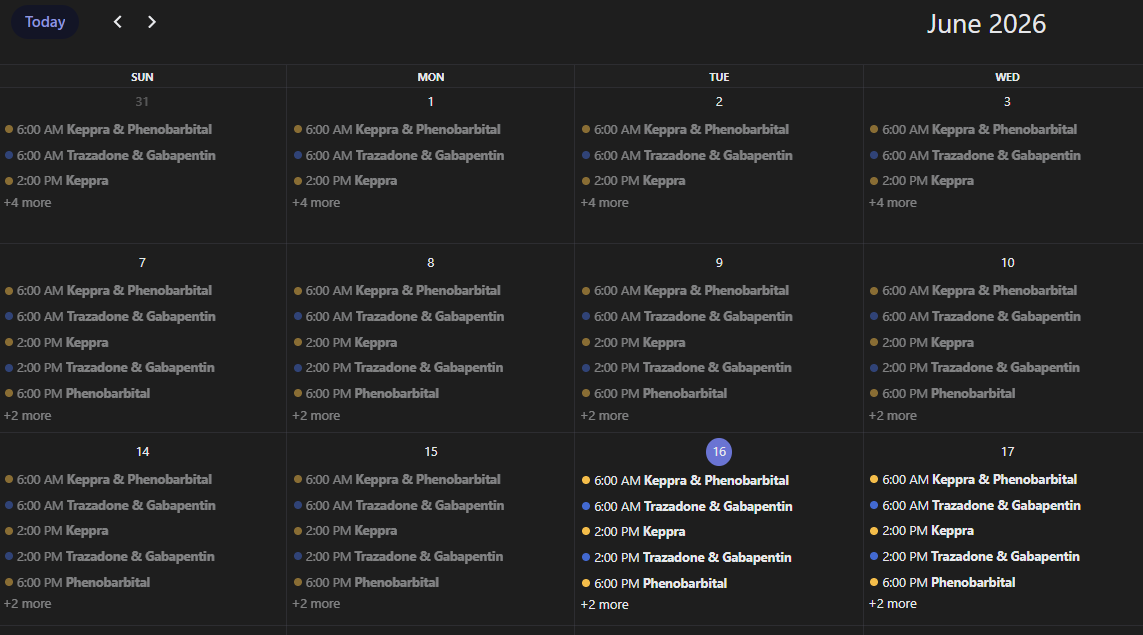
The calendar.<patient>_medication entity lays the whole schedule out by day,
which makes every-N-days and on/off-cycle doses easy to see at a glance:
Because a dose is just a switch.<patient>_<time> entity, anything in Home
Assistant can mark it given, not only a notification tap. A contact sensor on a
pill box, an NFC tag on the bottle, a dashboard button, even a smart scale, just
turn the switch on (or call medication_reminder.mark_given to also record the
actual taken-time):
trigger:
  - platform: state
    entity_id: binary_sensor.pill_box_lid   # your sensor, tag, or button
    to: "on"
action:
  - action: medication_reminder.mark_given
    target:
      entity_id: switch.bella_8_00_am_apoquel   # the dose that trigger is for
    data:
      given_at: "{{ now() }}"
Marking given this way still clears the reminder, decrements that medication's
supply, updates the <med>_last_taken time, and feeds the over-dose guard, the
same as tapping Mark given. If a trigger covers more than one dose a day,
point it at the switch whose dose_time is closest to now.
This is a reminder aid, not a medical device (see the note up top), but it is built to fail toward "tell the caretaker" rather than stay quiet. The safety-relevant behaviours:
- Fail-safe overdue detection.
binary_sensor.<patient>_needs_attention(device classproblem) goes red when a dose is past its time by the nag window and still not given or skipped for the day. It re-evaluates on a 60-second timer, so it trips on elapsed time alone, and when state is uncertain it errs toward red. A deliberately skipped dose counts as handled, so it does not alarm. Wire it to a light, siren, or pager for an alert you can see across the room. - Missed-dose escalation. Reminders nag every 15 min for 45 min, then escalate once as a time-sensitive "missed" alert, so an ignored reminder does not silently disappear.
- Early-dose / soft over-dose warning. Marking a dose well before its scheduled
time warns the caretaker and offers an undo button. The switch reports
minutes_earlyon themedication_reminder_dose_givenevent so automations can react. - Reversible marking. Un-marking a dose fires
medication_reminder_dose_undoneand restores the supply count, so an accidental "given" tap is fully undone, not left as a permanent miscount. - Crash-safe state. Dose state and the
given_attime are written to disk on every change, so they survive Home Assistant restarts, crashes, and power loss without silently losing "already given" and inviting a double dose. - Supply run-out protection.
binary_sensor.<patient>_supplies_low(device classproblem) flags low stock at your threshold, with doses-left and an estimated run-out date, plus a once-a-day refill reminder. It also trips when a tracked prescription runs out of refills, so you are prompted to renew the script before the pills run out. - Misconfiguration check. If a tracked supply's medication matches no dose (so it would never decrement), the integration raises a Repairs warning.
- No false alarms on off-days. Overdue and missed only fire on days a dose is
actually due (
scheduled_todayhonours day-of-week, every-N-days, on/off cycles, and day-of-month schedules), to avoid alarm fatigue.
By design, every guard warns, it never blocks. The integration will not stop
you marking a dose early or twice; it surfaces the risk and leaves the decision to
the caretaker. For as-needed (PRN) meds you can set a minimum interval between
doses and a daily cap; the <med>_dose_guard sensor goes red when another dose
now would be too soon or over the cap (the "no less than 4 hours apart" case).
The configuration UI follows your Home Assistant language. English is the source,
with German (de), Dutch (nl), French (fr), Spanish (es),
Italian (it), and Russian (ru) included; all but French are community-contributed. Any string a locale has not translated yet
falls back to English, so a partial translation is always safe.
Want your language added? It is a single-file pull request: copy
en.json to
<lang>.json, translate the values (keep the keys and {placeholders} like
{medication} exactly as-is), and open a PR with just that one file. A
Translations CI check reports each locale's coverage against English
automatically, and python scripts/check_translations.py runs the same report
locally. See
translations/README.md
and the tracking issue #13.
The current versions deliberately keep the notification logic in battle-tested YAML automations while the integration owns the config UI and entities. That gives you the big win (no more hand-declared helpers, UI-managed schedule) without putting medication-critical notification code into brand-new, untested territory. A future version may move reminders into the integration itself.
Planned:
- Optional in-integration notifications/nagging (so the YAML companion automations become optional).
- Persistent dose attribution: "given by" and "refilled by" surfaced as attributes on the dose and refill entities, so who did what shows without opening the Logbook (the 0.26.0 admin dashboard reads this from History and the Logbook today).
Shipped from the roadmap:
- More schedule types beyond day-of-week: every-N-days (0.11.0), on/off cycles e.g. 21 on / 7 off (0.12.0), as-needed PRN (0.14.0, suggested by community member IOT7712), and day-of-month / monthly (0.15.0, suggested by community member ggaltqq).
- As-needed (PRN) display polish: PRN doses named by their medication (e.g. "Ibuprofen (as needed)"), with the placeholder 00:00 time dropped from the schedule view (0.15.1). (Suggested by a community member.)
- Specify the time a dose was taken: the
medication_reminder.mark_givenservice withgiven_atfor scheduled (switch) doses (0.16.0), andmedication_reminder.log_dosewithtaken_atfor as-needed (PRN) doses (0.17.0), each updating a<med>_last_takensensor. - HACS default store: merged into the HACS default repository list (hacs/default#8536), so the integration installs straight from HACS by search, with no custom repository needed.
- Over-dose guard for as-needed (PRN) meds: a minimum interval between doses and a max-per-day cap, surfaced as a
<med>_dose_guardproblem sensor that warns when another dose now would be too soon or over the cap (0.19.0). Builds on the early-dose warning (0.10.0) and PRN taken-time recording (0.17.0). (Idea from community member IOT7712.) - Per-medication detail: optional strength/mg, brand, the condition it was prescribed for, a dosage summary, and a full name separate from the short reminder name, plus a
<patient>_medications"current medications" view for handing a provider the "what" rather than the "when" (0.20.0). (Suggested by GitHub user VGrol.) - Edit a dose in place: a new Edit a dose step pre-fills the form with a dose's current values and replaces it on save, instead of removing and re-adding (0.21.0). Editing only the schedule keeps the same entity; changing the time or medications starts a fresh one. (Requested by GitHub user weswark.)
- Localized configuration UI: German (0.24.1, contributed by GitHub user RookieIVG), Dutch (0.24.1, contributed by GitHub user VGrol), French (0.27.0), Spanish (0.30.0, contributed by GitHub user markjimenezpy), Italian (0.32.0, contributed by GitHub user apilone), and Russian (0.34.0, contributed by GitHub user interkom) alongside English, plus a translation coverage check for contributors (0.25.0). (Requested by GitHub user interkom.)
- Roles split with caregiver and admin dashboards (0.26.0): a safe-to-share caregiver view (mark given, log a PRN dose, refill a low supply) with no config or editable counts, and an admin view with a per-patient setup audit, editable supply counts, and a who-marked-or-refilled audit trail; plus tapping a notification body to open your meds dashboard.
- Per-medication cost tracking (0.27.0): an optional cost per unit on each supply, exposing
value_on_hand,cost_per_dose, and a schedule-basedest_monthly_coston the supply entity. - Per-dose consumption amounts (0.28.0): "units consumed per dose" is now fractional (e.g. 0.5), and each dose can override the medication's default with its own amount, so one supply tracks a medication taken at different amounts on different days.
- Manifest
integration_typeset toservice(0.28.1), so the integration presents correctly in the Home Assistant integrations UI. (Suggested by @frenck during the HACS default-store review.) - Per-dose amount on the dashboard (0.29.0): the bundled dashboards show a dose's "Units consumed (this dose)" amount next to the medication (e.g. "Marcoumar ½"), so half-pill days read differently from full ones. (Requested by GitHub user ph-dekeyser in #18.)
- Rolling 30-day PRN usage sensor (0.31.0):
days_this_monthcounts the distinct days an as-needed med was logged in the last 30 days, for meds with a days-per-month limit. (Requested by alva-seal in #21.) - Notification clears on any mark-given (0.31.0): the reminder notification now clears when a dose is marked given from the dashboard, an NFC tag, or the mark_given service, not only the notification button. (Reported by RobertGalatNordic in #22.)
- Prescription refills remaining (0.33.0): an optional per-supply "refills remaining" count that starts at the number of refills the script allows and counts down one on each refill, exposing
refills_remaining,refills_configured, andrefills_outon the supply. When it hits zero,supplies_lowturns red so an automation can prompt "time to schedule a new prescription," separate from pill-count low stock. (Requested by a community member on the forum, tracked in #31.) - Partial dose marking (0.35.0): the
mark_givenservice takes askippedlist naming meds in a grouped dose that were not taken, so the dose is still marked given but each skipped med's supply is left alone, without splitting it into its own dose. The skip shows in theskippedswitch attribute and the given event. (Requested by a community member on the forum, tracked in #30.) - Partial-dose skip buttons (0.36.0): an opt-in that adds a one-tap "Mark given, skip " button per med on grouped doses, auto-discovered into a "Took most of it" dashboard card, so partial marking no longer needs the service for the common one-missing-pill case. Off by default. Builds on #30.
- Skip a dose for the day (0.37.0): a
skip_todayservice and a "Skip today" notification button clear a dose for the day without taking it or deducting supply, a third state thatneeds_attentionandall_doses_giventreat as handled. Distinct from the partial-dose med skip. (Requested by a community member on the forum, tracked in #33.) - Snooze a reminder (0.38.0): a "Remind me later" notification button and a
snoozeservice defer a dose's reminder by a configurable delay (default 30 min), pushing the nag window and the missed-dose escalation out rather than cancelling them. (Requested by a community member on the forum, tracked in #32.) - Adjustable quantity at mark time (0.39.0): a per-dose "Ask for amount when marking" opt-in and a
unitsoption onmark_given, for a med whose dose varies, so the supply decrements by the amount actually taken. Off by default. (Requested by GitHub user ph-dekeyser, tracked in #35.) - Grouped reminders by time (0.40.0): when several doses are due for one patient at the same time, the reminder blueprint sends one combined notification (tap to open the dashboard) instead of one per dose. On by default, toggleable; single-dose reminders and the missed alert are unchanged. (Requested by GitHub user ph-dekeyser, tracked in #36.)
- Weekly pill-box plan view (0.41.0): an opt-in per-day plan for filling a pill organiser, one table of each med and the amount per time slot for a chosen day, computed for the actual date (every-N-days, cycles, monthly included). Adds a plan sensor and a day-offset number; the bundled dashboards show it as a "Pill-box plan" card. Off by default. (Requested by GitHub user ph-dekeyser, tracked in #37.)
The red/green "all OK / attention needed" status panel, the flashing alert, and the aggregate-status idea were suggested by Home Assistant Community user IOT7712. Their request to handle "as required" medications safely also seeded the as-needed (PRN) dose type and the over-dose guard. Thanks for the thoughtful feature requests, especially the focus on a reliable, glanceable, fail-safe indicator for care settings.
Supply & refill tracking was inspired by Home Assistant Community user Tadies, who built a pill counter on their dashboard with counter helpers; their requests also shaped day-of-week scheduling and the 24-hour time-format option (also requested by GitHub user DarkVeter). Thanks for sharing it.
The day-of-month / monthly schedule type grew from a request by Home Assistant Community user ggaltqq for more schedule options.
The German, Dutch, Spanish, Italian, and Russian translations were contributed by GitHub users
RookieIVG (de), VGrol (nl), markjimenezpy (es), apilone (it), and interkom (ru), after interkom asked for
multi-language support. Thanks for making the integration usable in more
languages, and for the clean, complete locale files.
Free and open-source, built and maintained in my own time, with no accounts, tracking, or ads. If it has saved you a missed dose or some hassle, a coffee is always appreciated and helps keep it going.

MIT © magikh0e