


The problem with AI agents isn't that they forget — it's that they improvise. durin is built the other way around: it remembers your work, sharpens its own skills, and runs on adaptable workflows that make it follow the exact steps you define instead of inventing its own. Reliable execution you control — local-first, on any model.
durin is named for Tolkien's dwarf-king of Khazad-dûm; the mark is a dwarven anvil lit by a forge flame.
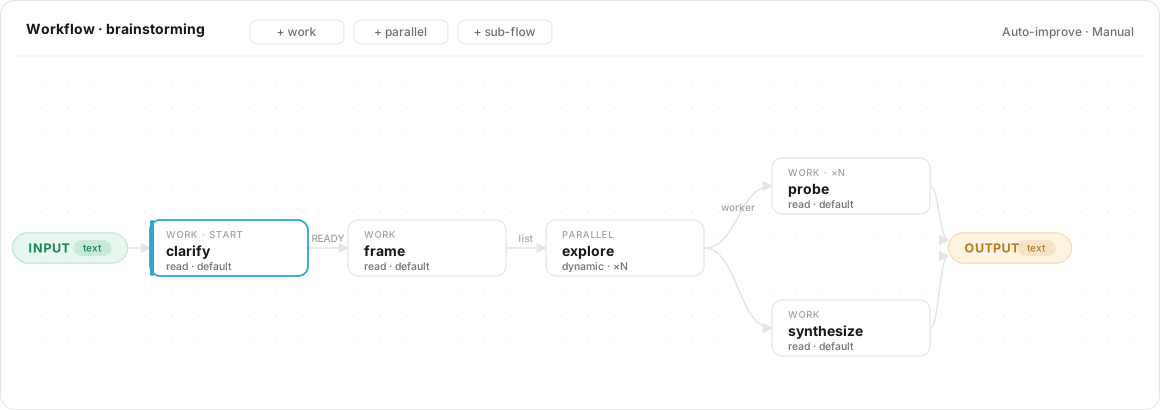
Left to itself, an LLM agent improvises a different path every time — great for open-ended chat, unreliable for work you need done a specific way. durin lets you pin it to adaptable workflows: visual graphs of nodes with routing, loop-backs, parallel branches, sub-flows, and human checkpoints. A task then runs the way you designed it — every time. The agent can pause to ask you, resume exactly where it stopped, and even edit and improve a workflow on its own (with an auto-revert safety net). Few personal agents give you this much control over how the work gets done.
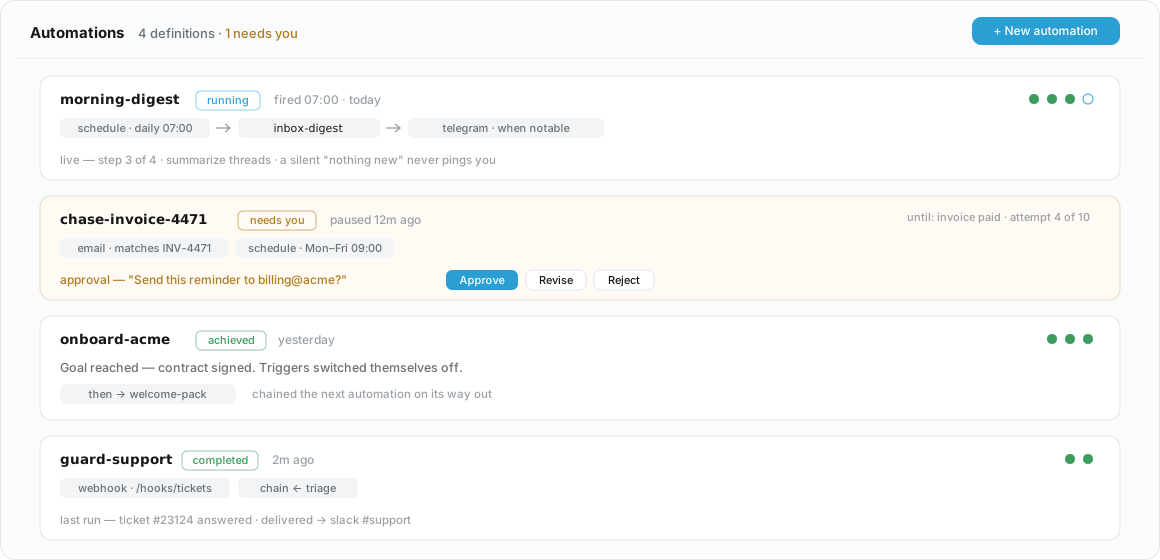
A workflow runs once when you ask; an automation runs it again on its own — on a schedule, an inbound message, a webhook, or another automation finishing. durin classifies the result, decides whether it's worth telling you about, and chains into the next automation when one is configured. When a run needs a decision only you can make — an approval, a question — it pauses and asks, either you or the counterpart you're corresponding with, instead of guessing. An automation can even carry a goal — "until invoice 4471 is paid" — and switch itself off the day it's reached.
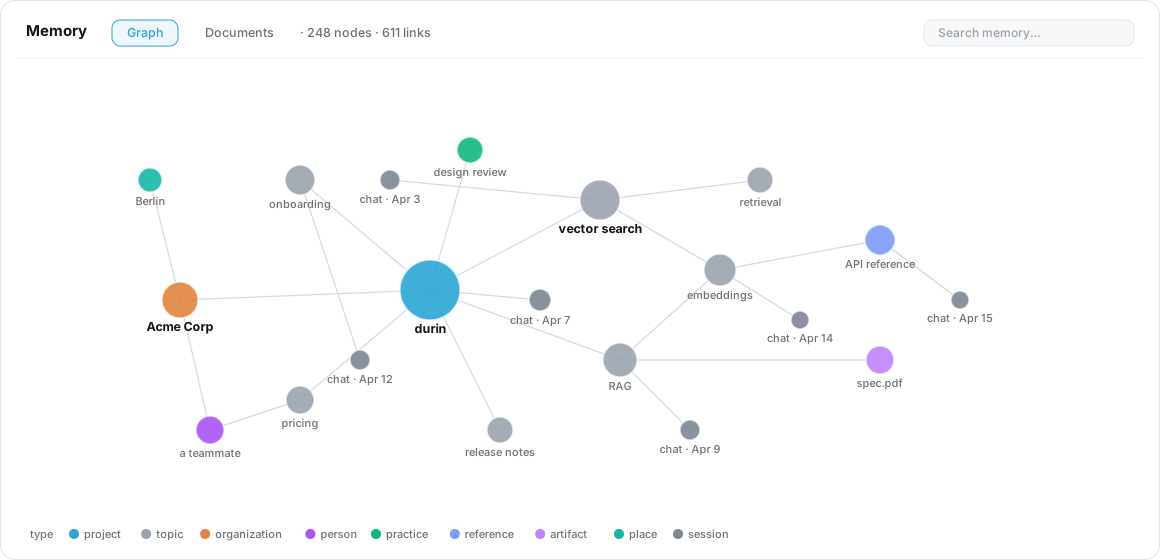
durin builds an entity graph from your conversations — people, projects, documents, decisions — and keeps it as plain markdown you own. Recall is instant and offline: it searches an FTS + vector index without an LLM in the hot path, so it's fast and private. Documents you hand it (PDF, Office, EPUB, web pages) land in a separate Library, kept apart from everyday recall. The markdown is the source of truth; the search indexes are derived and rebuildable. (Benchmarked at LoCoMo ≈ 0.79.)
durin discovers skills from public marketplaces, security-scans each one for scam/malware patterns before you run it, and connects MCP servers from a curated catalog with one-click install and auto-detected OAuth. Its composition doctrine keeps behaviour reliable — prefer deterministic code, use workflows for structure, treat skills as the through-line the agent follows — and it sharpens its own skills over time.
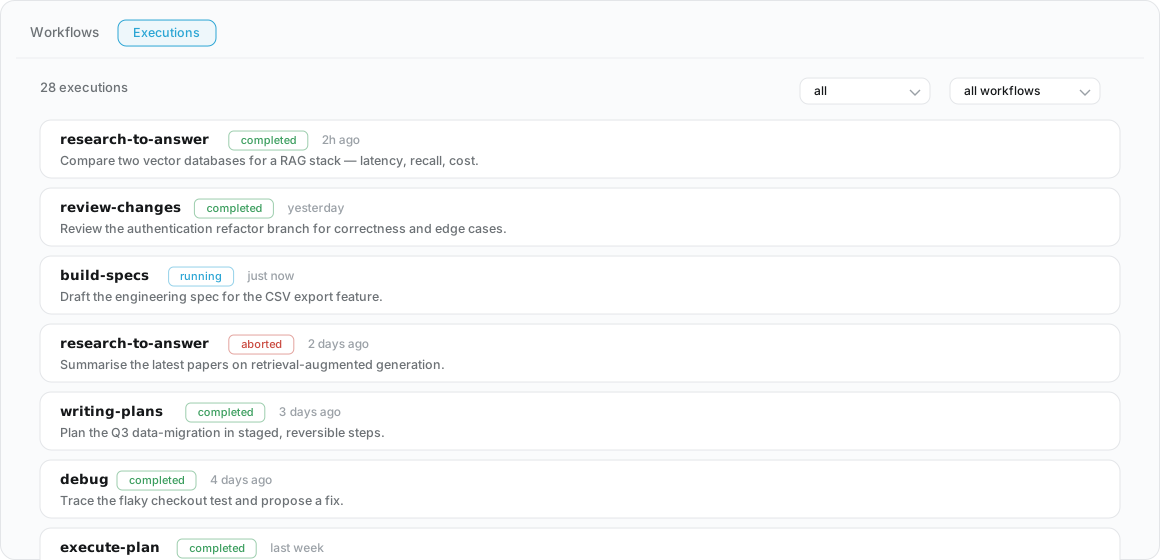
Every run — workflows, scheduled cron jobs, agent tasks — shows up in a live panel with per-step detail, status, and the model used. Nothing happens in a black box: watch a run, open a paused checkpoint, and pick up right where it stopped.
- Any model, or none. 35 provider integrations — Anthropic, OpenAI, Gemini, NVIDIA, Mistral, DeepSeek, Groq, Z.AI, Qwen, Moonshot, and more, plus OpenRouter and other gateways that reach hundreds of models. Switch mid-conversation, or run fully local with Ollama / llama.cpp / vLLM / LM Studio.
- Talk to it anywhere. A CLI, a Textual TUI, a browser dashboard, and chat channels — Telegram, Slack, Discord, email, WhatsApp, WebSocket — all reach the same agent and the same memory.
- Local-first & private. Runs as a daemon on your own machine under
~/.durin/; nothing phones home. - Personas, voice, and schedules. Per-channel personas (a SOUL + a model), local speech-to-text and text-to-speech, and cron for scheduled work.
A cold-path dream runs offline: it consolidates your conversations into the memory graph and curates your skills, so durin quietly gets better at helping you over time — without you lifting a finger.
durin installs with uv, which fetches a compatible
Python for you — nothing on your system has to match. Don't have uv yet?
curl -LsSf https://astral.sh/uv/install.sh | sh
uv tool install --prerelease allow durin-agent   # PyPI (uv picks a compatible Python)
durin onboard                    # interactive setup wizard
durin doctor                     # confirm setup is healthy
durin agent                      # launch the TUI
Run the gateway for the browser dashboard plus chat channels:
durin gateway start # dashboard at http://127.0.0.1:8765See the install guide for prerequisites, optional extras (memory, local models, audio), and platform notes. For everyday and in-session commands, see the CLI reference.
- Install · configure · uninstall
- CLI & in-session commands
- Configuration reference
- Providers & models
- Channels — Telegram, Slack, Discord, email, and more
- Documents & your knowledge
- Workflows
- How it works (internals)
MIT