



Tools for workforce management problems such as queue staffing, shift scheduling, rostering, and operations research optimization.
The full documentation is available at pyworkforce.readthedocs.io.
We recommend installing pyworkforce in a virtual environment:
pip install pyworkforcepyworkforce supports Python 3.12, 3.13, and 3.14.
If you are using Anaconda and run into installation issues, update the environment first:
conda update --allIf the issue is related to OR-Tools, check the OR-Tools installation guide.
For runnable examples, see the examples folder.
pyworkforce is organized around three planning steps:
Use pyworkforce.queuing when you need to estimate how many resources are required
to handle incoming work, for example calls arriving at a call center. The current
implementation uses Erlang C assumptions: constant arrival rate, infinite queue,
and no customer dropout.
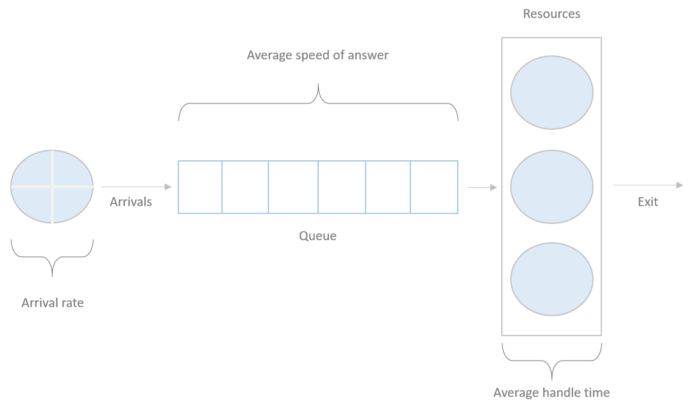
- queuing.ErlangC: Calculate staffing requirements and performance metrics for one queue scenario.
- queuing.MultiErlangC: Run multiple Erlang C scenarios from a parameter grid.
Use pyworkforce.scheduling when you already know the required resources by time
interval and need to choose how many people to place on each predefined shift.
- scheduling.MinAbsDifference: Minimizes the total absolute difference between required and scheduled resources.
- scheduling.MinRequiredResources: Minimizes the total weighted number of scheduled resources while ensuring every interval is covered.
Use pyworkforce.rostering when you have named resources and need to assign them
to days and shifts while respecting rules such as banned shifts, rest days,
minimum working hours, and preferences.
- rostering.MinHoursRoster: Builds a resource-level roster that covers shift requirements with the minimum scheduled hours.
A brief introduction can be found in this medium post
from pyworkforce.queuing import ErlangC

erlang = ErlangC(transactions=100, asa=20/60, aht=3, interval=30, shrinkage=0.3)

positions_requirements = erlang.required_positions(service_level=0.8, max_occupancy=0.85)
print("positions_requirements: ", positions_requirements)
Output:
>> positions_requirements:  {'raw_positions': 14,
                             'positions': 20,
                             'service_level': 0.8883500191794669,
                             'occupancy': 0.7142857142857143,
                             'waiting_probability': 0.1741319335950498}
If you want to run several scenarios at the same time, use MultiErlangC.
For example, this tries different service-level targets:
from pyworkforce.queuing import MultiErlangC

param_grid = {"transactions": [100], "aht": [3], "interval": [30], "asa": [20 / 60], "shrinkage": [0.3]}
multi_erlang = MultiErlangC(param_grid=param_grid, n_jobs=-1)

required_positions_scenarios = {"service_level": [0.8, 0.85, 0.9], "max_occupancy": [0.8]}

positions_requirements = multi_erlang.required_positions(required_positions_scenarios)
print("positions_requirements: ", positions_requirements)
Output:
>> positions_requirements:   [
                                {
                                    "raw_positions": 13,
                                    "positions": 19,
                                    "service_level": 0.7955947884177831,
                                    "occupancy": 0.7692307692307693,
                                    "waiting_probability": 0.285270453036493
                                },
                                {
                                    "raw_positions": 14,
                                    "positions": 20,
                                    "service_level": 0.8883500191794669,
                                    "occupancy": 0.7142857142857143,
                                    "waiting_probability": 0.1741319335950498
                                },
                                {
                                    "raw_positions": 15,
                                    "positions": 22,
                                    "service_level": 0.9414528428690223,
                                    "occupancy": 0.6666666666666666,
                                    "waiting_probability": 0.10204236700798798
                                }
                            ]
A brief introduction can be found in this medium post
from pyworkforce.scheduling import MinAbsDifference, MinRequiredResources

# Rows are days. Each value is the number of required positions for one hour of the day.
required_resources = [
    [9, 11, 17, 9, 7, 12, 5, 11, 8, 9, 18, 17, 8, 12, 16, 8, 7, 12, 11, 10, 13, 19, 16, 7],
    [13, 13, 12, 15, 18, 20, 13, 16, 17, 8, 13, 11, 6, 19, 11, 20, 19, 17, 10, 13, 14, 23, 16, 8]
]

# Each shift has 24 entries, one per hour. Use 1 if the shift covers that hour, otherwise 0.
shifts_coverage = {"Morning": [0, 0, 0, 0, 0, 1, 1, 1, 1, 1, 1, 1, 1, 0, 0, 0, 0, 0, 0, 0, 0, 0, 0, 0],
                   "Afternoon": [0, 0, 0, 0, 0, 0, 0, 0, 0, 0, 0, 0, 0, 1, 1, 1, 1, 1, 1, 1, 1, 0, 0, 0],
                   "Night": [1, 1, 1, 1, 1, 0, 0, 0, 0, 0, 0, 0, 0, 0, 0, 0, 0, 0, 0, 0, 0, 1, 1, 1],
                   "Mixed": [0, 0, 0, 0, 0, 0, 0, 0, 0, 1, 1, 1, 1, 1, 1, 1, 1, 0, 0, 0, 0, 0, 0, 0]}

# Method One
difference_scheduler = MinAbsDifference(num_days=2,
                                        periods=24,
                                        shifts_coverage=shifts_coverage,
                                        required_resources=required_resources,
                                        max_period_concurrency=27,
                                        max_shift_concurrency=25)

difference_solution = difference_scheduler.solve()

# Method Two

requirements_scheduler = MinRequiredResources(num_days=2,
                                              periods=24,
                                              shifts_coverage=shifts_coverage,
                                              required_resources=required_resources,
                                              max_period_concurrency=27,
                                              max_shift_concurrency=25)

requirements_solution = requirements_scheduler.solve()

print("difference_solution :", difference_solution)

print("requirements_solution :", requirements_solution)
Output:
>> difference_solution: {'status': 'OPTIMAL',
                          'cost': 157.0,
                          'resources_shifts': [{'day': 0, 'shift': 'Morning', 'resources': 8},
                                               {'day': 0, 'shift': 'Afternoon', 'resources': 11},
                                               {'day': 0, 'shift': 'Night', 'resources': 9},
                                               {'day': 0, 'shift': 'Mixed', 'resources': 1},
                                               {'day': 1, 'shift': 'Morning', 'resources': 13},
                                               {'day': 1, 'shift': 'Afternoon', 'resources': 17},
                                               {'day': 1, 'shift': 'Night', 'resources': 13},
                                               {'day': 1, 'shift': 'Mixed', 'resources': 0}]
                          }

>> requirements_solution: {'status': 'OPTIMAL',
                           'cost': 113.0,
                           'resources_shifts': [{'day': 0, 'shift': 'Morning', 'resources': 15},
                                                {'day': 0, 'shift': 'Afternoon', 'resources': 13},
                                                {'day': 0, 'shift': 'Night', 'resources': 19},
                                                {'day': 0, 'shift': 'Mixed', 'resources': 3},
                                                {'day': 1, 'shift': 'Morning', 'resources': 20},
                                                {'day': 1, 'shift': 'Afternoon', 'resources': 20},
                                                {'day': 1, 'shift': 'Night', 'resources': 23},
                                                {'day': 1, 'shift': 'Mixed', 'resources': 0}]}