
中文说明请参阅 README.zh-CN.md。
The AI Audio UI Biz Bundle enables ordinary Bluetooth headsets, glasses, speakers, and other audio products to be upgraded into AI products with AI note-taking and translation. It uses a professional recording algorithm with advanced language models for real-time transcription and translation in 100+ languages worldwide.
This Demo shows two integration approaches. Pick one, or combine both:
| Approach | Description | Demo entry |
|---|---|---|
| UI Biz Bundle (mini program panel) | Reuse the AI Notes / AI Translation mini program panels provided by Tuya. UI and business logic are maintained by Tuya — lowest integration cost. | Home tab |
| Native SDK (custom UI) | Build your own recording, transcription, summary, and translation screens on the ThingAudioRecordInterface native APIs. Full UI control. |
SDK tab |
Before integrating this biz bundle, complete Preparation and Framework Integration.
Demo: tuya-aivoice-ios-sdk-sample-objc.
| Tab / Entry | Screen | Capabilities | Key implementation |
|---|---|---|---|
| Home | Home | AI Notes / AI Translation mini program cards with shortcuts (recording, simultaneous interpretation, real-time transcription, dialogue translation), device list, tap a device to open its panel | MainViewController, MiniAppRoutes.h, DeviceListView |
| Home → top-right + | Add device | Standard provisioning (Tuya UI) or custom BLE single-point provisioning | ActivatorService, CustomBLEPairingViewController, CustomBLEPairingSession |
| SDK | Recording / Dialogue translation | The recording screen links to a dedicated dialogue page with alternating left/right talk buttons, configurable phone/Bluetooth/device I/O, two-sided languages and TTS, plus live ASR and translation bubbles | NativeSDKViewController, FaceToFaceTranslationViewController, NativeAudioService |
| SDK → Record list | Record list | All stored recordings, mixed search over title, tags, and transcription | NativeRecordListViewController |
| SDK → Record detail | Record detail | Transcription, summary, translation, audio playback and amplitude; trigger offline transcribe / summarize / translate tasks | NativeRecordDetailViewController |
| Me | Personal settings | User info, rename nickname, device management, diagnostic logs, perfusion debugging, logout | MineViewController |
| Me → Device management | Device management | Refresh devices in the current home, online status, rename, remove | DeviceManagementViewController, DeviceService |
| Me → Perfusion debugging | Perfusion debugging | Feed a local audio file into the recording pipeline instead of the mic to exercise ASR / translation / TTS, compute WER, and export an HTML report | Standalone ThingPerfusionKit component |
| Launch | Login / Register | Login: phone / email + password. Register: phone / email + verification code (with countdown) + password. Searchable country picker | LoginViewController, RegisterViewController, AuthService, CountryPickerViewController |

Full-size individual shots:
| # | Screen | Image | Description |
|---|---|---|---|
| 1 | Home | 01-home.png | AI Notes / AI Translation cards with shortcuts, and the current home's device list |
| 2 | AI Notes mini program | 02-ainote-miniapp.png | Mini program home: recording, real-time transcription, simultaneous interpretation, audio import, call recording, and the file list |
| 3 | AI Notes · Recording | 03-ainote-recording.png | Mini program recording screen with AI transcription |
| 4 | AI Notes · Interpretation | 04-ainote-interpretation.png | Simultaneous interpretation while recording; source and target language switch at the bottom |
| 5 | AI Translation mini program | 05-aitranslate-miniapp.png | Text translation, simultaneous interpretation, dialogue translation, call translation, and history |
| 6 | Native SDK · Recording | 06-native-sdk-record.png | Custom recording screen: audio source, ASR / NLG / TTS switches, languages, state, and live waveform |
| 7 | Me | 07-mine.png | User info, device management, nickname, diagnostic logs, perfusion debugging, logout |
Shots 2–5 are Tuya mini program panels (the UI biz bundle approach); shot 6 is the Native SDK custom-UI approach.
When you use Cursor, Claude Code, or similar agents to integrate the Tuya AI Audio UI biz bundle on iOS, load the companion skill aivoice-integration/SKILL.md (skill id: tuya-aivoice-ios-integration). It includes a decision tree, CocoaPods and config steps, SDK initialization, login, home and device flows, provisioning, and mini program routing aligned with this repo.
- Cursor: Add the skill under your user or project skills directory when working in this repo, or attach
aivoice-integration/SKILL.mdin integration-related chats. - Tip: Have the agent read that file first so guidance stays consistent with
MARK: AIVoicecomments and the sections below.
-
Important integration, configuration, and business-logic notes in the project are marked in source with
MARK: AIVoice. When integrating, search the project forMARK: AIVoiceand read each comment to avoid misconfiguration or misuse. -
Ensure the local
ios_core_sdk/directory contains theThingSmartCryptionsecurity component and that the project includesthing_custom_config.json. Theios_core_sdk/directory is ignored by Git and must be obtained from the Tuya Developer Platform for local use.
| Item | Requirement |
|---|---|
| Xcode | 15 or later |
| Deployment target | iOS 13.0+ |
| Dependency manager | CocoaPods (use_frameworks! :linkage => :static, use_modular_headers!) |
| Tuya biz bundle version | 7.8.x |
Tuya dependencies declared directly by the Demo (see Podfile):
| Pod | Purpose | Required |
|---|---|---|
ThingSmartCryption |
Local security component; obtain it from the Developer Platform and place it in ios_core_sdk/ |
Yes |
ThingSmartAIVoiceBizBundle |
AI Audio UI biz bundle (also brings in the ThingAudioRecordInterface native APIs) |
Yes |
ThingSmartHomeKit |
Home, device, and user fundamentals | Yes |
ThingSmartMiniAppBizBundle / ThingSmartBaseKitBizBundle / ThingSmartBizKitBizBundle |
Mini program container and base biz bundles | Yes |
ThingSmartFamilyBizBundle |
Home management UI biz bundle | Optional |
ThingSmartActivatorBizBundle |
Device provisioning UI biz bundle | Skip if you do not provision devices |
ThingSmartBusinessExtensionKit / ThingSmartBusinessExtensionKitBLEExtra |
Needed for custom BLE single-point provisioning (declared explicitly instead of relying on transitive UI biz bundle dependencies) | Custom provisioning only |
ThingSmartPanelBizBundle |
Device panel UI biz bundle | Skip if you do not control devices |
ThingSmartDeviceDetailBizBundle |
Device detail UI biz bundle | Optional |
ThingSmartOTABizBundle |
Device OTA UI biz bundle (commented out in the Podfile) | Optional |
ThingPerfusionKit |
Perfusion debugging component, referenced by local path ../Modules/ThingPerfusionKit (not inside this repo) |
Perfusion debugging only |
- Clone this repository.
- Download the security component from the Tuya Developer Platform and place the
ThingSmartCryptionfiles intoios_core_sdk/(the directory is Git-ignored). - Fill in
APP_KEYandAPP_SECRET_KEYintuya-aivoice-ios-sdk-sample-objc/AppKey.h. - Fill in
appIdandthingAppKeyintuya-aivoice-ios-sdk-sample-objc/thing_custom_config.json. - Run
pod install, then opentuya-aivoice-ios-sdk-sample-objc.xcworkspaceand build.
The bundle identifier and
appSchememust match what you registered when creating the AppKey on the Tuya Developer Platform, otherwise SDK initialization fails.
{
    "config":
    {
        "appId":"",
        "thingAppKey":"",
        "appScheme":"AIVoiceDemo",
        "needBle":true,
        "is_support_home_manager":true,
        "need_backgroud_audio":true,
        "needQRCode": true,
        "device_detail_mini_program": true,
        "hotspotPrefixs": ["AAA", "BBB"],
        "support_ble_gpt": true
    },
    "colors": {
        "themeColor": "#FFA228"
    },
    "blackColors": {
        "themeColor": "#FF5A28",
        "backgroundColor": "#000000",
        "warningColor": "#FF4444",
        "tipsColor": "#2DDA86",
        "guideColor": "#1989FA",
        "navigationBarColor": "#1A1A1A",
        "tabBarSelectedColor": "#FF5A28",
        "alertMaskAlpha": 0.7
    }
}
Parameter overview
| Parameter | Description | Type | Required | Default |
|---|---|---|---|---|
| appId | App ID from Tuya Developer Platform: open your app/SDK page; the id in the page URL is appId (e.g. https://platform.tuya.com/oem/app?id=888888 → appId is 888888) |
Number | Yes | — |
| thingAppKey | AppKey for the SDK in Tuya Developer Platform | String | Yes | — |
| appScheme | Channel identifier for the SDK in Tuya Developer Platform | String | Yes | — |
| hotspotPrefixs | Hotspot name prefix for device provisioning | Array | No | ["SmartLife"] |
| needBle | Whether to support BLE device provisioning | Boolean | No | true |
| support_ble_gpt | Whether to enable BLE GPT capabilities | Boolean | No | true |
| themeColor | UI theme color | String | No | #FF5A28 |
The Demo declares the following in build settings (INFOPLIST_KEY_*) and Info.plist. Keep the ones your app needs:
| Key | Purpose |
|---|---|
NSMicrophoneUsageDescription |
Recording (needed by both the Native SDK and the mini program panel) |
NSBluetoothAlwaysUsageDescription |
BLE device discovery and provisioning |
NSBluetoothPeripheralUsageDescription |
Bluetooth permission compatible with iOS 12 and earlier |
NSCameraUsageDescription |
Scan a QR code to add a device |
NSLocationWhenInUseUsageDescription |
Location when creating a home |
NSPhotoLibraryUsageDescription |
Photo library access |
UIBackgroundModes: audio |
Background recording; use together with the need_backgroud_audio config |
Tuya iOS biz bundles are exposed as services; all features are provided via protocols.
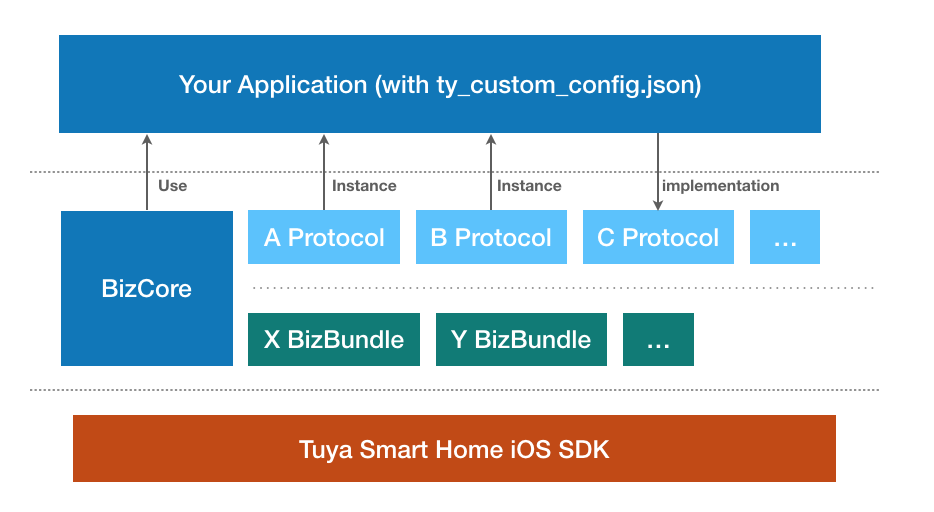


Before integrating the Tuya SDK, you should understand these concepts.
A home is the abstraction for a whole-home smart scenario: devices, accounts, and permissions for a single "home" or place. Main capabilities: list homes, get devices/groups under a home, add/update/remove homes, rooms, and members.
| Class / Protocol | Description |
|---|---|
ThingSmartHomeManager |
List homes, sort homes, add home |
ThingSmartHome |
Single-home management (initialized with homeId) |
ThingSmartHomeDelegate |
Callbacks for home changes (devices, rooms, dps, etc.) |
You must initialize ThingSmartHome and call get home detail before homeModel, roomList, deviceList, groupList, etc. are populated. Then set the current home; the class that owns the home must conform to <ThingFamilyProtocol>.
// 1. Get home list (basic info only)
[self.homeManager getHomeListWithSuccess:^(NSArray<ThingSmartHomeModel *> *homes) {
    // If no homes, create one via addHomeWithName:geoName:rooms:latitude:longitude:success:failure:
} failure:^(NSError *error) { }];

// 2. Init current home and fetch detail (required before deviceList is available)
self.home = [ThingSmartHome homeWithHomeId:homeId];
[self.home getHomeDataWithSuccess:^(ThingSmartHomeModel *homeModel) {
    // Now self.home.deviceList / groupList / roomList etc. have data

    // 3. Set the current home
    [[ThingSmartBizCore sharedInstance] registerService:@protocol(ThingFamilyProtocol) withInstance:self];
    id<ThingFamilyProtocol> impl = [[ThingSmartBizCore sharedInstance] serviceOfProtocol:@protocol(ThingFamilyProtocol)];
    if ([impl respondsToSelector:@selector(updateCurrentFamilyId:)]) {
        [impl updateCurrentFamilyId:homeId];
    }
} failure:^(NSError *error) { }];- Docs: Home Management, Home Info
Devices are bound to a home after provisioning. Before device operations, ensure you have loaded home detail for that home (see above) so the device list and device instances are correct.
| Class | Description |
|---|---|
ThingSmartDevice |
Device control and management (rename, remove, publish DP, etc.) |
ThingSmartDeviceModel |
Device data (devId, name, dps, online status, etc.) |
// Device list comes from home after getHomeDataWithSuccess
NSArray *deviceList = [self.home.deviceList copy];

// Init device by devId (user must own device and home detail must be synced)
ThingSmartDevice *device = [ThingSmartDevice deviceWithDeviceId:devId];
device.delegate = self;  // Listen for dps updates, device info, removal, etc.

// Open device panel (mini program panel)
ThingSmartDevice *smartDevice = [ThingSmartDevice deviceWithDeviceId:device.devId];
id<ThingPanelProtocol> impl = [[ThingSmartBizCore sharedInstance] serviceOfProtocol:@protocol(ThingPanelProtocol)];
if (impl) {
    [impl gotoPanelViewControllerWithDevice:smartDevice.deviceModel group:nil initialProps:nil contextProps:nil completion:nil];
}- Docs: Device Management
Devices are home-scoped. All devices belong to a home. Before using device features (list devices, control devices, etc.), the user must have at least one home. If there is no home, create one, set the current home, and load home detail; only then can devices be listed and controlled.
- Where:
thing_custom_config.json&AppKey.h - What: Ensure AppKey, APPSecretKEY, and APPID from the Tuya IoT platform are set in these config files.
- Docs: SDK Preparation
- Where:
application:didFinishLaunchingWithOptions: - What: Initialize the Tuya SDK at app launch (
startWithAppKey:secretKey:). Also initialize the mini program container ([[ThingMiniAppClient initialClient] initialize]) and forwardapplication:didFinishLaunchingWithOptions:toThingModuleManagerso biz bundles can register their services. - Docs: Integrate SDK
- What: Demo mini program entry URLs and AppIDs are defined as constants in
MiniAppRoutes.h(AI Notes: recording, simultaneous interpretation, real-time transcription; AI Translation: simultaneous interpretation, dialogue translation). - Note: If you use different mini programs or paths, update the constants here to match Tuya platform configuration to avoid navigation failures.
- What: Login, registration, verification code, and password reset examples live in this service, covering both phone and email:
- Verification code:
getWhiteListWhoCanSendMobileCodeSuccess:failure:for available regions,sendVerifyCodeWithUserName:...to send,checkCodeWithUserName:...to verify; the type distinguishes register / login / reset password. - Phone: password login
loginByPhone:..., code loginloginByPhoneWithCode:..., registrationregisterByPhone:..., resetresetPasswordByPhone:.... - Email: the matching
loginByEmail:...,loginByEmailWithCode:...,registerByEmail:...,resetPasswordByEmail:.... registerWithCountryCode:account:password:code:...detects automatically whether the account is an email or a phone number.
- Verification code:
- Country picker:
CountryModelships a country list grouped by region (China / Asia-Pacific / Americas / Europe / Middle East & Africa).CountryPickerViewControllerprovides a searchable picker and remembers the last selection, so users never type a country code. - Wired into the Demo UI: the login screen uses password login only (
loginByPhone:/loginByEmail:); the register screen uses verification code + password. Code login and password reset are available inAuthServiceand can be wired into your own UI. - Note: Choose the right auth flow for your app and handle token, user info, and logout correctly.
- Docs: User & Account
- What: Examples for Wi-Fi, Bluetooth, and other provisioning flows.
- Note: Different products may use different provisioning APIs; choose the right one and handle timeouts and errors.
- Docs: Device Provisioning
The add button in the upper-right corner provides two provisioning methods:
- Standard provisioning opens the Tuya provisioning UI through
ActivatorService. - Custom provisioning opens
CustomBLEPairingViewControllerand usesCustomBLEPairingSessionfor BLE discovery, token acquisition, and activation.
The custom flow is: validate login and the current homeId → scan for BLE devices → let the user select one device → request a fresh token → activate → refresh the home device list. It supports one BLE single-point device at a time. BLE-Wi-Fi dual-mode, EZ/AP, Mesh, Beacon, Matter, and sub-device provisioning are outside this flow.
Implementation paths:
Services/Pairing/CustomBLEPairingSession.h/.m: state machine, SDK adapter, error mapping, cancellation, and cleanup.Views/Activator/CustomBLEPairingViewController.h/.m: scan list, selection, activation result, and in-memory page log.tuya-aivoice-ios-sdk-sample-objcTests/CustomBLEPairingSessionTests.m: state-transition and error-handling tests with a fake adapter.
Custom BLE provisioning explicitly depends on ThingSmartBusinessExtensionKit and ThingSmartBusinessExtensionKitBLEExtra. Configure NSBluetoothAlwaysUsageDescription and the iOS 12-compatible NSBluetoothPeripheralUsageDescription before real-device testing. Provisioning runs only while the page is in the foreground; leaving the page stops scanning and activation.
- What: To open the Tuya standard device panel when tapping a device in the list, use
gotoPanelViewControllerWithDevice. - Note: For a custom panel, add the
ThingSmartPanelBizBundleUI biz bundle in the Podfile. - Docs: Open Panel
- What: The Tuya SDK manages devices and permissions by home, so at least one home is required for device features.
- Note: You can create a default home on first launch or after registration (see Demo); for multiple homes, implement list and switch logic.
- Docs: Home Management
- What: After creating or selecting a home, set the current home (e.g. via
updateCurrentFamilyId) so the SDK loads device list and permissions for that home. - Note: With a single home, call update current home during home or device-list init to avoid an empty list or permission issues.
9. Native SDK Recording and Dialogue Translation Pipeline (NativeSDKViewController.m / FaceToFaceTranslationViewController.m / NativeAudioService.m)
- Entry: the SDK tab.
- What: If you do not use the mini program panel, build your own recording UI on
ThingAudioRecordInterface(shipped withThingSmartAIVoiceBizBundle). The Demo wrapsThingAudioDetectManagerNativeinNativeAudioServiceand guarantees that every callback is delivered on the main thread. - Capabilities:
- Pages: standard recording and face-to-face translation use separate screens; open the latter from the entry card on the recording screen.
- Input source: configure the left and right sides independently with the phone microphone, system Bluetooth microphone, or a paired audio device in the current home.
- TTS: independently configure each side for phone speaker, system Bluetooth, or direct device output; direct device output supports OPUS SILK / CELT.
- Processing: ASR and translation are always enabled for face-to-face dialogue; TTS playback can be toggled independently for each side.
- Languages: 14 common languages each for source and target (zh/en/ja/ko/fr/de/es/ru/it/pt/th/vi/ar/hi).
- Speaker: the bottom left/right buttons map to
f2fChannel0/1. Tap either side while idle or paused to callstartAudioRecording; while recording, only the active side can be tapped to callpauseRecordTransfer, after which the next speaker can be selected. - Recording control: start, pause, and stop with a live waveform plus state and duration readouts; standard recording still supports resume.
- Live results: streaming ASR and translation update left/right conversation bubbles. An unfinished segment without recognized text keeps reusing the current “Recognizing” bubble; a new sentence is created only after text has been recognized and an End status is received.
- Note:
addRecordListener:deviceId:andremoveRecordListener:deviceId:must be paired with the same instance and the samedeviceId, otherwise callbacks leak.
- Entry: the record list card at the top of the SDK tab.
- List: all stored recordings sorted by
recordTimedescending, with mixed search over title, tags, and transcription. - Detail: transcription, summary, translation, audio playback, and amplitude curve; you can re-run offline tasks on a recording (
taskType: 0 transcribe, 1 summarize, 2 translate). - What: Content is fetched via
fetchTranscriptionWithFileId:,fetchSummaryWithFileId:, andfetchTranscriptionSentencesWithFileId:; the sentence API carries timestamps, so you can render sentence by sentence and seek playback.
-
Entry: Me → Perfusion debugging.
-
Componentized: perfusion has been extracted from the Demo app into a standalone local component,
ThingPerfusionKit, referenced from the Podfile by local path:pod 'ThingPerfusionKit', :path => '../Modules/ThingPerfusionKit'
Subspec Contents Dependencies CorePerfusion config provider, WAV format validation, WER computation, report generation (no UI) ThingAudioRecordInterface,ThingModuleManager,ThingAnnotationFoundationUIReady-made perfusion debugging screen (ships its own base view controller) Core+ UIKit / AVFAudioAll three dependencies are already transitive dependencies of the AI Audio biz bundle, so no new pod is required. Integrate
ThingPerfusionKit/Corealone if you want the capability without the screen.⚠️ ../Modules/ThingPerfusionKitlives outside this repository. If you clone this repo alone, that path does not exist andpod installfails — obtain the module as well, or comment out this line (the perfusion entry then becomes unavailable). -
How it works: perfusion replaces microphone capture with a local audio file fed into the recording pipeline, so you can reproduce and regress the whole ASR / translation / TTS flow without making a sound. When
ThingMicrophoneAudioInputstarts audio input, it reads three settings back from the app throughThingAIBudsDebuggerProtocol: the perfusion switch, the file name, and whether to auto-finish. -
No startup registration: the component uses
ThingRegisterAPIAnnotationto write its config provider into the_ThingMOV3_Mach-O section at compile time;ThingMachRegistercollects it at launch, so no registration code is needed inAppDelegate.registerProvider/isProviderReady/configFetchCountexist only for self-checks and troubleshooting. -
Main APIs:
ThingPerfusionViewController: the ready-made debugging screen — just push it.ThingPerfusionService: perfusion switch, file name, auto-finish, end callback, and management of perfusion audio and reference files.ThingPerfusionWERCalculator: standalone WER evaluation, usable without perfusion.ThingPerfusionReportBuilder: HTML test report generation.ThingPerfusionAudioFileInfo: WAV format parsing and validation.
-
Directory layout (all under the app sandbox Documents; handled by the component):
- Perfusion audio:
voiceRecord/automaticTest/audioFiles - Reference answers:
voiceRecord/automaticTest/references(.txt) - Test reports:
voiceRecord/automaticTest/reports(.html)
- Perfusion audio:
-
Audio format requirement (the most common pitfall): the SDK treats the file as 16 kHz / 16-bit / mono integer PCM and swaps it straight into the capture stream, so only integer-PCM WAV works (WAV
audioFormatfield 1; 3 is IEEE float and is not supported). The typical symptom of a wrong format is "perfusion runs but no ASR output at all". Convert with:afconvert -f WAVE -d LEI16@16000 -c 1 input.wav output.wav
The component validates the file and the screen reacts in three tiers: fully compliant starts directly; PCM with a mismatched sample rate / channel count / bit depth warns and lets you start anyway; non-PCM or non-WAV is blocked outright with the conversion command shown.
-
WER definition:
WER = (S + D + I) / N, accuracy = 1 − WER. Text is normalized first (lowercase, punctuation replaced by spaces rather than deleted, per-character Chinese segmentation, filler removal, thousands-separator and numeral normalization), then aligned with edit distance to obtain S/D/I. Verified item by item against the team's existingASR_WER/WER.pyon real data. -
Report contents: KPI overview (accuracy / WER / reference word count / total errors / elapsed time), error composition, test conditions, per-sentence comparison, full-text per-word comparison (substitutions red, insertions yellow, deletions green), normalized text, and an explanation of the computation. Single-file HTML with dark mode support.
-
Note: per-sentence comparison never splits one recognized segment across multiple reference lines, so when ASR merges several reference lines into one segment some reference lines are counted as missed; the report flags this. Full-text WER is unaffected and is the authoritative number. Call
resetwhen done so later normal recordings are unaffected.
- Entry: Me → Device Management.
- Implementation:
DeviceManagementViewControllerandDeviceService. - Capabilities: refresh devices in the current home, display online status, rename a device, and remove a device from the current home.
- Entry: the Me tab.
- Capabilities: display the current user, update the nickname, open device management, open diagnostic log submission, open perfusion debugging, and log out.
- Note: The screen uses the Demo's custom UI components (
FamilyBaseViewControllerprovides shared navigation, card, and dialog styling); operation results come from the Tuya SDK.
- Entry: Me → Upload Diagnostic Logs.
- Implementation: use
ThingFeedBackProtocolto open the Tuya feedback screen, where the user confirms the issue description and submitted information. - Note: If the feedback module or protocol service is unavailable, the Demo displays an unavailable message and does not create repository log files.
tuya-aivoice-ios-sdk-sample-objc/
├── AppDelegate.m/.h           # SDK initialization (MARK: AIVoice)
├── SceneDelegate.m/.h         # Root view switching (login / main tab bar)
├── AppKey.h                   # AppKey / SecretKey
├── thing_custom_config.json   # Biz bundle configuration
├── MiniAppRoutes.h            # Mini program AppIDs and shortcut URLs (MARK: AIVoice)
├── LoginViewController.m/.h   # Login screen
├── Models/
│   └── CountryModel.m/.h      # Country / region data
├── Services/
│   ├── AuthService.m/.h       # Login and registration (MARK: AIVoice)
│   ├── ActivatorService.m/.h  # Provisioning (MARK: AIVoice)
│   ├── DeviceService.m/.h     # Device management
│   ├── NativeAudioService.m/.h        # Native recording SDK wrapper
│   └── Pairing/
│       └── CustomBLEPairingSession.m/.h  # Custom BLE provisioning state machine
├── Views/
│   ├── Main/                  # Home and tab bar
│   ├── Auth/                  # Registration, country picker
│   ├── NativeSDK/             # Recording, record list, record detail
│   ├── Device/                # Device list and device management
│   ├── Activator/             # Custom BLE provisioning screen
│   ├── Mine/                  # Me
│   └── Common/                # FamilyBaseViewController shared UI base class
└── Utils/
    └── UIHelper.m/.h
Perfusion debugging code is not in this repository; it lives in a sibling standalone component:
../Modules/ThingPerfusionKit/
├── ThingPerfusionKit.podspec
├── README.md
└── ThingPerfusionKit/Classes/
    ├── Core/    # ThingPerfusionService / WERCalculator / ReportBuilder / AudioFileInfo / RecordBridge
    └── UI/      # ThingPerfusionViewController / ThingPerfusionBaseViewController